Darn Good 9, Third Impression

OK, that is a bad wordplay on Emerson, Lake and Palmer’s “Karn Evil 9, Third Impression”. In other words, in my continuing “X100 impressions” posts, a few more points.

As I said yesterday, it’s just a matter of learning how to work the technology. Like a new car – after a few weeks you have learned how it works “inside and out”. And like a new aircraft, which is why a pilot needs to be checked out on each type of aircraft he is going to fly.

So, back to the camera.

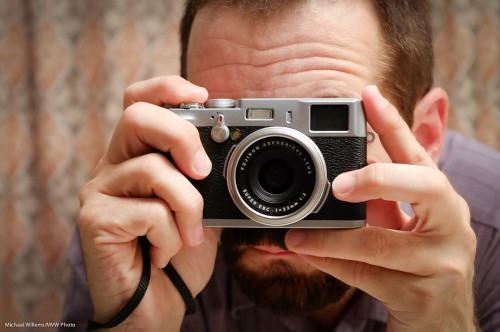
One thing in particular is worth mentioning. When you focus closely, the camera often misses – and yet it indicates it is focusing. So watch me as I focus on one of Canada’s most talented photographers, Joseph Marranca, Yes, even taking into account parallax I am focusing on him, not on the background, with a small enough focus point to not hit the background at all, and I am on a contrasting area of his face – and yet it completely misses:
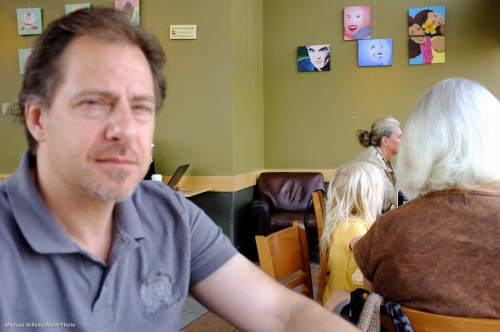
This common issue seems to not just occur in OVF (optical viewfinder) mode – in EVF (electronic viewfinder) mode also, in spite of what other reviewers have said. And mainly when focusing on close by subjects.

Here’s the same shot a moment later.

Why? No idea.

Note that when the subject is too close you have to go to Macro mode. (And I also note that some reviewers have said “macro mode does not get close enough” – well, that is merely a subject of the large sensor. Nothing to complain about.. move on.)

Now to exposure. More than others, this camera seems to want to keep all exposures mid grey, leading to this kind of mistake:

That was 9pm and rather dark – and yet, by using 1/35th second at f/2.8 at 1600 ISO the camera insists on making this look like bright daylight. And in this case, that ensures a blurry pic. So the camera does not take actual light levels into account as much as my other cameras.

No big deal! Because of this bias, simply use exposure compensation (down) when using a semi-automatic mode (I was in Aperture mode). This adjustment is much needed in evening shots. But since the control ends at -2 stops, that means for proper evening shots you simply must go to manual., where you can dial in any exposure you darn well like.

And still I go back to two points:

First, the image quality, which is really superb. I am shooting all these as JPG – and that is the first time I have shot JPG in a decade. The quality is often just about as good as the work I produce with my 1Ds MkIII and 1D Mk4. Amazing – for the first time, I actually have SLR quality out of a point-and-shoot. (And yes, if I had money for a Leica M9 I would get that too, of course. But that’s $9,000).

Second, I keep how cool a little camera is for street photography. No-one comes and asks me what I am doing. Uncle Fred does not come up to talk about aperture and lenses.

(OK, these two gentlemen in the background did rather worriedly ask “HEY! You taking our picture?” – but they took my assurance of “No, I’m taking his” (meaning Joseph’s) at face value.)

A small camera is just less threatening.

 

X-Ray Vision?

When you shoot people, you often need to clean up their skin just a little.

Permanent features can be lightened a little, while temporary blemishes can be removed. Don’t get me wrong, I am not advocating changing people into something they are not, but a little work is often the secret to a good photo.

So here’s a Lightroom trick that helps you see where problems are likely to occur. This is not always easy to see, but with my trick it’s a doddle.

Take a RAW image into Lightroom. Ensure that exposure etc are good. You should see something like this:

Looks good (and being a photo of me, that is rather an achievement).

Oh yeah?

Then take this into Lightroom’s Develop module, and:

  1. Go to the HSL (Hue, Saturation, Luminance) section.
  2. Ensure you have selected the Luminance controls.
  3. Now decrease the orange luminance all the way (-100).
  4. Red and/or Yellow can go to -100 also, but sometimes work better at 0 or even at  +100 – try it to see. (And in people with different skin colour, different directions and amounts may be needed for all three orange, red and yellow – but it’s still those three).

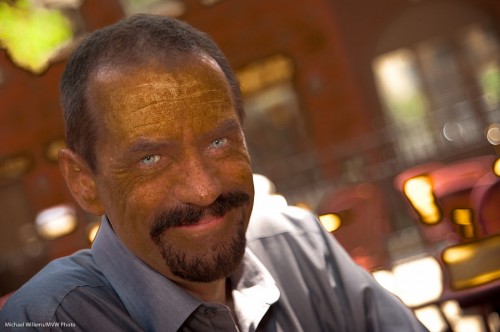
You now get this rather disconcerting view:

Light is fine; dark is fine: but the areas with rapid transitions between light and dark are the possible problems.  These “mottled” areas show you two things:

  1. Where you may need to concentrate your Lightroom or Photoshop efforts;
  2. Where this person may develop skin issues in later life.

On that last point: as a photographer, I see the damage the sun causes. My skin is relatively clear (I grew up in the Netherlands and the UK), but still, as you can clearly see there’s likely to be areas I can be slightly improved.

Anyway – this technique should speed up such “improvement” work as you may want to do.


When you get a new camera…

…you need to learn to use it. Its instructions. Its strong points and weaker points. Its do’s and dont’s. Its quirks, even.

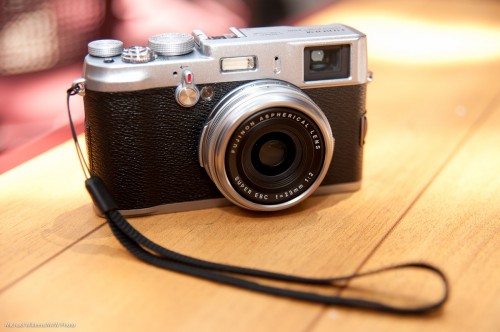
I am learning to use my Fuji X100:

Fuji X100 (Photo: Michael Willems)

It will take me a few days of use until I fully “get” it – its instructions (cannot use the optical viewfinder for close focus); when it does not accurately focus; when exposure is off; how it displays pre- and post-shot; how best to focus (in manual, I can use the AE-L/AF-L button to focus, which I only just discovered!), and so on.

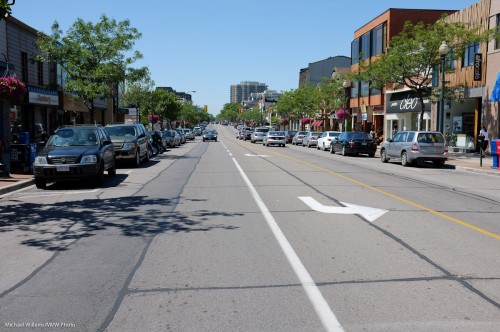
Let’s start with a few snaps taken during a nice downtown Oakville “getting to know the camera” walk today. All these were shot as JPGs, and post-editing in Lightroom was minimal – a little cropping, perhaps a slight exposure tweak, that sort of thing.

Oakville Scene (Photo: Michael Willems)

Oakville Scene (Photo: Michael Willems)

Oakville Scene (Photo: Michael Willems)

Oakville Scene (Photo: Michael Willems)

Oakville Scene (Photo: Michael Willems)

Oakville Scene (Photo: Michael Willems)

Oakville Scene (Photo: Michael Willems)

Oakville Scene (Photo: Michael Willems)

Quality is excellent. Results are good.

In using the camera today, I found a few issues I have to work on. Namely:

    1. I have to get quicker at the “switch to EVF (electronic viewfinder) if you want to focus closely” thing.
    2. Switching focus points. I switched to “let camera select focus points” half way, since I was not quick enough switching. Next time, manual focus plus the AE-L/AF-L button to pre-focus!
    3. When does the camera refuse to focus? And when does it miss, and focus on the background instead of on the object I am clearly pointing the focus spot at?  I am not 100% clear yet, so this needs a little more work too.
    4. I have to get more familiar with shutter speed limitations: at what ISO is it limited to what shutter speed? This needs to be second nature to me.
    5. Exposure is sometimes unpredictable, or at least seems so when looking pre- and past-shot. In fact looking at the results, they seem good, if somewhat hot in the highlights – forgiveable on a bright sunny day at 2pm. So maybe on a crazy bright day like today I just shoot and ignore the previews and post-views.

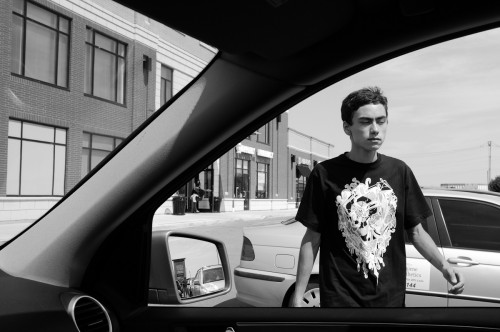
      And here is my favourite of the day, because it shows clearly what you can do with a little camera: people do not even notice you. Not even Mr Muscles here:

      Oakville Scene (Photo: Michael Willems)

      (Click and see it at large, original size to see the full effect.)

      The Degas-like composition is due less to my artistic input than to the fact that the camera was just fast enough for me to capture him before he skated out of the frame.

      The pedagogical point of this post: when you get a new piece of equipment, whether it is a camera, a set of lights, a flash, or a lens, do not be discouraged too quickly. Learn its quirks and benefits and how to best use it.


      X100 – First impressions

      A few first impressions of the Fuji X100 camera:

      Fuji X100 Pic - Photo: Michael Willems

      This, like all my reviews, is a “first impressions from the field”. Not a full review: for those you can read dpreview.com and other sites.

      These sites are great. But 23 pages of review are all very well: what do they really mean? I mean – to a user, a photographer, not someone who sits in his loft obsessing?

      I have had my X100 for a day so I think I am qualified.

      First, I upgraded the X100. And rather than by following the two-page instructions from Fuji that involve at least two files, I did it the simple way:

      1. Download firmware file (.DAT).
      2. Copy this to a freshly formatted card.
      3. Start camera with RAW pressed while powering on.
      4. Say YES to the upgrade dialog.

      Done.

      Why on earth Fuji needs to include an “upgrader app” file and spend two pages of convoluted instructions making it so complicated I would hesitate to do it, I will not understand. Engineers making it complicated again. I am an engineer so I can comment: KISS. Keep It Simple, Stupid.

      On to the camera. I am not worried if the review (of the original, not upgraded) software says bad things about the firmware. I want to know what it means to me, not to a theoretical user. So “Auto ISO is hidden” does not bother me – I do not use auto ISO (or if I do, it’ll be all day, so I will find it). And interface stuff you can learn is not a serious drawback.

      In a few words:

      The camera is a delight. The hybrid electronic/optical viewfinder is a. ma. zing. The camera is well built. Retro looking. Solid. Offers excellent image quality. Has a JPG conversion engine that does a great job: this camera may be the first one in many years that  I actually use in JPG mode. Great 23mm lens (equivalent to 35mm “real” lens).

      So this is basically a Leica M9 at a fraction of the price?

      Sure. But since there are no free lunches, what are the drawbacks?

      That is what I am talking about because this camera is so good.  Get one, unless one of the issues below is a showstopper for you.  I am skipping through the trivial ones (“auto ISO is hidden”, “The ISO dial turns the wrong way”, and so on.). These, while true, are unimportant. But there are some real ones – “issues that could get in the way”, rather than “issues I’d rather see done some other way”.  My main ones among these are:

      1. The focus points are hard to shift. I want a quick way to shift my focus point. I do this in every image. So it must be quick. Instead, I need to use both hands in unusual positions. I can never find the button without looking at the back, necessitating me moving the camera away from my face.
      2. Focusing in low light often fails.The battery/memory card door opens way too easily. Happens regularly.
      3. The central “Menu/OK” button is very hard to press, unless you have the fingers of a six month old embryo. You will inevitably press the other, surrounding, buttons instead.
      4. Battery life is not great if the “quick start” option (which is needed!) reduces it by half.
      5. Focusing is impossible at less than 80cm (ca 2.5 ft) unless you use the electronic viewfinder.
      6. Even with new firmware, startup time is slow.
      7. Not enough buttons are customizable.
      8. The maximum speed goes down with large ISO and aperture settings. At 400 ISO and f/2, the camera cannot shoot above 1/500th second, for instance. And the ND filter which was designed to handle this is many key-presses away.

      These are not fatal, but they are the ones I really notice as a photographer. Many of them (though not point 3) will be solved in upcoming firmware, I imagine.

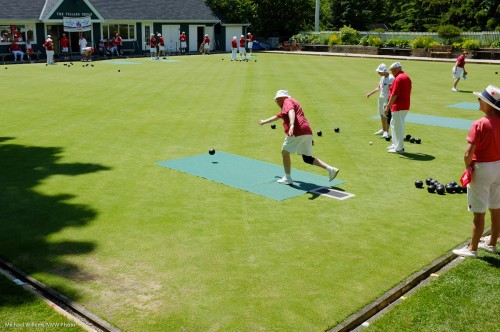
      A few snaps (where as per previous posts, I make the viewer tell his or her own story):

      Fuji X100 Pic - Photo: Michael Willems

      Fuji X100 Pic - Photo: Michael Willems

      Fuji X100 Pic - Photo: Michael Willems

      I think “street”… I cannot wait to get to Toronto to do some street photography with this wonderful camera. It’s winning – and not in the Charlie Sheen way.

      Canadians: Happy Canada Day. More tomorrow.

      Post Note: As reader Duke S. points out: I could well refer to this camera as “Preciousssss…”

      Post post note: Second impressions and third impressions now also online here.