AdobeRGB or sRGB?

Reader Yannick asks:

My friend and I have a lot of conversation about cameras and there’s something I wanted to bring up. He said you’d be the perfect person to answer this question. My friend shoots using adobe RBG colour space and I was telling him how sRBG has a slight advantage cause it’s the most commonly used settings and I believe you require some programs to make full use of adobe RBG. I’m not sure if I’m making any sense. But some clarification from your part would be greatly appreciated.

OK, thanks for the trust. Here’s my take on this important question.

If you shoot JPG, you need to decide what colour space to use: you set it in the camera.

  • The good: AdobeRGB is best for high-end print publications, while sRGB looks best on low- and medium-end printers and especially on computer screens.
  • The downsides: sRGB has fewer colours; Adobe looks very dull on computers.

So you decide based on your purpose. What is the colour space of the device or publication you are making the pictures for.

adobeRGB

If you do not know, then my recommendation is: shoot sRBG for general purpose use. That way your pictures look great on computers, in emails and on web sites, and printed at home. The very slight loss of colour space is not a problem there. Shooting in AdobeRGB and getting horrible flat colour on web browsers etc that do not handle that colour space well is much worse.

But the best thing to do by far is to shoot in RAW. That way you need only decide later, on your computer, when you produce your JPG. Until that time you keep all colours – and freedom.


Bounce

..or use high ISO. When you take pictures in a restaurant with dark high ceilings and walls – nothing much to bounce off – you get bad pictures – the flash pictures love to hate.

Even when you use a Gary Fong Lightsphere:

IMG_1314

Better, but clearly not panacea, then: this light is not ideal. Harsh shadows, flat light, unflattering skin.

So under those circumstances, it is OK to use very high ISO. 1600 ISO at f/4 at 1/60th second, with a bit of bounce (even high, far walls and ceilings will bounce something back), gives me this:

IMG_1303

Better, and perfectly OK for large prints, and it avoids that clearly “flashy” look.

You can also use a slow shutter speed (on Nikon cameras, engage “Slow Flash”; on Canon cameras this is normal in Av mode).

Dust to dust…

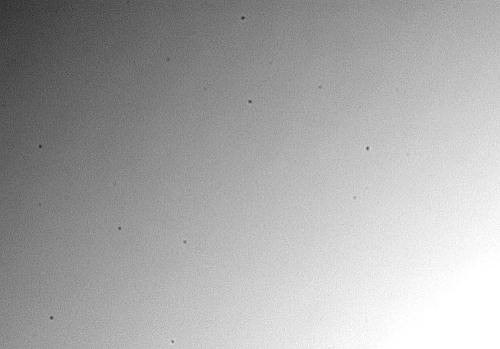
Your sensor will contain dust, eventually. Even self cleaning sensors eventually do collect dust. It looks like this:

To actually see this dust, as in the image above:

  • Use BULB mode
  • f/22 (smallest aperture)
  • Wider angle
  • Aim at a white surface, out of focus (use manual focus for this)
  • Click and wave the camera about. Try an exposure of 3 seconds. If too dark, make it 65. If too light, make it two. And so on.

Once you have the image, that shows you the dust you have.

If you need to clean, there are solutions (pads, brushes), but use them with care. Start with a blower, then use the brushes, then use wet pads. A photo store can tell you the pros and cons. Risky, maybe – but I have been doing it for years with no ill effects.

Pic of the day

Look at this recent newspaper picture of Elizabeth May, the leader of Canada’s Green Party:

I shot that with a 16-35mm lens set to 33mm on a full frame camera. Exposure was 1/60th second at f/2.8 at 800 ISO, using – what else – bounce flash.The wide angle gives the image depth.

But ignore the technical details and ignore politics. Does this not show what a delightful people-person she is? And a politician who does not hide her wine glass when she sees the press gets full marks for integrity.

This is also a good example of a photo where the foreground is blurred and the background is sharp. That is why you pick your own focus point. If you use the “all focus points are used and the camera picks” mode, you will get the foreground object in focus. Which may not be what you want. Which is why photographers use just one focus point mos of the time.