Back button focus: Why and how.

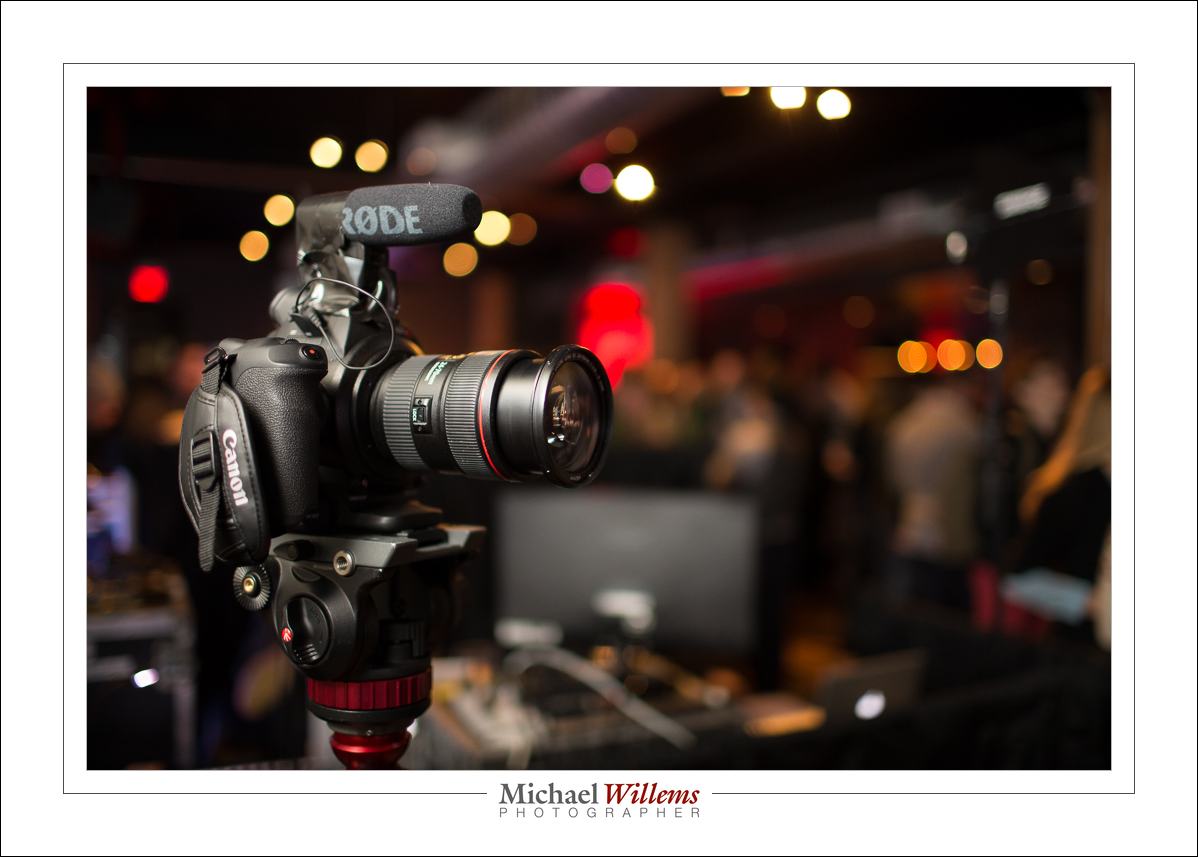
Some photographers (like me, usually) prefer to use “back button focus”. That means that instead of focusing by pressing the shutter button half way down, they focus by pressing a button on the back of the camera. Usually the “AF-ON” or “*” (asterisk) button top right on a Canon camera like the one below. The shutter button now only operates the light meter (in manual mode) or sets the exposure (in automatic and semi-automatic modes.)
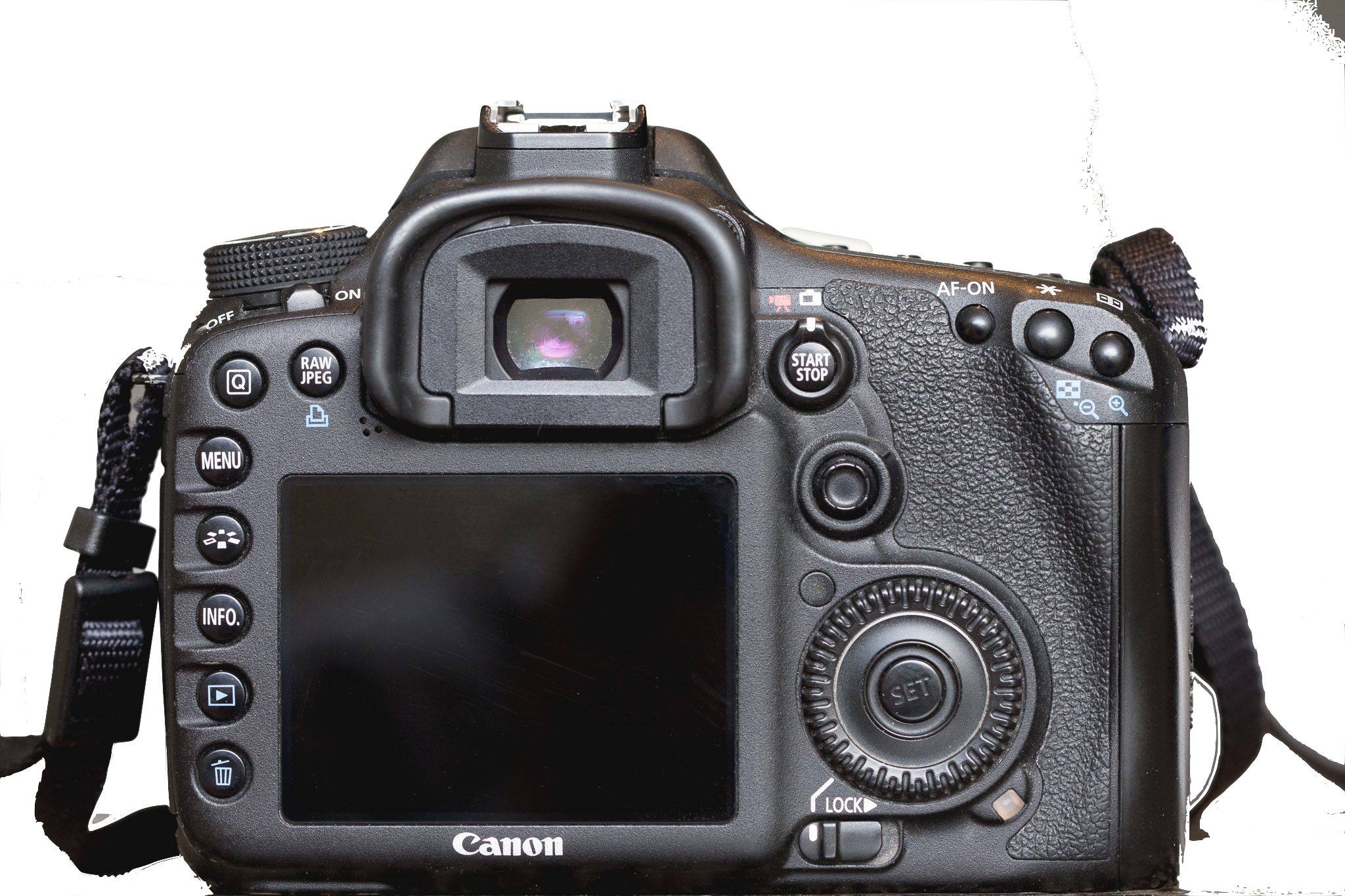
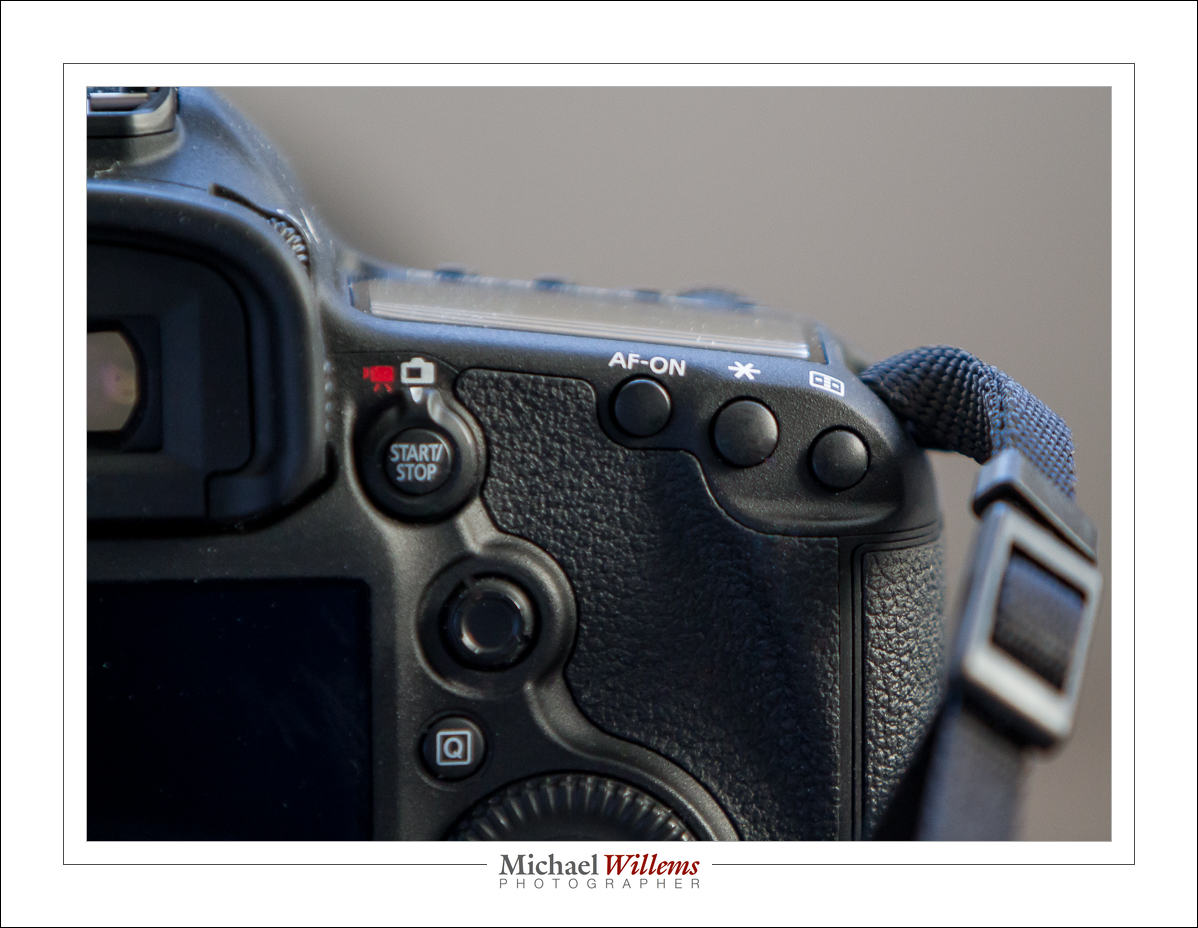
On most Nikon cameras, you can use the AE-L/AF-L button on the back to operate focus.

Why would you want to do this?

You might not, or you might. If you prefer this, it is probably for some of the following reasons:

One is that it is easier to separate the process of determining and setting exposure from the process of determining and setting the correct focus distance. These are separate processes that have nothing to do with one another: why combine them into one button? You may well want to focus on the bride’s eyes, while taking an exposure reading off Uncle Fred’s grey suit. This way I set exposure and ignore focus. When I am done and exposure is good, then I go focus where the image should be sharp, and forget exposure (or vice versa). And the two areas do not need to be the same. And usually they are not the same. Unless, of course, your bride has 18% grey eyes.

Also, it is easier to “set and forget” one or both. If, for instance, your distance to the subject does not change, why should you have to re-focus for every shot? There are plenty of situations where this is the case. Like portrait headshots. Focus once, then concentrate on expression and pose, not on focus. By using a separate button you make it possible to do this: focus once, and then forget it until you or the subject changes position.

The third advantage of focusing like this is that it is now easier to make manual adjustments. I focus using autofocus, but sometimes I want to adjust manually. No problem. I can do that, If my camera is set up for back button focus. Beep focus, then overrule that with manual focus.

How?

How do you set it? That depends on the camera. A few examples/notes:

  • On most Canon cameras it’s a Custom Functions (C.Fn) entry or two. For instance, on the Rebel T3i you use C.Fn 9 (option 1 or 3).
  • On the 60D, use C.Fn IV-1 (option 1, 2, 3, or 4)
  • On my 5D Mark 3 it is done in the Custom Controls section of the Quick (“Q”) Menu: set Shutter Button Half-Press to “Metering Start”, and set AF ON to “Metering and AF Start”. I usually also set the AEL button (the asterisk) to “Metering and AF Start”. That way I can use either the asterisk or the AF-ON button. Less chance I miss it!
  • Exactly the same applies to the Canon 7D.
  • On Nikon cameras, set the AF-L/AE-L button to “AF ON”. To do this, go to the pencil menu, find section “controls”, and use “Assign AE-L/AF-L button.”  Within this menu, choose “AF-On.”

Q: Michael, didn’t you say “back focus” was to be avoided?

A: Yes. But this is “back button focus”. A very different thing altogether. “Back focus” means the focus is inaccurate. “Back button focus” means that we are using a button on the back of the camera to start the focus process.

Q: So should I start using back button focus?

A: No, unless you understand all this, know your camera, and are happy to benefit from the advantages I outlines—and only if those are important to you. It’s no big deal either way; I go back and forth between using it and not using it. But now at least you know what it is all about.

 

A few admin words

A few admin words for my readers:

First, if you have not yet joined the Speedlighters Forum on Facebook, then by all means do. Here it is: www.facebook.com/groups/SpeedlightersForum/ – ask to be added and I will add you as soon as I see the request. It’s free, it’s secret, so you can ask basic questions without the whole world knowing about it, and it’s full of friendly people.

Second: I make some buying recommendations. These will always be in an Article, so pull down the “Articles” link above to find them. You can save money, or get best products, by using the recommended vendors. And they are there because I use these vendors myself.

Third: you get a 10% discount on one of them, Honlphoto, by using the link in the article (or by clicking on the Honl advert on the right), and then using Discount Code “willems” upon checkout. Take a look at the kits, especially.

Fourth: There’s about to be a special Flash kit, consisting of all sorts of things in a combination created by me, at Vistek. Stay tuned to hear about this as soon as it is ready to be released.

Fifth: I notice that many people are not quite sure how Lightroom work,s or how to set it up at the start. I therefore have a 2-hour consulting product: Setting Up Lightroom. Follow the link to learn more.

Sixth: The same is true for using your DSLR for Video. There, too, there’s things to know. And I can teach you those things… click right here to hear more.

Seventh: I teach almost all my courses (including the Flash signature course) remotely, using Google Hangouts. All you need is a good Internet connection and a computer with a (built-in or separate) camera. Whether you live next door, or in Australia. Keep that in mind, and do benefit from that to cut your learning time in half. Because that is what my courses do.

And now, back to the salt mines: picture editing. I love it, actually.

Michael


Colour. Just because.

That is often my answer when someone asks “why did you use those gels in that picture?. “Because I could”., “Why not”.  And you start adding colour here, there and everywhere. Consider this:

(100 ISO, 1/20 sec, f/16, 24-105 f/4 lens).

Private student Tim made the picture yesterday. And I put the yellow gelled flash inside the car why, exactly? Because otherwise it would be dark. A little colour adds a lot: think matching, or opposite, colours. Deep blue skies go well with yellow: blue and yellow, like red and green, or green and purple, constitute one of nature’s favourite combos.

And it’s so simple, with a Honlphoto gel:

Just strap it onto the speed strap and bingo. (If you do the Honl photo modifiers thing, go http://www.honlphoto.com/?Click=2032 and don’t forget code word “Willems” at the end to get another 10% off. Look at the kits: they rock, especially the last one).

I use gelled speedlights to:

  • Add opposites to relieve boredom
  • Warm up cold subjects (half CTO gel does wonders)
  • Get creative
  • Add a little red to skin in low key portraits
  • Correct colour when shooting in tungsten ambient light
  • Turn backgrounds blue

…and so on. Once you get into the habit, you’ll see how good your photography gets. Speedlights, and easy-to-use, sturdy gels, make all this not just possible. They make it convenient and affordable, too.

This site is called the speedlighter for a reason: speedlights unlock the potential. Just get another flash or two, get some gels and other modifiers, and get creative.


Lenses, Lenses everywhere, and nary a shot to take.

OK, weak joke, I know. But it is true that I feel like that: I sit here tonight surrounded by lenses instead of being out shooting. And not just me: lenses tend to take up a lot of a photographer’s time. What lens? Prime or zoom? Wide range or narrow range, more specialized?

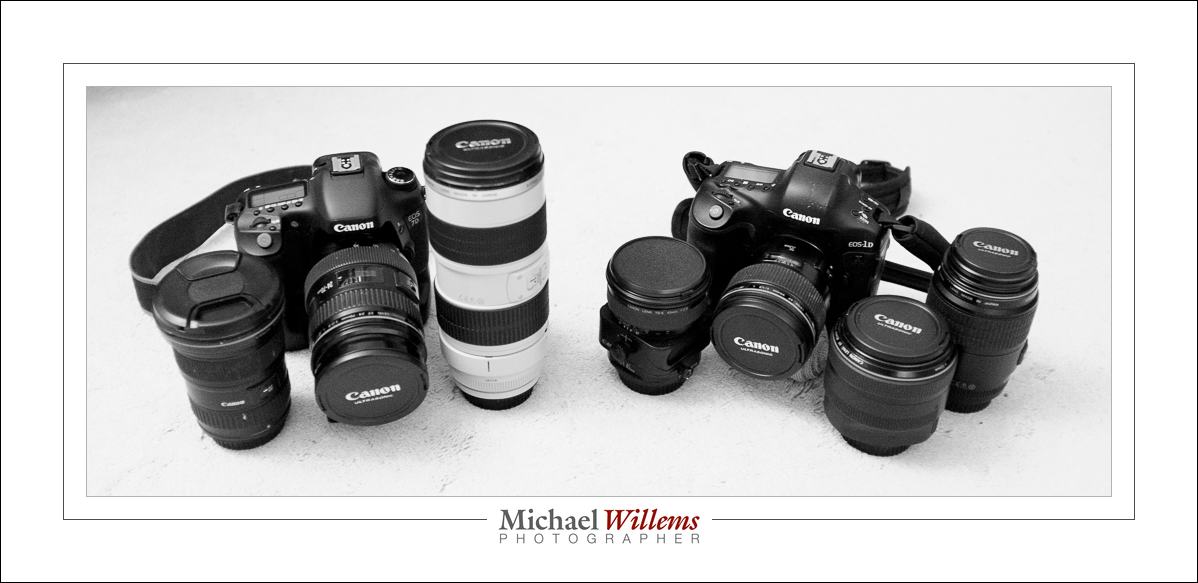
Most photojournalists would like roughly the same list of lenses in order to be able to handle everything. I think I am pretty close. Here are my lenses as they sit here in front of me:

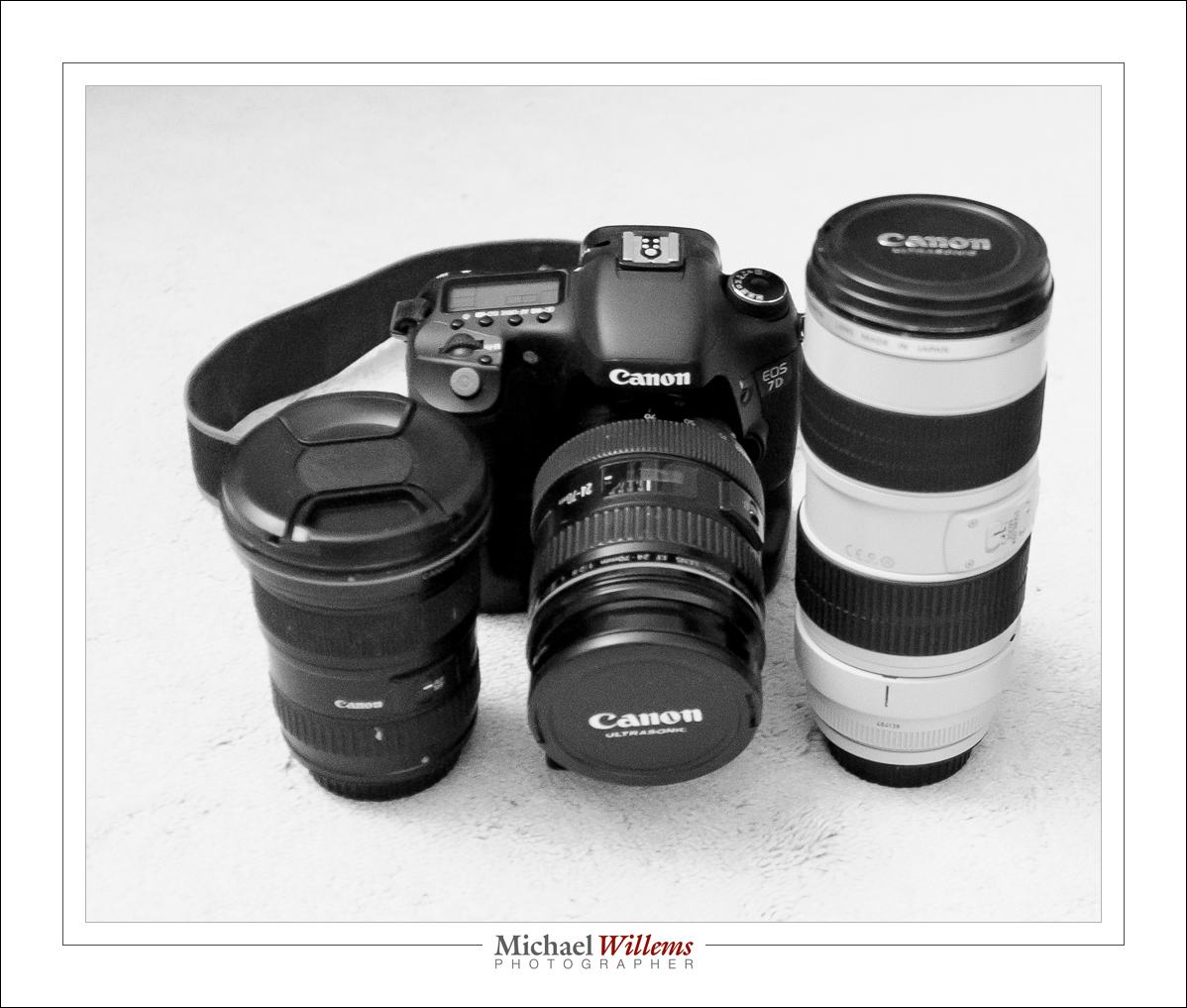
On the left, my zoom lenses. You use a zoom when you need convenience, when you have little time for lens changes, when you need various focal lengths, when you aren’t sure what you will be needing: in short, zooms are for flexibility. Professional zooms are f/2.8 lenses, for the most, meaning they will go down to an f-number of 2.8 whether you zoom in or out (ass opposed to consumer lenses, which generally go down to f/3.5 when zoomed out, and f/5.6 when zoomed in).

My zooms are:

You will see:

  • 16-35 f/2.8
  • 24-70 f/2.8
  • 70-200 f/2.8

A nice wide range: because of my two cameras, one of which is a crop, the range is effectively from 16 to 320mm (200mm on the crop camera works like 320mm). None of these are “one lens does it all” lenses: these are a compromise. For quality, choose whether your lens is a wide angle or a telephoto. It cannot be both, if it is to be good.

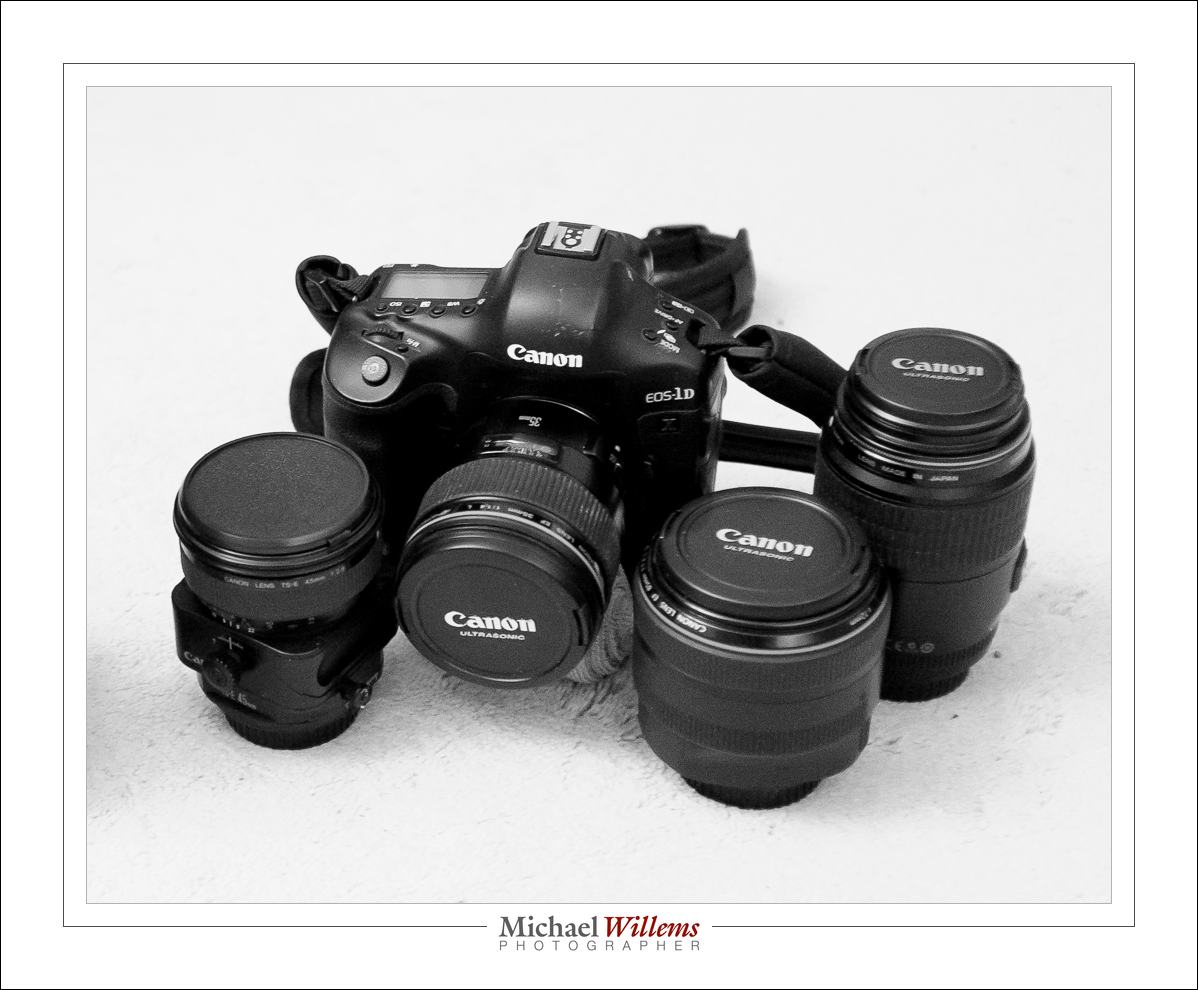
Then my prime lenses:

I have four primes:

  • 35mm f/1.4 (on the camera)
  • 45mm f/2.8 Tilt-Shift (left)
  • 85mm f/1.2 (second from right)
  • 100mm f/2.8 macro (right).

You use primes when you do not need the flexibility of a zoom, or when you need specialist lenses like a tilt-shift or a macro. In return for that, you get other benefits. A major one for many prime lenses is larger apertures: f/1.4 gives you both blurry backgrounds and faster shutter speeds. Another benefit is quality: fewer lens elements means sharper pictures. And, last but not least: consistency. The look and feel and composition of each shoot is the same.

Do we all need all of those lenses? Of course not. But now you know where you start saving. And especially: you learn to use the tools you have to what they were designed for. An f/5.6 lens is just fine-€”but don’t try to use it to shoot a dark event without flash, or to get a super blurry background. As long as you stay within the range of situations a particular lens was designed for, you’re just fine. After all, remember this: an SLR with a cheap kit lens is approximately a godzillion times better than an iPhone.

And the photos above? I took those with my Fujicolor x100 small camera. A point-and-shoot with a fixed 24mm lens (equivalent to 35mm). Just goes to show.


Aha me a riddle

OK, so I set the Nikon camera to the recommended studio setting of 1/125 sec, f/8, 100 ISO, and, using Pocketwizards, set off an off camera flash fitted with an umbrella.

Ouch. So what happened here?

The shutter curtain happened; that’s what. It got in the way; the shutter was not fully open when the photo was taken.

But surely 1/125 is slower than the 1/200 that is possible with this Nikon camera?

Well: in this case once the signal traversed the combination Camera—Pocketwizards—Flash, it was clearly not enough. There is a delay in that path, a delay that is significantly great compared to the flash time. I.e. the camera said “Flash: Fire Now!”; and the flash took its time so that by the time it fired, the shutter was already half closed again.

The solution? Use a slower shutter speed. 1/60 gives us this:

We could also have used a faster path. Perhaps different Pocketwizards, or a cable, or a different flash, or even a different camera would have helped.

Tip: check what your critical shutter speed is, if you use off-camera flash (and you should). make a note of it, and always stay well below it.

___

Notes: Honl Photo special modifier deal coming for readers of www.speedlighter.ca. Also, a Vistek special Speedlighter Kit is in the making. And on March 30, I am a guest presenter on TWIP, Frederick Van Johnson’s excellent This Week in Photo podcast. Things happen fast: Stay tuned!


Mixing is fun.

Provided you start with no light, and also that you do not overexpose, you can light up things (subjects, backgrounds, etc) by using gels.

Like here: a red gel for the background, and a yellow gel for the face/front of subject.

But here’s the funny thing. She was wearing a blue top. Blue! And here it shows as green!

That is because blue paint + yellow light = green. Try it. And similarly, try mixing other colours. Try to look up additive and subtractive mixing. Google “colour mixing red green blue” and see whether you can recreate the combinations. And since it’s science, of course you can. But also try to mix other, non primary, colours and see what happens. gels can be a lot of fun!


Launch

I attended a Canon Canada industry event today: launch of the C100 MkII video camera. Here it is:

(1600 ISO, 1/60 sec, f/1.4, bounced flash).

Hey. Wait. Let’s talk about this shot. Why those particular settings?

  1. It was dark, and bouncing was tough, so the lens will need to be open at f/1.4 to let in enough light. Also, this creates round bokeh background lights, not hexagons. So, aperture done.
  2. I wanted a handheld sharpness guaranteed shutter speed. Say twice the lens focal length. And with a 35mm lens, that means 1/60 second. So, shutter done.
  3. So now I wanted the background to read around -3 stops, or something thereabouts: dark, but not pitch dark; a nice warm glow. My first guess was that 1600 ISO would get me there. If it had not been, I would gave tried other ISO values until done.
  4. White balance to zero. Flash compensation to minus one (the camera is black and the flash is metering off the camera).

That wasn’t so difficult now, was it? And note, I am not saying that my way is the only way. If you have another way of getting to good settings, good for you. But this works for me and you should think about what works for you. And then, and you are probably starting to recognize a theme: practice. practice. practice.


Know your stuff.

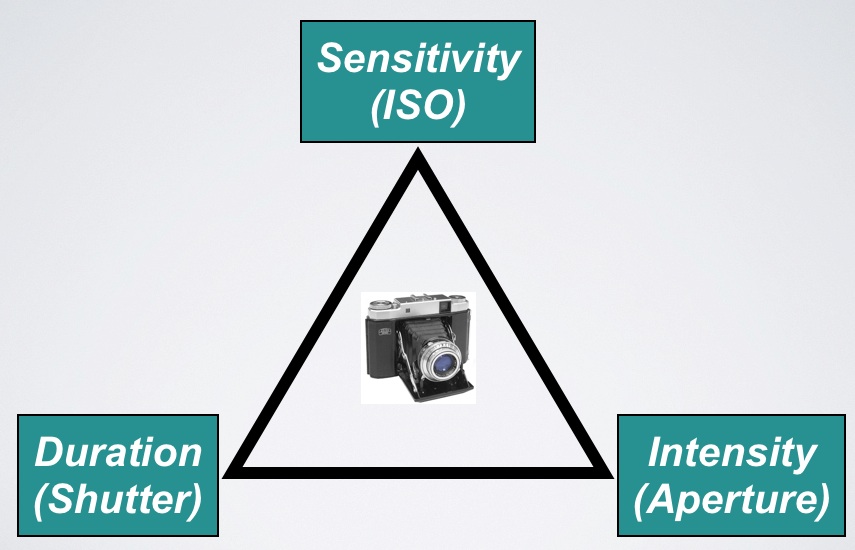
You know the exposure triangle, yes?

They work together. All three of these variable affect exposure (“how bright it is”).

  • For a brighter picture, you go to a higher ISO, or a lower “f-number”, or a slower shutter speed.
  • For a darker picture, the opposite.

And to make things easy, we have “main numbers” for each of the three variables.

  • Each of these main numbers doubles, or halves, the light.
  • We call a doubling, or halving, of the light “one stop”.
  • So the main numbers are one stop apart.

Main numbers are like this:

  • Shutter: …1/8 sec, 1/15, 1/30, 1/60, 1/125, 1/250, 1/500, 1/1000, 1/2000 …
  • ISO: …ISO100, 200, 400, 800, 1600, 3200…
  • Aperture: … f/1.4,  2.0,  2.8,  4.0,  5.6,  8,  11,  16,  22 …

Moving ISO “to the right” in the table above makes things brighter; that’s the definition of ISO sensitivity. Moving aperture and shutter “to the right”, on the other hand, makes things darker. (Why? A faster speed means a quicker click, which means less light gets in. A larger f-number gives us a smaller opening in the lens; that too results in less light).

And these can cancel each other out! So if you make one change that would darken the image by a stop, and at the same time make another change that would brighten the image by a stop, you will end up with the same brightness in the resulting picture.

E.g. moving from 400 ISO to 800 ISO (“brighter”) and at the same time going from 1/60 to 1/125 second (“darker”) would result in the same brightness.

Your camera probably adjusts things in steps of one third of a stop, which means it takes three “clicks” top go from one main number to the next (200 to 400 ISO, or 1/125 to 1/250 sec, of f/5.6 to f/8). But the main numbers are the important ones.

You need to know these numbers off by heart.

That way, you can quickly do mental arithmetic like “Hey, I moved the aperture from f/4 to f/8. My shutter was at 1/1000 of a second. How do I need to set the shutter to get back to the same exposure?”. (The answer is 1/250. But you should be able to do that in your head. Which is very easy once you have the series above, the main numbers, memorised.)

So before you go any further:

  1. Do you understand the above? If now, why not?
  2. Have you actually practiced the above (in manual mode)? Not once or twice, but dozens, hundreds of times?
  3. Have you memorized the main numbers?

If you are a beginner, do the three steps above before you go any further. OK, go ahead. I’ll wait. Because if you think you can really learn photography without knowing and understanding this, you are wrong. And if you think you can understand this without trying this many times, you are also wrong. We call this “wishful thinking”.

___

Michael (www.michaelwillems.ca) does custom private training as well as group-based training and classroom training; see http://learning.photography. Contact him now (416-875-8770 or michael@mvwphoto.com) to set up a date.

East of Toronto

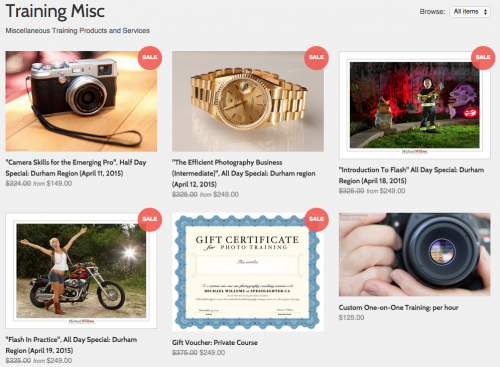
Good news for those of you east of Toronto: The Durham Region gets its own specials in Whitby.


They are:

  • April 11: Camera Skills for the Emerging Pro”, Half Day Special
  • April 12: The Efficient Photography Business (Intermediate)
  • April 18: “Introduction To Flash” All Day Special
  • April 19: “Flash In Practice”, All Day Special

These four courses are for committed amateurs or emerging pros. And they come with special prices for the books, also. See learning.photography/collections/training-misc for details and booking.

Book now: each course will go ahead if we get enough people, and there is strictly limited seating.