Lightroom Top Tips #213

Another Lightroom tip.

Imagine you have done a shoot with two cameras, but one was set to the wrong time – you forgot to set it to the right seasonal time, perhaps?

Easily solved.

  1. Go to the LIBRARY module. Select the folder or collection that contains the event you are talking about.
  2. Show the filter bar (press “\”) and using METADATA, select only those photos taken with that incorrectly set camera. In my example below, that was the Canon 7D.
  3. Select all of these (Apple-A or Control-A).
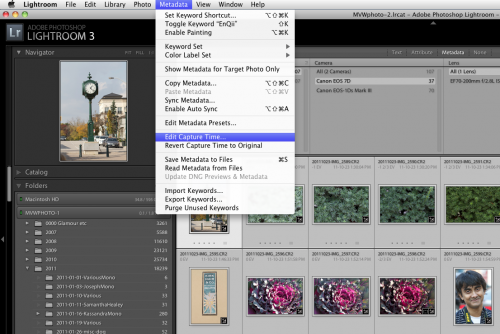
  4. Now go to METADATA in the menu, and within that select EDIT CAPTURE TIME:

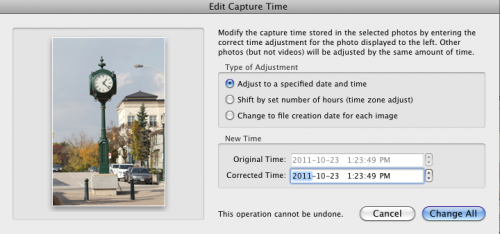
Now you see the options:

Select SHIFT BY SET NUMBER OF HOURS, select the number of hours, and hey presto, all your images are set to the right time.

Is that cool, or what? Lightroom’s strengths majorly include the organizing features you may not have found yet, like this one. Have fun!


Stop!

Before you take a picture outside, stop and think a moment.

You know you do not want a picture with your subjects squinting into the sun. So, turn subjects away from the sun.

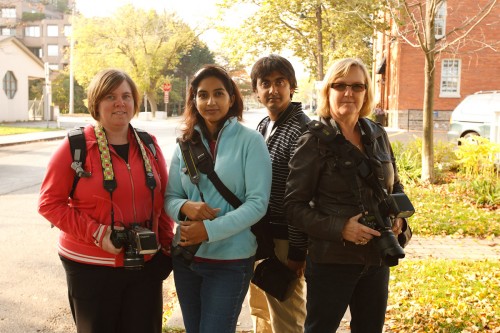
But you also do not want this – a picture of the same people pointing the other way. In tis picture, my students on my photo walk on Sunday are no longer squinting, but they are too dark, and the background is too bright:

Students (Photo: Michael Willems)

Not bad.. but noise hides in the shadows, while bright pixels are sharp pixels.

Better:

  1. Reduce exposure of the background to two stops below ambient (-2 stops, e.g. by using exposure compensation, or by using manual settings for aperture, shutter and ISO);
  2. Use flash. Even a single flash on camera.
  3. Consider making that flash warmer by using a 1/4 Hol photo CTO Gel (set your white balance to “flash”).

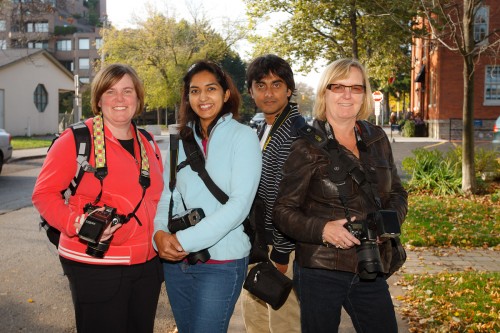
You now get what you want: brighter people and yet, a darker, more saturated, background. We’ve turned things around!

Students (Photo: Michael Willems)

Better eh!

(Yes, I grant you, straight flash is sub-optimal, so off-camera flash or softboxes (or a combo) would be even better of course. If I had had it at hand, I would have put my Honl softbox on the flash. Or you can use the Fong Lightsphere perhaps. Or raise the flash with a bracket. Or set up two flashes, one left and one right, to get a little rim lighting, as in image one – but lit well. Or use a flash turned down a little using Flash Exposure Compensation. Flash really has no limits to how you can use it creatively.)

For sure, this one is acceptable.

Here’s another one using the same technique:

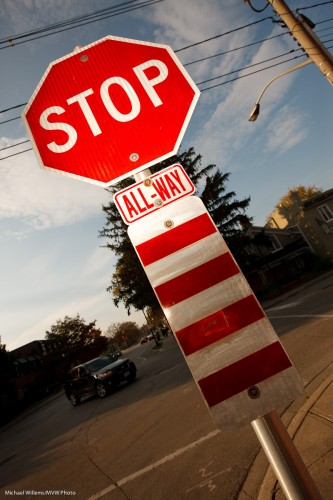
Stop! (Photo: Michael Willems)

Make this STOP sign your beginning: go make a picture exactly like mine. On a bright day, using on-camera flash.


Ask not…

…. how speedlighter can help you… ask instead how you can help spee…

STOP. That’s terrible: way too corny. But what I mean to point out is how you can benefit from this resource, and what I get out of it in return. I thought a few words on this subject might be useful.

What is this blog for? It is for past, current and future students of photography. Beginners, enthusiasts and pros. As a working photographer and educator, I intend to help teach as many people as I can photography.  After all, photography is time travel. We need to commit our moments to photos in order to save them forever. And it is easy. I intend to help you increase your skills.

So on speedlighter.ca…

  • I cover as wide a range of subjects as possible.
  • For as wide a range as readers as possible.
  • I write daily, and I write for everyone.

That means that…

  • There will be repetition of subjects – that is how you learn.
  • Some of it will be simple; some may be beyond you.
  • But always, posts are quick to read and intended to be easy to absorb.
  • You can search by keyword, on the right; or by category. Us this tool!
  • And you can ask me questions. I welcome them!

To best use speedlighter, read frequently and do those searches. Copy my shots – see them as “homework”, as many of you did recently for the “hidden worlds” post.

So what do I get out of this? Happy students, for one. And if you want to give back, here’s how you can do it.

  1. Send me questions to answer.
  2. Use my training services. Either at the schools I teach at, or as private coaching, or via Skype.
  3. Contribute directly, even!
  4. But most importantly, spread the word. Tell your friends to read these posts daily. Share on Facebook and Twitter.

So today let me start by answering a recent reader question.

Michael: Wat is the difference between a flash meter and an ambient light meter?

Ah. There are two kinds of light meters, and those are them.

An ambient meter is a traditional meter, and it measures the light in your environment. Set the ISO to your camera’s ISO; set the shutter or aperture to your camera’s shutter or aperture, then hold the camera in the same light that is illuminating your subject; then press the button and read the aperture or shutter you need to set on the camera to get a good exposure.

A flash meter does not just look at ambient light. It looks at the bright flash emitted by a strobe or speedlight, and measures that (combined with the ambient light, if any). The mode of operation is similar, but the way it works is not – it waits for that flash before it gives you any reading.

A modern incident light meter, like my Sekonic, does both. The MODE button pressed and the display symbol then moved to the sun symbol means ambient, and moved to the lightning symbol means flash metering.

Use ambient metering when using available light, and use flash metering when using manual flash, such as strobes, or speedights set to “manual” mode.

(More about metering in the next few weeks. And yes, I use a light meter!).

 

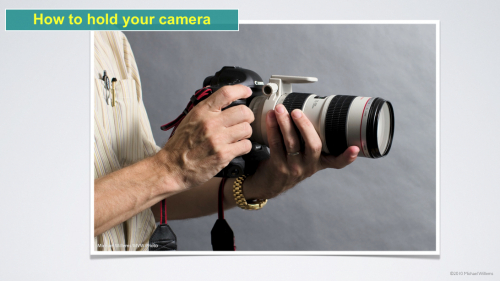
How to hold your camera

Look at how I am holding my camera here:

Holding a lens (Photo: Michael Willems)

Even without the long lens, that is how you should normally hold your camera: left hand under the lens, and turned so that the four fingers are below the lens, and the thumb left/above.

Why? Because this way, you stabilise the camera more. And unless you are using a tripod, stability is everything.

To zoom, use thumb and ring finger of your left hand – hand stays where it is. And to take a portrait shot, with your right hand, move your camera a quarter turn up – the left hand stays as it is.


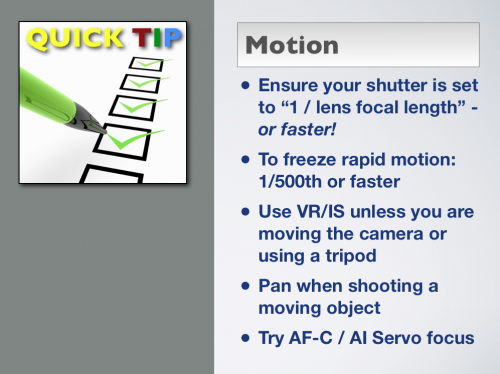
Dealing with motion

Dealing with motion can be complicated becuase it involves multiple aspects of photography:

  • Are we talking about your motion , or the subject’s motion?
  • Do you want to show motion, or freeze motion?
  • How do you Focus?

So here, in my usual quick tips format, are a few tips that may help:

These are simple pointers to good camera technique:

  • To avoid motion blur, ensure your shutter is set to “1 / lens focal length” – or faster! I.e. if using an 18mm lens. at least (roughly) 1/18th of a second; when using a 100 mm lens at least 1/100th of a second; and so on. Preferably twice as fast or better!
  • To freeze rapid motion, like a race car: 1/500th, or preferably faster, like 1/1000th.
  • Use VR/IS stabilization, it rocks – unless you are moving the camera or are using a tripod.
  • On that subject: tripods are cool – use one whenever you can.
  • Pan (follow the subject while pressing the shutter) when shooting a moving object.
  • Try AF-C / AI Servo focus if your subject’s distance from you varies (it is coming to you, or moving away from you).

Use of these techniques maximizes the chances of an image that uses, or freezes, motion the way you want it.


Unproductive Questions

One reason to learn in a formal setting is that it helps you ask the right questions.

“But surely, Michael”, you say, “there are no bad questions?”

True enough – but there are many questions that waste your time if you try to really answer them; that should not be pursued, but rather should be answered with “don’t do that”, or “do it another way” or “that is unimportant”. In that sense, they are simply the wrong questions.

I get many of those questions as a teacher, and of course students in a class will hear and understand the explanation and move on.  But if you take no classroom training you will spend much energy on those “wrong questions”.

I mean questions like:

  • I don’t like changing lenses, so which all-purpose lens can do all my photography? (Understandable, but wrong question. If one lens could do it all, I would own that lens. Except it would weigh 10lb and cost $5,000 and distort around the edges).
  • How can I take the same sports pictures you do, but with my kit lens? (Ditto. you simply cannot).
  • How do I best use my pop-up flash? (Not. Use an external flash: it is more powerful and you can direct its light elsewhere, and in any case it is farther from the lens).
  • What happens when I press exposure compensation while at the same time pressing exposure lock and the shutter? (Who knows! This is the kind of question that just wastes energy. Yours.)
  • How do I best mount two filters on top of each other: polarizer on top or polarizer on the bottom? (You don’t. Only one filter at a time).
  • How do I avoid flare without going through the effort of getting a lens hood? (Not very well. Use a lens hood.)
  • What is the highest zoom I can get? (Before answering, I would need to hear much more on why this is important to you.)
  • What lens/camera/flash should I buy? (That is an understandable question, but you should not expect a real answer, since only you can make that decision – after you understand the criteria for choosing!)

…the list goes on ad infinitum. Many of these are “wishful thinking” questions. Some are not. They are all questions that are easily answered, or at least countered, by a teacher-  but when you ask them without that formal training, you will waste half your energy (I bet you can find a dozen sites on the Internet that try to answer those unproductive questions.)

I have an interest in saying this, of course – I coach privately, I teach at the School of Imaging and at Sheridan College – but that’s not why I am stressing the point. I would not do this daily blog if it was. Instead, I am prompted by a closed Facebook group where thousands of pros and would-be pros converge and talk, and it amazes me that quite a few of the would-be pros proudly say “I don’t go for formal training”. That is a shame – because training, rather than giving you all the answers, helps you ask the right questions, and in doing that, saves you lots and lots of time.


Close and fuzzy

A repeat post(*) about a beginners tip we all forget sometimes: there are several things that all contribute to the blurred backgrounds we all love (“narrow depth of field”). And they are….

  1. Selecting a larger aperture (a lower f-number)
  2. Zooming in (using a telephoto lens, not a wide angle lens)
  3. Getting closer

ALL those work. So why forget numbers 2 and 3? If you do not have an f/1.4 lens use an f/5.6 lens but get close!

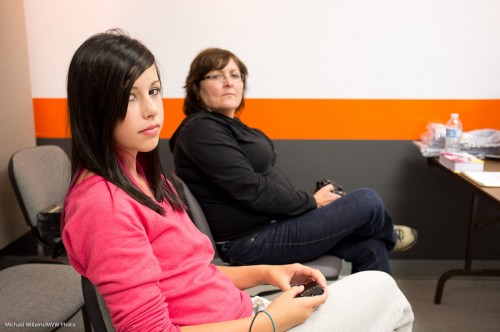
Here’s me demonstrating this point to two students the other night:

Some blurring of the lady in the background – but not a lot (that was f/2.8 on a point-and-shoot Fuji X100 camera- which gives a depth of field equivalent to around f/4.0 on a full frame camera).

Now, same settings exactly, but let’s get close:

Hey presto – dramatic blurring of the lady in the background. It can be as simple as that.


(*) a repeat post on this subject – why? Simple: you learn by repetition. Also, of course not everyone has read all prior posts. Finally, you’ll see a slight difference in how I explain things, when I explain them several times, and that is a useful difference, designed to help you learn.


Sunny Sixteen

Why do you need to be able to operate a camera manually? Because it gives you an idea of what values might fit a situation. The same way you need to know arithmetic even if we have calculators.

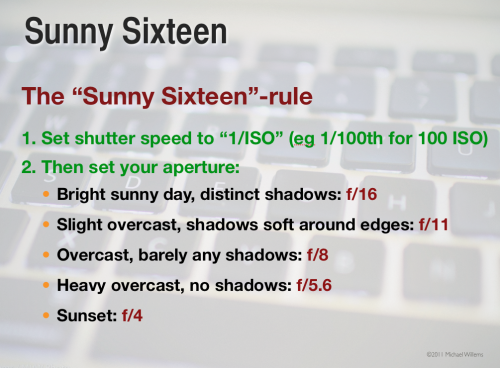
So here’s a rule all photographers need to know. A rule of thumb – that’s all it is of course – but a useful one. Namely, the “sunny sixteen rule” for exposures at mid-day:

Selecting these values will give you a “good standard exposure”. Of course you adjust when it is not mid-day, or you are a very high latitudes, and so on.

If you do not yet know it, learn this “rule” today. It’s great to be able to shoot without a light meter sometimes.


Table of Truth

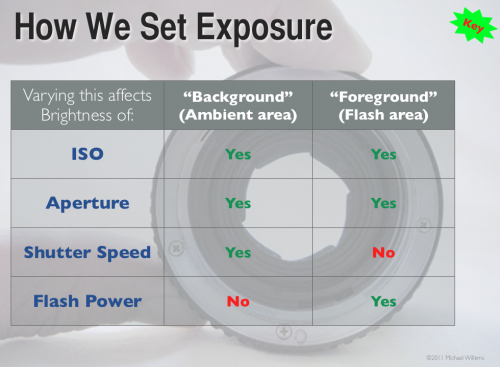
In case you, like many photographers, wonder how aperture and shutter, as well as ISO and flash power, affect your flash pictures – here’s how!

Study that graph – a good photographer knows this graph off by heart – in fact, a good photographer has made this chart part of his or her DNA.

Note that if you set your camera to an automatic mode (like P), or if you set your flash to an automatic mode (i.e. TTL), you’ll get confused, since the camera varies things! So when learning, keep everything on manual.


Tip of the day

Thinking a little more about yesterday’s post: here’s a suggestion for you.

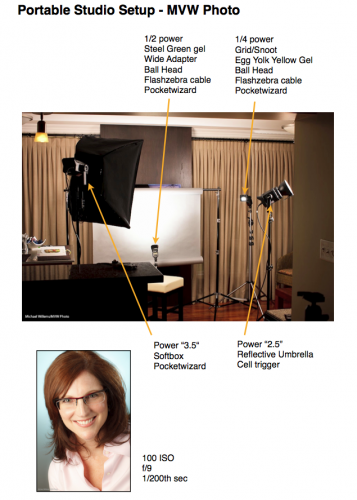
When you find a setup thart works, or when you pack your bag just the way you like – anything like that, make a one-page cheat sheet for yourself.

Like mine for the portable studio I showed you yesterday:

Click through to see it as a PDF:

HomeStudio-Small

And of course I have that cheat sheet PDF on my iPad also.

These “recipe” sheets help me or my assistant quickly set up a starting situation, in case I am in a hurry. (OK, I am always in a hurry.) This way, I ensure I do not forget something. I have one for my lighting bag (what goes where), for common lighting situations, and for common shoots.