Menu

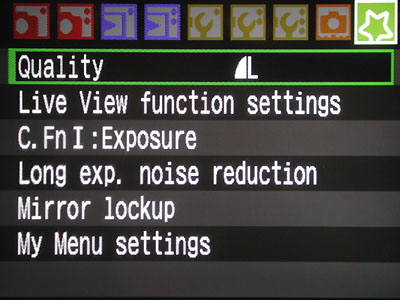
As a teacher of photography, I am struck time and time again by how difficult it is to explain camera menus to people. Canon is better than most, but all are difficult. All sorts of buttons, and different ones all the time:

mymenu

To experienced users and pros, these are simple. But to novice camera users, navigating through these menus is a real challenge. Do makers of cameras not do focus groups?

Evidently not. Just look at the “wake-up” button that you need to keep pressing every few seconds when setting anything on your DSLR. Again – obvious to us, but tough for novices. Nothing tells you this!

Did you know that on a 7D, you can get the camera to default to always going to your custom menu when you press the “menu” button? Look for it under “My Menu Settings”. The function has an unintuitive name, but it’s there…

I think we need Apple to design the next DSLR User Interface.

Picture Styles: useful?

BKKphotographer asks:

“Are Canon’s Picture Styles important in your workflow? Do you, for example, create your own and download them to your cameras? I started to get interested in them, until I started using Lightroom. LR does not understand them per se but it attempts to approximate the standard Canon styles with its Camera Calibration Profiles.

If I make my own Picture Style and use it on my camera it gets lost when I import to Lightroom. I think they are only useful in a workflow that is based on Canon Digital Photo Professional.

I find that whole subject very confusing – for example how those profiles relate to LR’s Develop Presets.

I think this area is a prime candidate for your clear concise explanatory skills!”

Well, I’ll do my best. Although In fact I think you are doing very well yourself, in the explanation above.

What are Picture Styles?

Camera Picture Styles are ways to handle (a.k.a. edit) the information that comes from your sensor. You can set these styles on your camera. Contrast, sharpening, colour balance, saturation, even curves are all part of such a style. If, for example, you set your in-camera style to “Landscape”, you get sharper images, with a tad more contrast and ever so slightly enhanced blues and greens. Portrait Style means less sharpness (who wants to emphasise wrinkles!). In a sense, these Picture Styles are like choosing a particular film.

picstyles

What happens to you image in camera?

If you shoot JPG, your chosen Picture Styles settings are applied to the sensor information, and the resulting JPG has them incorporated (e.g. it has enhanced blues and greens, and is sharpened).

But if on the other hand you shoot RAW, the style settings are not “applied” – instead, they are “attached”. (The RAW file contains a field that says “oh, and the user set the camera to Landscape Style when he took this picture). It is then up to the software you use at the other end (on your PC or Mac) to apply the settings.

What happens afterward?

If you use Canon DPP (Digital Photo Professional), it knows the camera’s built-in Picture Styles. So if it sees a RAW image with style “landscape” set in the attached info, it knows exactly how to apply that style. And it automatically does that, so the RAW image looks the way it looks on the back of the camera.

If on the other hand you use Lightroom, or Photoshop, or some other software, it does not know the exact meaning of Canon’s “Landscape Style”. Your camera maker, of course, in its usual controlling manner, does not share this information. (Hey – why would you share stuff that would make your photos better and hence your cameras more popular!)

So now what?

So now you have to do it yourself in software. Take the unaltered file, then enhance the sharpness, apply the right contrast, and so on. This is inconvenient. So Lightroom attempts to do it for you. Adobe has built in (for RAW files for some, but not all, cameras) its own camera-specific develop settings. When I import an image from my 1D, for instance, I can now set it to “Camera Landscape”. That approximates the in-camera setting very well.

But when you have made your own Picture Styles and uploaded those to the camera, as indeed you can, then these are not known at all to Lightroom, so you have to make your own develop settings in Lightroom to mimic your self-developer camera Picture Styles. You can – but is it worth it? It would take a lot of time.

So what does Michael think?

I think Picture Styles are only really worth it if you stick to DPP. I also think that if you shoot RAW,  the main advantage of these Styles is “how you see the image on the back of your LCD” and “how quickly you get to an OK-looking JPG later”. Other than that, why not just do it on  your computer? The Lightroom styles are a good approximation of the Canon styles, I feel.

Important note: I do think it is very important when importing into Lightroom to use the “Camera Normal” (or if you wish, “Camera Landscape”, etc) develop setting (you can do that automatically upon import, or set it later in the Develop Module), and not ACR (the Adobe Camera Raw profile, which does not look as good). When I show photographers this, and the resulting significantly better colours, they usually say “wow!”

So if you ask me “are Picture Styles important to you” I would say “yes – I only set them, or an approximation to them, in software later”. I can do it while shooting but find I might as well save myself the time and do it later.

I could of course write my own, as you have and upload those to the camera, and then approximate them in Lightroom as well. I commend anyone who does – but I have insufficient time to do it myself.

Does that help?

"What lens should I get?"

“What lens should I get?”

I hear that question a lot from students, and I am always delighted to help answer it.

Of course “help” is all I can do. And I will, over time, in this blog. I can explain the difference between:

  • Zoom and prime.
  • EF and EF-S (or non-DX and DX).
  • Wide and telephoto.
  • Normal and specialised, like Macro and Tilt-Shift.

And I can explain what to use them for (long for sports and safaris, short for environmental, parties, and photojournalism).

And with that knowledge, you can, for instance, buy the lenses I use – or at least understand why I bought them:

lenses

So this is a typical photojournalist collection, consisting of fast (f/2.8 or better) lenses:

  • Zooms: 24-70 2.8L, 70-200 2.8L and 16-35 2.8L
  • 100mm macro
  • Fast primes, 35 mm f/1.4L and 50mm f/1.4

But “fast” does not have to mean “expensive”. The first lens you should buy is the lens I shot my lenses with – the cheapest Canon lens (and Nikon has one too): the 50mm f/1.8. The “nifty fifty”. And while the lenses above range from $500 (50mm) to $1,000-$2,000 (all the rest), the 50mm f/1.8 is just over $100. And boy, is it fast and sharp. Zoom in to see!

And that nifty fifty on a crop camera turns into an 80mm portrait lens.

One thing to feel good about: when buying a lens, you are investing. Unlike a camera, which loses value as quickly as a PC, a lens keeps its value for many years.

3200 on a 7D

This is what the cat looks like, when shot using my 7D, hand-held using the 35mm f/1.4L lens in available Tungsten light, slightly cropped, at 3200 ISO:

IMG_2036

I am not going through the trouble of showing the full crop because I want to make a point. And that point is: we often over-analyse. As you see here, indoors, low light, 3200 ISO with a fast lens, and you get images that look great at 1200 pixels wide and in a moderate-sized print.

Yellow and blue

We have seasons in Ontario. Grey (now), then brown, then white, then grey, then brown, followed by green, and then grey again. White, unfortunately, with brown , is the longest.

IMG_2060

But in between, you get some nice pictures.

IMG_2070

I always look for contrast: brightness and colour. This was this morning, outside in a car park.

Taken with the 7D with the 35mm f/1.4L prime lens. My general walkabout lens.

Street

mvws9240

Today’s post is a picture of the day. Recent, in Toronto. 24mm on a 1Ds MkIII full frame camera. 1/60, f/5.6, 400 ISO.

In photos, it is important to think about foreground and background, and the interaction between them and between them and the viewer. Normally, background people should not look into the camera. But I think it worked for me here!

Planning Phoenix

So I am planning an “Advanced Flash” workshop in Phoenix, Arizona, on December 3. Read more about it, and sign up for it, here:

http://www.cameratraining.ca/091203-Phoenix.html

If you are a pro or emerging pro in Phoenix, and flash is not your cup of tea- you need to spend this evening with me to hear why flash, and in particular TTL flash, is great once you have mastered it. And to hear that it is not difficult!


Gallery

Boston Globe’s “Big Picture” does it again. Look at this collection of stunning images of Afghanistan:

http://www.boston.com/bigpicture/2009/10/afghanistan_october_2009.html

Stunning. And also sad. Especially, I thought, the “no democracy – we just want Islam” picture – and those are supposed to be students.

And why are they great photographically? I think because they are all a combination of great composition, meaningful subject, and good technique (wide open f/1.4 lenses, available light, and wide angles with a close subject).

Why fast lenses?

Beginners often ask me “why should I buy those lenses with the low F-numbers? Why not buy the standard lens with the 5.6 on the front? They say the lens with the 2.8 on the front is better but I see it takes the same pictures: it’s just more expensive, right?”

Not exactly. The low F-number means  the lens has a larger maximum aperture. This means two things: it lets in more light, meaning faster shutter speed; and the ability, should you choose this, to create blurrier backgrounds.

Here’s my hand at F/11. Recently in Scarborough, while the other instructor, Christine, was explaining the effects of the Aperture setting. My hand is as close as the lens will allow while still achieving focus. I am in Aperture mode (“Av”) and have set the camera to a setting of F/11:

f11

Now the same at f/5.6: a much blurrier background, see:

f56

And now, since I have an expensive lens, I can go even farther, to the extreme end of this lens, namely f/1.4. Meaning very wide open. Meaning very blurry background – and when you look carefully, even foreground:

f14

So that is why people buy these lenses with those low F-number – i.e. “fast”lenses. If you want to blur the background dramatically. Or if you want to have the resulting faster shutter speed (at the same ISO, f/1.4 gives a shutter speed four times faster than f/2.8, and 16 times faster than f/5.6).

Of pixels and millimeters

Reader Dave asks:

“I have a technical question about sensors and pixels… I understand that larger sensor sizes gather more light and thus are better in low light situations and that more pixels will help make a sharper picture… but why do too many pixels make noise and what is the perfect balance? I.e. how many pixels would be good to have on a 1.6 cropped frame sensor?”

Well, the perfect balance will be a challenge. But indeed, this is a balance. Make the sensor larger and you get less noise. Make it smaller with the same number of pixels, and you get [corrected:] more noise. It is not “too many pixels” that make noise. It is “too many pixels stuck together into a small place, meaning they are small pixels”. The smaller you make a phototransistor, the more noisy it gets. So the more pixels you stick in a given area, the more noise.

So to reduce noise you can increase the sensor size, or reduce the area.

That’s why

  • Canon have reduced the pixel count on the G11 compact camera from the G10. Fewer pixels in the same area sensor gives you less noise.
  • My 1Ds MkIII creates less noise than the 7D. They have about the same pixels, but a larger sensor (the 1Ds is full frame, the 7D is 1.6 times smaller) means less noise.

Does that make sense?