
Balance light

You know the problem. You shoot a living room with large windows and what do you get?

OK outside. A bit light but OK. But dark furniture. Like, silhouettes.

Ah no – you went to a photo course, so you know about “exposure compensation” – the “+/- button”. So you turn that up to, oh, plus two stop (to make it brighter) – and yes, now the furniture looks light. Nice.

But uh oh – the window is now all white. Nothing visible. Like a gateway to heaven in “heaven can wait”.

Fortunately, you have also done a “mastering flash” course. So you know to:

  1. Turn exposure compensation down to make the sky nice and blue
  2. Then turn on the flash (and turn it around so it lights up the wall behind you)
  3. Then take a test shot
  4. Then decide whether to use “flash exposure compensation” – the “plus minus with flash next to it”. This turns the flash power up or down. You decide you need some more light on the furniture so you turn this to plus one stop.

Now here’s your picture:

MVWS0145-2

Nicer, no? Try this technique if you haven’t yet. And you can compete with the best interior photographers.
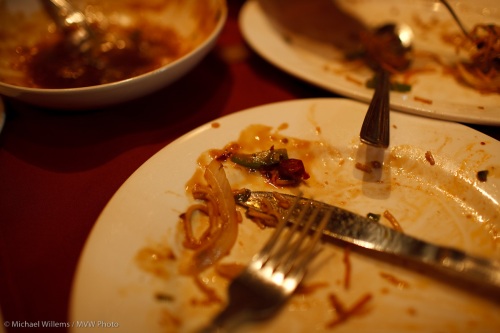

Chili chicken.

I have always thought that for clarity, “white balance” should be called “colour balance”.

White balance means “interpret the red-blue-green respective channels to match the colour of the light hitting the subject, in order to neutralise the colour cast”. Your camera does this every time (Auto White Balance, or AWB).

When it gets it wrong, which sometimes happens, you see a red, or blue, or green cast to the light. In that case, you can correct this by manually telling the camera the colour of the incident light. Setting the white balance, in other words.

So you go from this (tungsten light):

MVWS0116

To this (corrected).

MVWS0117

That was the chili chicken I had with Baz Kanda, a very talented Ottawa/Mississauga photographer, just the other day. Or rather, it was the remains after we had eaten the chicken. And a photographer plays with his camera even when eating dinner. And when you use a fast lens, like the 35mm f/1.4 I was using here, available light is enough.

TIP: if you shoot RAW (which I do 99.9% of the time) you can leave your camera on “auto” at all times and do it in Lightroom or Photoshop later, on your computer. By clicking on a white item (e.g. the place) with teh white balance dropper. Yes, that’s a bit more work while editing – but it’s also a lot less work while shooting. Guess what I prefer, so I can concentrate on the Chilli Chicken?

Silhouettes

How and why do I shoot a silhouette, like this one I shot recently in Toronto:

Silhouette

Why? To create a mood. In this case a serious, almost grim, mood suits the Gothic cathedral theme, and goes together well with the threatening sky, and the wide lens adds to this “closing in on me” feeling. I suppose if I were religious this would not be the sort of picture I’d make!

How do you do this? This is just an underexposed picture, in essence, so it does not really matter how you get there. Manual, or metering off the sky, or exposure compensation (negative). Or all three.

Me, I use my spot meter to meter off the sky. Then I lock that in using Exposure lock, after I perhaps add some negative exposure compensation. Or more likely, I use manual – again, using the spot meter on the sky as my starting point.

My aim is to get the building almost black – I prefer to do the last bit in Lightroom, because if I am too low, I have to increase exposure which adds noise. Decreasing exposure does not add noise that way.

Go shoot a few silhouettes, for fun!

Fill the frame

If you have been in any of my composition or travel photography classes, you will have heard me recommend that you simplify – this is essential.

And one way of doing this, I then go on, is to fill the frame. Get close. Concentrate on the essence and ignore the rest.

Like in this shot:

Candy Jelly

“Fill the frame” often meets resistance.

  • “But I’ll cut off bits!”
  • “But I’ll miss essential stuff”.
  • “But you can’t cut through someone’s head! Not allowed!”
  • “But then I won’t show the whole story”.
  • “But I was always taught I must never cut people off at the feet!”.

All very well. But think about it: if I had not filled the frame above, I would had had mess on all sides, black tables, hands, trays: clutter. The shot would have been much less effective. And sometimes you tell the story better by getting close-up.

I have a tip for you. Next time you hear my voice talking to you as you are about to shoot – or could it be your conscience? – just shoot twice. Once close in, like in the shot above; and once wider, with lots of stuff on all sides.

Then at home, see which one you actually prefer.

Black and white…

..is underrated, I think; especially for portraits. Or else why don’t we do it more?

A good black and white photo can full of character; moody, even. Especially in portraits, where the absence of colour means the absence of distraction, and the ability to concentrate on the essence of the person.

MVWS8517-2

35mm f/1.4, 1/30th sec, available light

For a good B&W picture, you need to realize that the background and the subject need to contrast, and that where we see clear colour contrast, in a B&W picture we may see none.

B&W works especially well where colour distracts. It can work where the subject either has blacks and whites, or is high-key or low-key. A good B&W picture can be a study in shades of grey.

MVW_0021

35mm on 1.3 crop camera, f/8, 1/200th sec, strobe in umbrella.

When I shoot black and white, I do the following.

  • I shoot in RAW. This is essential.
  • I always set the camera to “Black and white” also. Even though this has no effect on the RAW images, it gives me a preview of roughly what the image will look like.
  • I ensure I do not overexpose the whites, but I do “expose to the right”. I.e. until the histogram almost hits the right edge.
  • Then I finish the image in Lightroom. In the DEVELOP module, I use the GRAYSCALE adjustment in the HSL/COLOR/GRAYSCALE tool. This gives me the easy ability to change different colours’ brightness.

This last step in particular has made B&W a practical endeavour once again for a busy guy like me. You know what they say: “no rest for the wicked”. And if I were, oh, 35 years younger I would add a “LOL” at the end of that.

Finally: B&W does not have to be moody – or rather, the mood does not have to be serious. Here’s my friend Keith, and his happiness and intelligence, big parts of his personality, really shine though here:

MVWS2431-Edit

50mm f/1.4, 1/1000th sec, available light

Go ahead, give it a go. Have fun shooting B&W. And because you are shooting RAW, you can always go back to colour at the touch of a button.

A very hard softbox.

Try this next time you want a person lit by a softbox and you have no softbox:

Use a computer monitor.

Display a white background (e.g. open a word document) and hey presto: a big and efficient softbox. And if you use a fast lens (e.g. a 50mm f/1.8), it’s plenty bright as well.

And you can even use it as part of the picture:

MVWS3506

Tell me that’s not cool: photographers improvise.

Pan, pan, pan.

MVW_9159

Panning means moving with your subject, so that the subject appears to stand still while the background appears to move. Like in the picture above.

To do this, you use shutter speed priority on your camera (“S” or “Tv” mode) and select a shutter speed of around 1/8 – 1/30th second. Move with your subject, and shoot in mid-move (keep moving after your picture is taken).

Then shoot repeatedly: not every image will work.

But you don’t even need to wait for moving subjects: create your own. For even more fun, here’s a tip: try to do this while you are zooming in or out with your zoom lens, instead. No, not all the time – everyone will think you had too many of those mushrooms – but an occasional psychedelic picture can be interesting. Like this one:

Forest

Have fun!

Psychedelic forest

Flowers

Pssst… wanna know a secret? Come closer. I’ll tell you a secret or two… closely guarded… don’t tell anyone…

Toronto, May Morning
This is about shooting flowers. We all like shooting flowers, so I suggest you go shoot some. And if you do, the following tips should help.

  • Use a Tripod
  • Shoot them after a gentle spring rain. Or better, create your own, with a squishy water spray.
  • Try a black background behind the flowers – a piece of paper will do.
  • Stop the wind from moving them. Get someone to hold a coat, or a piece of paper, around the flowers.
  • Shoot them from ground level; or shoot up at them rather than down.
  • Use a long lens and stop down to f/16 or better, if you can.
  • Use soft light: not sunlight or flash, whatever you do! Use a cloudy day, or open shade, or window light (great light, just like for portraits!), or if you have to, flash bounced off, or through, a softening surface, like a sheer curtain or white sheet.
  • Use a long lens or a macro lens.
  • Get in close.
  • Use a tripod, did I mention that?

There you go. Nice flower pictures, and they look professional. Don’t tell anyone!

Keep it Simple, Student

The other day, when teaching a class on studio lighting, I decided I may as well be the model. So here it is: my portrait, shot by a student. Sharper than any I have ever had.

Michael Willems - August 2009

Michael Willems - August 2009

Students were shooting with a classical setup. Classic does not have to be expensive. This is all we used:

  • A paper backdrop behind me.
  • Three affordable studio strobes (Key, fill, and hair light)
  • Three light stands
  • Two umbrellas on main and fill light
  • A snoot on the hair light
  • To set it off, two pocketwizards
  • A light meter to measure.

But at last they were using 1Ds Mark 3 cameras (or their Nikon equivalent) and “L” lenses, yes? Right?

No. While there was a wide range of equipment, the picture here wsa taken with a Canon Digital Rebel XS (the cheapest Canon DSLR) and a 50mm f/1.8 prime lens – the cheapest Canon lens. If you could see the picture full size as I am seeing it, you would be amazed (and perhaps a little depressed at the million pores we all have).

That 50mm lens (available for Canon, Nikon and several other brands) is one of the sharpest, and a great lens for these portraits. It used to be a “standard lens” but it is now, with crop factor cameras, a great portrait lens (50mm is now equivalent, on those cameras, to 75-80mm). And very affordable – well under $200.

It is really all you need for this type of professional studio portrait.

Note the way I am leaning forward. That makes a portrait more dynamic. And note the catch lights in my eyes – those are necessary in a portrait.

If you want to learn this type of photography, take a course. Worth doing and worth spending a few dollars on – especially since one thing you may do not need to do is to spend lots and lots of money on expensive equipment.

Close-Far Adds Depth

MVWS7604

In my teaching role, I am often asked “why are my pictures not spectacular the way the real thing was”. Usually in the context of something impressive and grand, like the eponymous Canyon.
The reason is usually “because you have added no depth”. Our eyes help our brain see in two dimensions, as does the fact that we move about. In a photo, neither of those happen. So your photos can look flat.
As I have mentioned before, there is a way to avoid that. As said earlier, we call this technique “close-far”. By adding a close object, and making it large, the far distance seems more distant – i.e., we see depth.
To do this, we use a wide angle lens and get close to the close object.
One thing I have not pointed out before is why exactly this happens. Is it due to the way wide angle lenses are constructed? Something special in the glass?
No. It is simply “where you are”. The difference in relative distance. In principle, any lens would do this.
In the picture above, Lynda is three times farther away from me than the glass. That is why the glass, being three times closer, looks three times bigger – giving my rain a clue as to its whereabouts. If I stood back a few meters, the glass and her face would be almost the same distance away from me, so they would look equally large. That’s all – relative distance. The lens does not come into it – except of course if I stood back and had a wide angle lens, Lynda and the glass would both be very small. That’s why I would use a long lens when standing back.
That, and that alone, is why we use wide lenses close to a close object to emphasis distance to a far object.