Wireless flash tip

In keeping with the “flash” tips, in anticipation of Saturday’s Advanced Flash course in Toronto, with Guest Star David Honl, for those of you who are trying wireless flash for the first time: here’s a beginner’s problem to avoid.

A picture of one of my favourite items (not) lit with an off-camera flash on my left using a Honl Photo Traveller 8 softbox; and a reflector on my left:
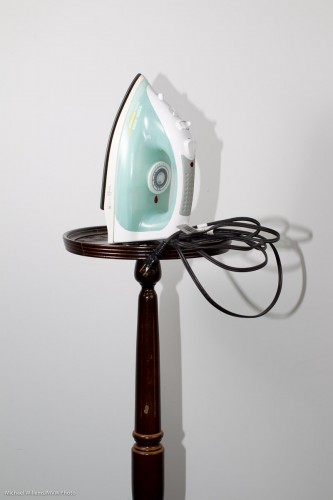
Can you see the problem? If you have eyes, you can: that horrible shadow.

You see, even though I used the off-camera flash with the Honl softbox, I failed (for the purposes of this demo, of course!) to disable the on-camera flash.

The on-camera flash (which can be the popup, on a Nikon or on a Canon 60D or 7D, or else an on-camera 580 EX or SB-900) is there to direct the off-camera flashes with “Morse code” pulses that happen before the shutter opens. So you need to make sure that when the actual flash happens, that on-camera flash is silent.

And you do that by setting the on-board flash to off. “–” on a Nikon, in the CLS menu, and just “disable” on a Canon. On the Canon, look, there are no rays coming from the flash head:
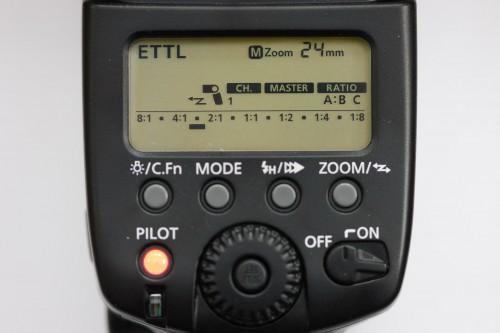
So then it still looks to you like it is working, but in fact it only fires its “Morse code” instructions, bu nothing else.

Now we have:
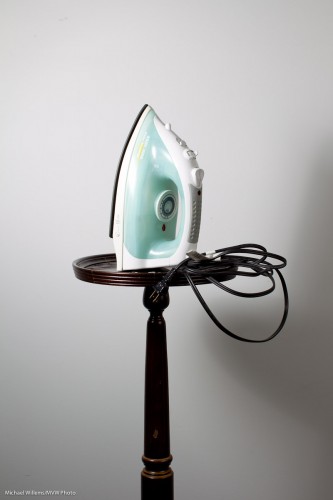
That’s better!

—–

One more recommendation, if I may (you will forgive me): there are spots open for the all-day “The Art of Photographing Nudes, 2 April 2011, Mono, Ontario. We use the same lighting techniques you are learning from me here, and more. Same model as last time, same two pros teaching! Click here to book.
Snoots

Leading up to this Saturday’s Advanced Flash course in Toronto, with Guest Star David Honl, (just a couple of spots left), I thought I might share another flash modifier tip today.

And that is the use of snoots.

A snoot is a long appendage to your light that causes the light to be directed in a narrower beam.  So when you really want to direct the light to go just where you want to, and nowhere else, you use snoots.

The best snoot for small flashes like a Nikon D700 or D900 or a Canon 430 EX II or 580 EX II are Honl Photo snoots (and no, Dave is not paying me to say that – it’s just that I use them almost daily in my flash work, and love them).

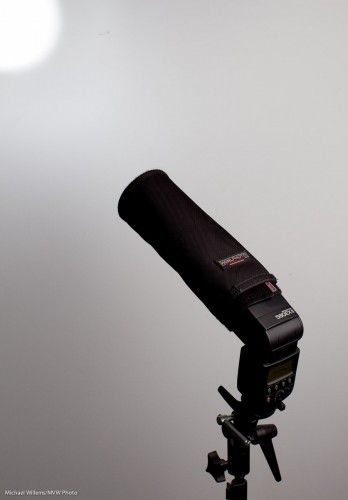
The snoot is also the bounce reflector, just rolled up. So it stores flash and mounts as a sturdy snoot in seconds:

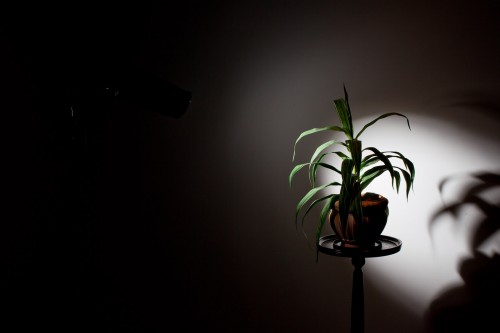
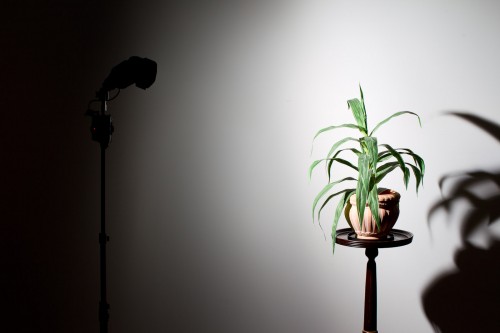
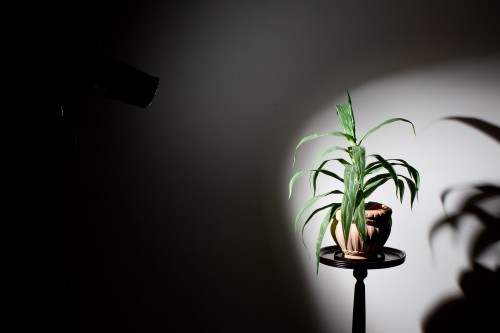
Remember, from yesterday’s post, the plant lit with a grid? If instead of lighting up the whole wall, I want to direct the light to a smaller area with a nice soft edge, I use a grid, like so:

But what if I want a more clearly defined light area?

Then I use a snoot. If instead of a grid I stick a short Speed Snoot to the flash’s speed strap, I now get this:

And if I want a smaller area? Simple, then I use the long snoot:

How do you often this type of snoot? As a hair light. Or in creative lighting: remember, creative light is not about what you light: it is about what you do not light. And that is what snoots are all about.

Grid and bear it

When you are shooting with multiple lights in a studio-like setting, one of the most important things is to shape the light; to control where it goes. And the problem with a bare flash is that its light goes, well, pretty much everywhere.

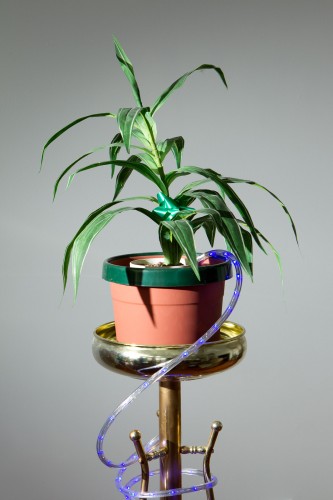
And one of the most annoying of the “everywheres” is the background. If you want a darker background in a small basement studio, say, you have the following problem: your flash, even if it is a side flash, lights of the background, so you just cannot get a dark background. You get something like this:

Darn, but you wanted a dark background!

In that case, you have three options:

  1. Move everything away from the background.
  2. Paint the background black.
  3. Direct the light more specifically.

Since options (1) and (2) are not always easy, I recommend you learn option (3). Use barn doors, or snoots, or gobos: anything to direct your lights more.

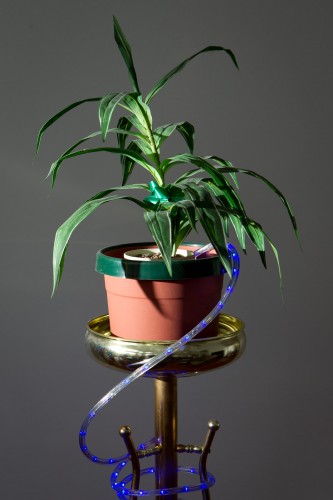
For small flashes, the grid is a fabulous option. A 1/4″ Honl Photo grid stuck onto the speed strap on the speedlight makes that picture into this:

That was easy! The grid stops the light from going everywhere – now we have a much darker background, since light no longer falls onto it.

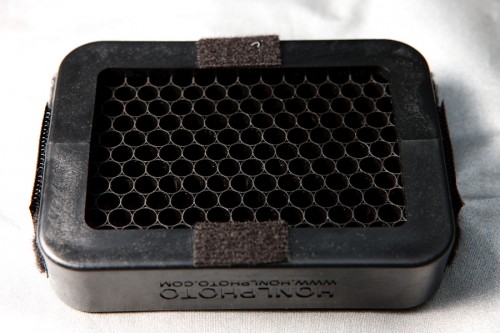
The Honl grid is affordable (I have several), small, and looks like this:

Honl Photo 1/4" Grid

Indispensable for users of off-camera flashes.

(As you may have read here by now, David Honl, the inventor of that range of Honl small flash modifiers, will be my Guest Star in Toronto on Saturday. Don’t miss it if you want to learn Advanced Flash from the pros.)

How did I do this?

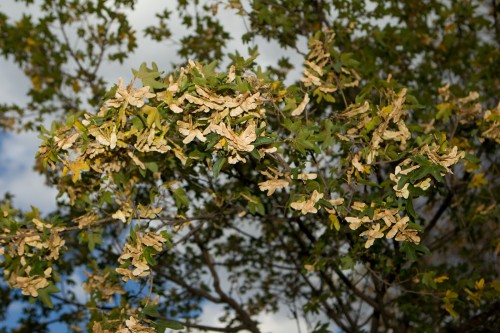
This was taken in bright daylight:

Otherworldly leaves

Otherworldly leaves

This looks otherworldly because:

  • I underexposed the background by two stops
  • I used a wide open aperture of f/4
  • I used a flash

How can I do that on a sunny day? 100 ISO and f/4 gives me 1/2000th second. (If you know the “sunny sixteen rule”, you will see that this is basically just another version of that: after all, f/16 at 1/100 means f/11 at 1/200th and hence f/8 at 1/400th, f/5.6 at 1/800th and f/4 at 1/1600th).

So that is what I set. 100 ISO, f/4 and 1/2000th second.

How, when I was using the flash? You know there is a flash sync speed limit of 1/200th second, depending on your camera’s shutter, right? So how was I able to get to 1/2000th?

Here’s how: I used fast flash. High speed flash/FP flash fires a series of pulses, so the light becomes continuous. Turn it on and you will see you can go to any shutter speed (if the subject is close, since with this technique you do lose power).

High-speed flash is among the many subjects I teach at my Advanced workshops, like the David Honl Special Guest “Advanced Flash” special on Saturday in Toronto, for which I believe there are just a couple of spots left.

Do try this at home

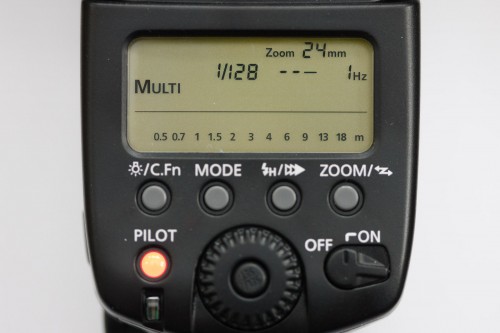
Did you know that if you have a modern sophisticated flash like a Canon 580 EX, you can set it to strobe/repeated flash mode (“Multi”)?

This makes the flash fire a number of subsequent pulses, at a certain frequency, at a certain power level.

To activate this mode on a 580EX, Press the MODE button until MULTI appears; then set power level, number of pulses, and frequency in pulses per second.

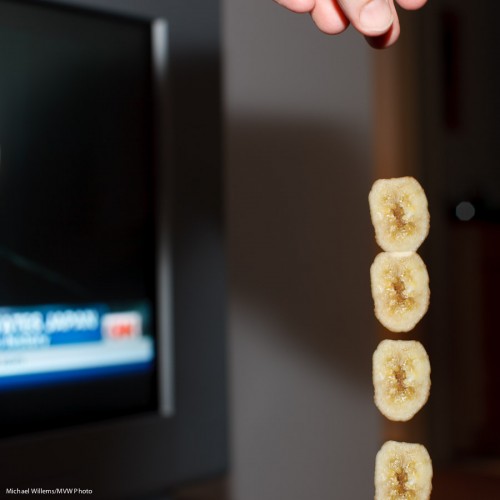
Which then gives you pictures like this, of my hand dropping a slice of dried banana:

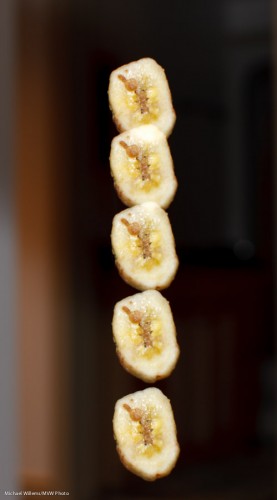
And another version:

Those were taken with the flash set to fire 10 pulses at 50 Hz, each at 1/32nd of full power. The camera was in manual mode.

(You do not even have to meter: look at the back: the flash indicates how far away the subject should be with your chosen flash/aperture and ISO settings!)

Challenge to physics students out there: use this image to estimate the acceleration of gravity, in meters per second squared. Or, if you already know that it is 9.81 meters per second squared, use this to work out the size of the banana)?

This (the flash part, not the physics part!) is among the many subjects I teach at my Advanced workshops, like the David Honl special on Saturday in Toronto., for which I believe there are just a couple of spots left.

Metering Gotcha

A photographer I know well (who shall remain nameless) called me in despair a few days ago.

She was doing some creative flash shots and had set her Nikon remote flash to manual. She was driving it with her pop-up flash. And because the remote flash was on manual, she had to meter. No problem. (Yes, you can set the remote flashes on “manual” while still using wireless flash to drive them!)

A Photographer using remote flashes

A Photographer using remote flashes

Oh. But however she set the flash, using the menus on the LCD control panel on the camera, the Sekonic light meter always indicated the same!

Huh? Was the flash not in fact varying its power in response to her settings?

Looking at the images, it seemed to be – but the meter kept indicating the same. She checked: the on-camera flash was disabled, meaning its light would not contribute to the shot.  So that wasn’t it. Now what?

After trying for an hour and a half, she called me in desperation. What was going on?

Do you know?

Okay, read on. It’s simple – as all these things are, once you know.

  • When you are using wireless flash, the on-camera flash tells the remote flashes what to do.
  • It tells them this using special flashes – binary signals in the form of short light pulses sent out before the mirror is lifted and the shutter opens. A sort of “Morse code instructions to the other flashes”.
  • But this “Morse code” is generated using short pulses of light!
  • The light meter sees these pulses of light, these instructions, and thinks they are the actual flash. So it reads them!
  • And since these pulses are always the same brightness, the meter always indicates the same.

D’oh!

So the solution is equally “simple once you know”:

  1. For a minute, set the remote flashes to manual (rather than “remote” or “slave” mode) using the switch at the back, and fire them using the test button at the back. Vary their power as needed.
  2. When you are happy with the thus achieved light, note down the power value (e.g. “1/16th of full power”).
  3. Then set that power on your camera’s remote menu
  4. ..and now finally, set the flash back to wireless slave mode.

Now you can go ahead and shoot, and every shot is well exposed.

As I said – when you know, it seems simple. But if you did not know the workings of TTL, it would take you forever.

You see, there is method behind the madness: this is exactly why I teach “TTL insides” in my one-time “Advanced Flash” workshop with Special Guest Star David Honl from L.A.- Toronto, 19 March, as you all know by now – a few places left only.

Shooting events

A corporate shoot the other evening, with an assistant/second shooter. A music school shoot all weekend. Many more shoots coming up: lots to do, and lots of fun.

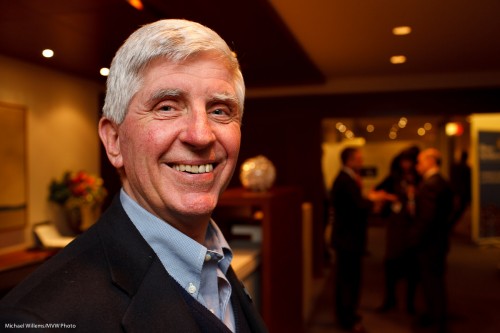
I like shooting indoors events, because with training, it is simple to get consistent results. And as you know, my favourite party lens is the 35mm f/1.4 prime (fixed) lens. It consistently gets you images like this, from the other night:

Event shot, photo Michael Willems

Event shot, photo Michael Willems (35mm prime lens)

I like this style of shooting and it is worth talking for a moment about how this is done.

  • The lens is a 35mm on a full frame camera. On a crop camera, you would use a 24mm lens. Prime lenses are nice and consistent and sharp.
  • The flash is a single 580EX II speedlight, on camera but bounced 45 degrees behind me, slightly to my right to get light onto the subject’s face.
  • The camera mode is manual. It is set to 400 ISO, 1/30th second, f/4. This gives me an ambient exposure of about -2 stops (the meter says “-2” when I look at an average part of the room).
  • The white balance is set to “flash”. That ensures that the subject is natural, but the background, which is lit by tungsten light, is warm.
  • The flash is on TTL.
  • I ensure the subject is close – but not too close. And not right next to the edge.
  • I compose using the rule of thirds – I avoid totally centered subjects here.
  • I look for a background that tells the story (i.e. a corporate cocktail party; people meeting and talking).

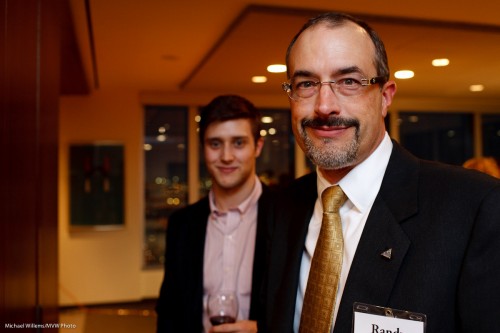
Here’s one more:

Event shot, photo Michael Willems

Event shot, photo Michael Willems

That person blurred in the background helps tell the story.

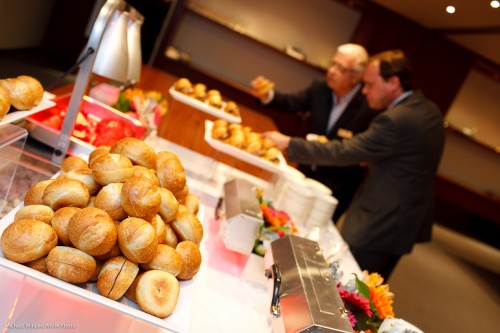
And one more, to inspire you all:

Event shot, photo Michael Willems

Food - always shoot this.

Do not hesitate: you can tilt. You can shoot the food. As an event photographer you probably should not be eating it, but shooting it is OK.

(These, and many other tips and tricks, are part of my special “Michael Willems’s Events Photography” course – soon as a special at Henry’s School of Imaging, as well as here as a one day special: April 3 in Mono, Ontario. Let me know if you are interested. )

Warm up the colour

When the light is very dull and you want to add some quality, you can add a bit of flash outdoors, I am sure you all do this.

But do you also think about colour?

I often add a gel for a little colour. Like in this image:

A family celebrating their late father, Burlington, 2010

Burlington, 2010: A family celebrating their late father and husband

A half CTO gel (CTO means “colour temperature orange”) allowed me to warm up the light on the family here. I use the Honl Photo speed strap and gels: incredibly easy system that has revolutionized small flash use.

Make sure that if you want the effect in the image above, your white balance is set to “flash”.

TIP: If you use a CTO gel and set the white balance to Tungsten (light bulb), the family would look normal – but now the background would turn blue.

(I probably don’t have to mention it again – David Honl himself is joining me as Guest Star in Toronto on March 19, at the School of Imaging, for a special four-hour “advanced flash” course! Book now – there is still some space).

One is a great number.

As you know, for a good flash picture you need many flashes. Or at least several.

False.

Sometimes you want to do it the dramatic way. In that case, the number of flashes is not very important; the location of the flash, however, is.

And the worst possible location is “on your camera”.

So you take your single light source off the camera. If you own a Nikon camera, or a Canon 60D – or the Canon 7D I took this picture with in yesterday’s Canon 7D class in Toronto, it’s simple.

  1. Using your camera’s menu, you make its pop-up flash into the “master” (Canon) or “commander” (Nikon).
  2. Ensure that you disable the “master’s” own flash function: it should only fire commands (“Morse code”) at the remote flash (430EX, 580EX, SB600, SB800, SB900, etc) that you are holding in your left hand…
  3. …which you have set to “slave” (Canon)/”remote” (Nikon) mode.
  4. You then ensure that the cell on the slave flash (on the front of a Canon, on the side of a Nikon) can see the command flashes emitted by the master.

A lot of words. What it means is that with just the right camera and a simple single hand-held flash you can create dramatic side-lit images like this, of a student in last night’s Toronto course:

And this, of another student:

Aren’t those great images? They show, I hope, that you can indeed take interesting images with a single flash aimed straight at your subject. As long as that single flash is not positioned on top of your camera.

About the settings. I set the camera in Manual exposure mode, and I made my settings right to create a dark background – i.e. I wanted to basically see only the flash light in the image.That meant 400 ISO, 1/125th second, f/5.6 on my 50mm f/1.2 lens. Razor sharp and dramatic light.

A note. I just want to remind you all that to learn these and many other advanced techniques, you have one chance to learn from me and, all the way from Los Angeles, my special guest star David Honl (the inventor of the great range of Honl Photo modifiers) on March 19, in Toronto. Just click here to book – in one day, just three weeks away, learn how to use flash, the most exciting light. There is still space, but to be assured of a spot, you need to book now. I promise you will be delighted with what you learn.

One Day Special: Advanced Flash

Good news. The One-Day Only Special “Michael Willems’s Advanced Flash”, with special Guest Star David Honl (yes, the David Honl, the inventor and creator of that great range of small flash modifiers!), is now open for booking.

  • When? March 19. From 11AM until 2:30PM
  • Where? Downtown Toronto, Henry’s School of Imaging flagship location at Church and Queen Streets.
  • What? Check the syllabus at www.cameratraining.ca/Flash-Honl.html
  • How Much? $175

Registration is limited, so go to the Henry’s School of Imaging site today to reserve your space – click here:

www.schoolofimaging.ca/Courses/64044-Advanced-Flash.aspx

Registration is open now and space is limited, so I recommend you book soon if you are interested. In this four-hour workshop in downtown Toronto, you’ll learn a lot about advanced use of flash, and Dave will show you some signature shots made with simple, small flashes that you can also afford.

Not to be missed if you would like to be exert at using small flashes to create professional shots, even when the light is tough.