Misc

Backgrounds and sharpness and white balance: oh my!

I thought I would chat about some of the things that go through my mind when doing a portrait, like this one last night:

Questions like:

  • What camera and lens? In this case, the Canon 7D and a 50mm f/1.4 lens.
  • What settings? Well, manual at 100 ISO, 1/125th second, f/5.6 is my standard start point, as it was here.
  • What lighting setup? In this case, a standard two main lights (softbox main light on camera left, umbrella fill light on camera right) with a snooted hair light behind left, and a gridded gelled background light. Note that while the main lights were monolights, the background light was a small speedlite fired by a pocketwizard through a Flashzebra hotshoe cable.
  • What lighting ratio? In this case pretty flat, but usually more like a 3:1 key:fill ratio.
  • What body position? Usually angled, in this case toward the softbox.
  • What head position? In this case, straight on since the subject wanted it that way.
  • What colour background? In this case I used a blue-green gel from the new Honl Photo “Autumn” colour gel set.
  • What viewpoint? I carefully choose this by moving myself left and right, up and down, until the person looks best to me for the portrait wanted. If in doubt, I take multiple views and choose later.
  • What white balance? I set it to “Flash”, even when shooting RAW, just so I get OK views on the back of the camera.

That’s all there is to a quick snap like this, which took a few minutes – if that.

Eyeball it

You shoot RAW, perhaps (at least I hope you do). That means you need not worry about setting white balance while shooting.

So how do you set white balance in post-production?

Ideally, you include a grey card and use the dropper tool in Lightroom (if that is what you are using) to take a neutral reading off this. But if you do not have a grey card in the photo?

Look at a student who kindly agreed to be the subject of a test picture. One: the original photo

Two: after I take a white balance off the eyeballs:

Three: as a personal preference, since I like warmer light I then always drag the colour temperature slider to a slightly higher temperature (a slightly warmer light):

And hey presto – done.

This is quicker than doing it on the camera, and more accurate, and you do not waste your subject’s time.

Power Travel Tip

And I mean power. Battery power.

What happens if you are travelling to Africa and are not sure how much access you will have to reliable power? How will you charge your batteries?

My tip of the day: bring a small 12V DC to 115V AC power inverter. You can buy these at your local hardware store (Home depot, Canadian Tyre).

Because guess what. You will always have access to, or be driving around in, cars, and these cars have cigarette lighter outputs. You can bring a small inverter like this – small is key, and to charge camera batteries or a PC you need little power. So charge your spare battery while you are driving!

Problem solved.

Tip of the morning

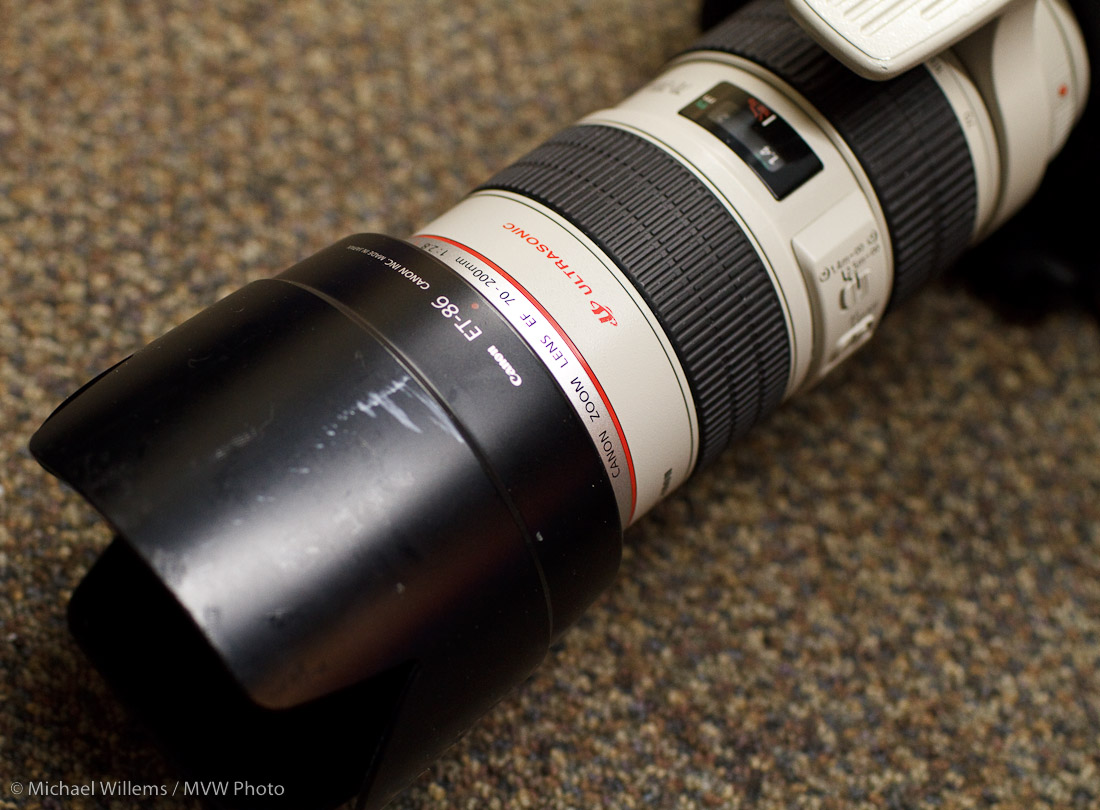
Look at my lens here:

Do you notice two things? Apart from the fact that this is my favourite long lens, the superb 70-200 f/2.8L IS, I mean.

  1. It has a lens hood. Always use the lens hood. Yes, even indoors. It affords protection for both damage and stray light causing “flare”.
  2. The dot is on top, even though Canon would rather I put the dot at the bottom. Why do you put the dot on top? Because it is then obvious if the hood is not on all the way (which would lead to vignetting in the corners).

There you go, another little tip to make you a better photographer – if ever so slightly.

Sim. Pli. Fy.

Here’s a snapshot (of a student the other day, who kindly let me take this image to demonstrate how not to do it):

Not bad.. but look at all the distraction.  This person has doorhandles growing out of his head. A chair growing out of his neck.  This is a typical “Uncle Fred” snapshot.

The solution?

  1. Look. Observe the antennas growing out of heads; the garbage cans in the background. Only after seeing them can you work on removing them.
  2. Move. By moving yourself a few inches you can make a huge difference to your subject’s background. A circle has 360 degrees, not one. And not every shot has to be taken from 5.5 ft above the ground.
  3. Zoom in: “fill the frame”. Get closer.
  4. Blur the background if it is distracting.

And then you get this:

Rather better, no?

ISO to the rescue

A beginners tip, today. About ISO.

All being engineers, you all know that ISO stands for the International Standards Organisation, of course. And you all know that the engineers in Japan chose this term to indicate the camera’s sensitivity setting. You can set the sensitivity of your camera, where more sensitivity means you can take pictures in the dark.

It also means faster shutter speeds. Try this: have someone wave at you indoors and, with your camera set to 100 ISO and with its flash turned off, take a picture. You will see this:

Now set the camera to 1600 ISO.

That means 16 times higher sensitivity (four stops) – which means 16 times shorter shutter speed, as the camera does not need as long to gather the same amount of light; hence 16 times less time for motion blur.

So now you get this:

The price? Noise. More noise, just as when you turn up the radio when you are hearing  a weak signal. The volume will  increase, but so will the noise. In photos, we used to call this “grain”, after the larger silver crystal grains that captured the light on negatives.

But usually, that is a small price to pay if you want to avoid blurry hands.

Best setting for… stadiums

Reader Ray asks about shooting in a stadium. In this case, he will be shooting Monster Jam at the Air Canada Centre.

Whether you are shooting monster trucks or skaters like the young lady below (who is not exactly in a stadium but is in similar light), this kind of shoot is interesting.

Here are some pointers and questions:

  • Are you even allowed in with a long lens? Many venues restrict this.
  • It may seem like there’s lots of light, but if you are shooting action (things move!) you need fast shutter speeds, so your light may still be insufficient. Look through the camera: do you see a shutter speed twice the lens length or more (if 200mm, you want 1/4ooth sec or faster)? Depending on the action you may need much more.
  • So to get this, turn up your ISO as needed. 1600 ISO is not uncommon, although in bright stadiums you may not need to go this high.
  • Use the fastest lens you can get (lowest “F-number”). This is important!
  • Pan with the action (follow the action). When panning, turn your IS/VR off, or to “mode 2” or “Active” if your lens has that.
  • Shoot RAW.
  • White Balance is unimportant when shooting RAW. Still, you may want to set it (e.g. to “Fluorescent”).
  • Use manual exposure mode (“M”) and check the histogram to set it. The light will not vary so you should use manual to ensure that your exposures are consistent. Use evaluative metering. You can start at, say, 1/250th sec at 1600 ISO at f/5.6 and vary from there (you’ll probably need to open up more or, alas, slow down the shutter, if you are using a kit lens).
  • Set your camera to continuous shutter release
  • You may want to use “AI Servo” / “AF-C” continuous focusing if the subjects move to ward you or away from you.
  • And finally: shoot a lot. A lot! You will get some good shots. The better your lens, the more you will get, but even with a less bright lens, you will get some winners if you shoot a lot!
  • Shoot when the subject is “standing still”, e.g. when the truck is at the top of an arc as it jumps.

Using all those guidelines should help!

Also – check out my book, which will be coming out soon, for many such “Quick Recipes”.

Michael

One more "Studio" post

I thought I would add one more picture of the small studio, and how it works.

This consists of:

  • A grey background
  • A main (“key”) light: a Bowens 400 Ws monolight, fired into a Bowens 60×80 softbox.
  • This light is activated through a PocketWizard; all other lights have a photocell that follows this light.
  • A fill light, 250 Ws fired into an umbrella
  • A 100 Ws background light with a yellow gel
  • A 250 Ws hair light with a snoot
  • A stool for the victim to sit on

The camera is set to manual exposure and has a Pocketwizard on it which drives the flashes. Don’t forget to set your camera to manual low ISO, and to check that your exposure time is under the synch speed (e.g. 1/125th second). Then meter for the right light (meter key and fill lights individually).

And this very vanilla setup leads to:

Photographers will know: the biggest challenge is to focus on yourself. That is why we are always hassling people to model for us.

Opus Non Magnum

A word about that Opus studio flash that you saw in that previous picture the other day, at the top:

I have owned nine Opus lights, and seven of them have failed. They are sometimes dead in the box (the nine above do not include the one that was dead when I opened the box). If they do work, they die, or they malfunction later. Seven out of nine – I have never seen worse.

The importer, after I wrote a few times, told me:

It sounds like the equipment you’re using has been discontinued by Opus.
These unit were designed for the “Home User” looking to experiment with strobe lighting with out paying the premium for professional lights.

Meaning what, that failing is OK for home users?

He adds that the lights have a two-year warranty. But having seen so many of these Opus lights die, and having heard many photographers describe Opus catching fire, I cannot recommend them in any way.

For affordable monolights that also offer quality, I can recommend the Bowens lights.