Another poor Facebook decision?

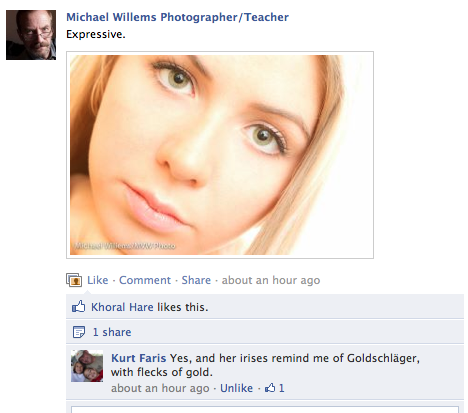
When I post an image on my Facebook page at http://www.facebook.com/cameratraining/ I see what people like, and comment on:

So I see someone “shared” my post. Nice. I’d like to see who, of course; so I click on the link. Now I get this:

Seems very odd that someone is allowed to share my copyrighted picture, but I am not allowed to know who this is.  Doesn’t it? Facebook has some odd “policies”, and it appears this is another one. Photographers, beware.


Facebook revealed

Ha ha – I am not the only person to take issue with what I see as Facebook’s Taliban mentality! Read this, in Gawker:

Inside Facebook’s Outsourced Anti-Porn and Gore Brigade, Where ‘Camel Toes’ are More Offensive Than ‘Crushed Heads’

An interesting read, and it underscores my warning about the excessive power wielded by Facebook.

And about the Taliban nature of their policies. I will tell you what I find obscene: the fact that an implied vagina is deemed worse than crushed heads, deep wounds, and excessive blood. That is sick.


Crop, or not?

There is a decision you need to make both when shooting and later, when cropping in “post”. Namely, how to crop.

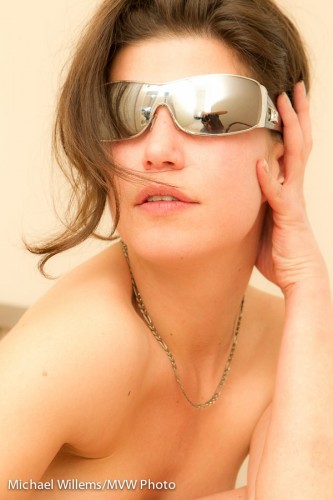
Perhaps you “fill the frame”: often  good technique to add quality to a picture. Yes, you can cut off heads, etc, as in this recent shot of my favourite model:

Or you frame carefully to both include the subject and to exclude the distractions that make an image look amateurish – this, you often do in post. In order to simplify, I cropped out some small distractions in the following set-up shot in post-production in Lightroom:

In both cases, keep one thing in mind: you may want to crop to particular aspect ratios. Like 5×7, or 8×10. In that case if you have shot too close, you cannot print at your selected ratio without losing essential elements.

That is why

  • I sometimes shoot a little wide, so I can crop later.
  • On the other hand, I am not bound to using the aspect rations the frame industry wants me to use.

Your choice – as long as you know what the consequences are!


Panta Rhei

Thought for today: Greek philosopher Anaximander said “Panta Rhei” – everything flows. The river constantly changes: we can never stand in the same river twice. We, too, are like that river. That is why we should be photographed – often, and well. If you are not having proper photos made of yourself and your loved ones, or if you are not doing it yourself: start today. Panta Rhei.


To improve or not to improve?

What I mean by that is: in portraits, do I “photoshop” (usually, “Lightroom”) the images to make people look better? So that everyone can look like Kim, my model here in yesterday’s shoot?

Kim Gorenko (Photo: Michael Willems)

Well, it depends, but in general, my strategy is this.

  • Light well. This is very important… post-production is not needed as much if you light well in the forst place. For smooth skin, soft, straight, bright lighting de-emphasises facial features such as wrinkles.
  • First, I do edit out any temporary issues (like pimples or bruises) with the healing tool.
  • As for permanent issues, I typically do not remove those, but I de-emphasize them (healing tool with, say, 25% opacity).
  • I do a general very slight Clarity decrease (in the Presence section of the Basic pane). Maybe -15. This is a wonderful control, if used well (it decreases contrast in skin tones, using what I imagine is very complex math).
  • Using the HSL pane, I sometimes increase the luminance of red and orange: this de-blotches blotchy skin.
  • And finally, I may consider going to black and white – which is more forgiving. There too, I increase red and orange brightness levels.

So while I shy away from making people into what they are not, I do try to de-emphasize minor blemishes and in general make people look as good as possible.

In the picture above, do you see the photographer – that would be me – and how he is holding his flash?


LR 4 beta…

Lightroom 4 beta has been announced, see the blog here and see the announcement here.

This means we will see Lightroom 4 some time this year – and that is great news. Lightroom is already the best thing since sliced bread – with version 4, that will only get better. Geographical features, movie handling, photo book editing, and much more will make Lightroom the continued choice for pros – and for you. Worth every penny.


Ten Video Tips

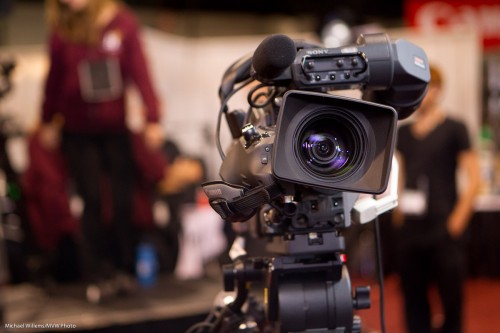
I occasionally shoot video with my DSLRs (7D and 1D Mk4). Not like this, therefore:

Camera (Photo: Michael Willems)

But simpler. And the secret is simplicity!

My top ten video tips:

  1. Shoot clips of ca 10 seconds.
  2. Add a lead-in and lead-out of a second or two to each clip so you can fade in/out
  3. Do not move the camera unnecessarily. The dog breathing is enough motion.
  4. Avoid focusing while shooting. Focus, shoot the clip, done
  5. Use external audio, or at least an external mike.
  6. Use manual exposure if you can, or at least lock exposure during your clip
  7. Avoid zooming in or out unnecessarily, and never zoom in, then out or vice versa.
  8. Use prime lenses.
  9. Shoot a “B-roll”, i.e. supporting clips that show the environment
  10. Start with an “establishing shot”

Try that and your videos get much better!


Why I shoot stills

I am sometimes asked “why don’t you shoot more video? Why stills? Video is much richer, no?”

In my opinion: not necessarily so.

First, there are the practical issues:

  • Video is harder to shoot.
  • You need more equipment (stabilizing rigs, audio systems, focus systems).
  • It is much larger, mening slow to transfer and needing much larger hard disk space.
  • You need much (much) more time to edit.

But there is another reason. Still photos give you time to look.

A video is like a collection if stills where you only get 1/30th second to study each one. A still photo, on the other hand, is something you can ingest, savour, distill, and study.

The need to do this is easily seen in complex photos, like this recent wide angle factory shot:

Food manufacturing facility (Photo: Michael Willems)

But the same is true for every photo. Even a simple portrait (of Courtney, my recent assistant, during a recent Sheridan College course I taught) can make you look, and look again; work out the story; get to the person in a way video cannot easily do.

Courtney Craig (Photo: Michael Willems)

Video chews it all for you; stills make you do some of the work.

My analogy: looking at stills is more like reading a book instead of watching the movie. And I like reading books.

 

Photograph your life this month!

Life is short, and precious; and photography is the one way we can commit today’s image, today’s person, to eternity. No-one can ever take today’s “you” away once you have a photo!

So I urge you to take pictures – all the time. Learn to do it well (hint: I and many others can help).

And to have professional pictures taken, while you learn to do it yourself. Like this, from a recent family shoot:

How many of you have pictures like that of yourself?

This holiday season may be a good opportunity! If Santa gives you a new camera, ten hers is my assignment:

  • Spend the week before New Year’s Eve practicing;
  • Read this blog and search it;
  • And then on New Year’s Eve, photograph your entire family.

That way you will have those memories forever.