Grain

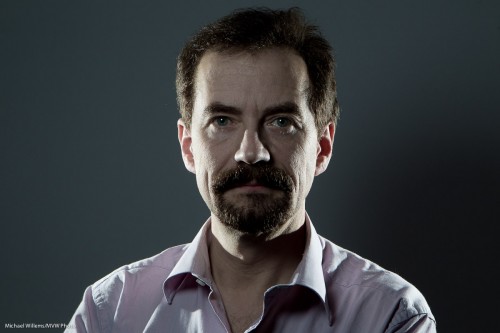
I recently, while preparing for a commercial shoot, took a few self-portraits. Including this one:
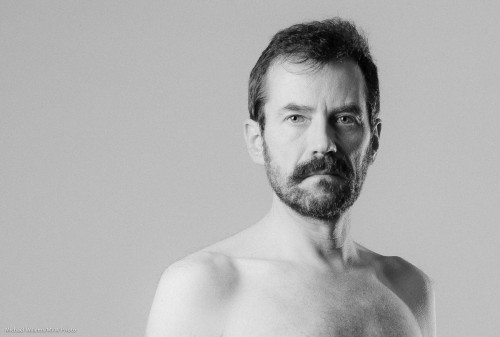
Michael Willems, Photogrpaher (self portrait, December 2010)

Michael Willems, Photographer (self portrait)

As always, click to see it large. (You really do need to see this one at original size to see the full effect.)

To do a portrait like this, I did the following – and I thought it might be useful for me to share the thought process:

  • I decided I wanted black and white, and to shoot it that way.
  • I set up the right studio lighting. I used a softbox on camera left; an edge light on camera right at the back; and a fill light using an umbrella on camera right in front.
  • I metered for these lights, with a fairly high key:fill ratio. In other words, I wanted the less-lit part of my face to be much less lit. To get this, I set the fill light around three stops darker than the main light.
  • That in turn allowed me to set up an edge light, to show the contours of my face.
  • I set up a white background.
  • I positioned myself at a distance from the background that would ensure a grey (rather than black or white) background.
  • I set up the main light, in a softbox, such that I would get nice catch lights in my eyes.
  • I pre-focused (on a chair), then set the camera to manual, and then used the camera’s timer to take the shot.
  • I used a horizontal layout, to create enough “negative space”, by using the rule of thirds (i.e I did not put myself in the “Uncle Fred” position right in the middle).

Finally, in post-production I added some film grain. This is one of Lightroom 3’s Develop module’s “Effects”, and it is one I really like. Tri-X film, anyone?

I am about to set up the same setups for Saturday’s workshop. Deciding on lighting is a photographer’s major job!
Workshop Weekend

This past weekend was Workshop Weekend in Mono.

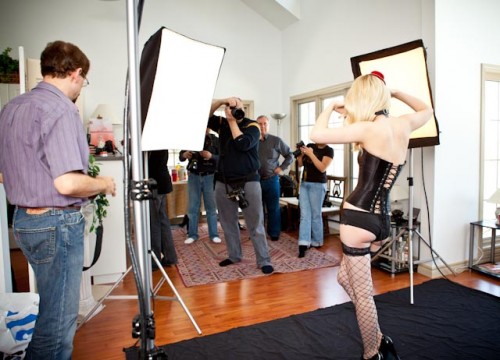
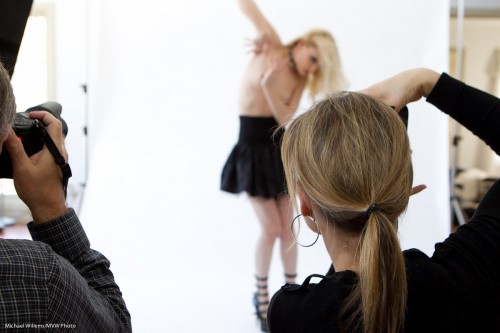
As you know, Saturday was “The Art of shooting Nudes” with Joseph Marranca. A group of students learned about theory and practice of this timeless type of photography:

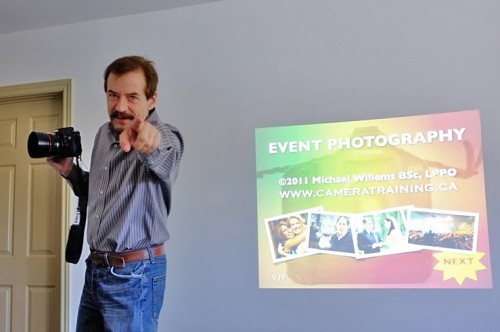
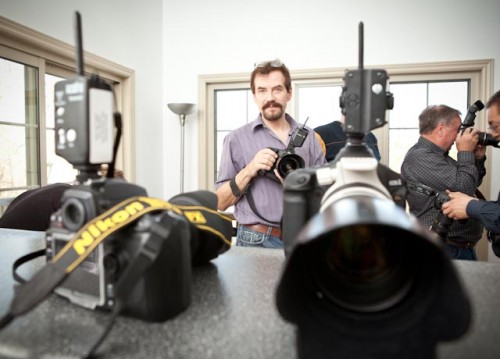
Sunday’s workshop was “Michael Willems’s Event Photography” – watch for this as a series of forthcoming specials at Henry’s School of Imaging, as well.

(Photo courtesy of Albert Wong and his sexy new camera – the Fuji X100 – I need one!)

Remember yesterday’s moody dark shot? Here’s how we took it:


Now, on to events.

When you shoot events, you need to be ready for anything, for three reasons:

  1. Events are, by definition, not under your control.
  2. There are no retakes.
  3. You may in the course of one event be called upon to shoot product, “grip and grins”, photojournalism, portraits, and fashion.

That means events can be very stressful. There is never enough light, time or space.

The secret to overcoming this? You remove the stress by preparing well. You do this in the following ways:

  1. Commercial preparation (Do you know the objective of the shoot? Names of important people? Phone number of your client?)
  2. Pre-shoot and location preparation. (Have you scoped out the location? Can you park? Do you have enough gas in the car?)
  3. Equipment choice and preparation (Do you have the right lenses? Enough spare batteries? Spares for all equipment, too?)

Tip 1 for today: make check lists. You should make three check lists: a preparation checklist, an equipment checklist, and a shoot checklist. These are individualized, and different per shoot type. And you should really make these, and fill them in when you prepare for, and do, a shoot.

Tip 2 for today: make sure you know the names of all the important people you must photograph. Verify these on paper. Name and why they are important. (E.g. “Mr Frank Smith, Uncle of Bride”, or “Ms Melody McGroom, CFO of the holding company”). This will make your life as an event shooter easier.

Tip 3 for today: shoot indoors flash in manual mode. Set the exposure to -2 stops indicated on the meter, then try a test shot. Aim your flash behind you and bounce off walls and ceilings.

(Photo: Michelle Bobechko)


Off to sleep, now. More tips in the next days, as always. Do read the June 2011 issue of Photo Life, Canada’s best photography magazine, for an article on Event Photography, with “10 problems, 20 solutions”.

A product shot or two

Today I taught Merav, a student, a few product photography tricks. Perhaps I can share one or two insights here and take you through how to do this.

The brief was: shoot some products using simple means. “Simple” to me means speedlights (bad knee – don’t ask). So the setup I decided on was simple: a table, a white cover, and the product. The white wall serves as a backdrop.

And the lights?

  • We used one main light, a 580EX flash controlled through a Pocketwizard, through an umbrella. (A Flashzebra cable was used to connect the Pocketwizard to the SB-900 flash).
  • The fill light was simply a reflector. Held in place with a stand.
  • We lit the wall behind the product with a Nikon SB-900 flash in SU-4 mode.

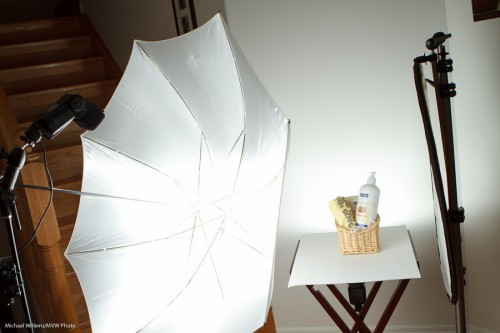
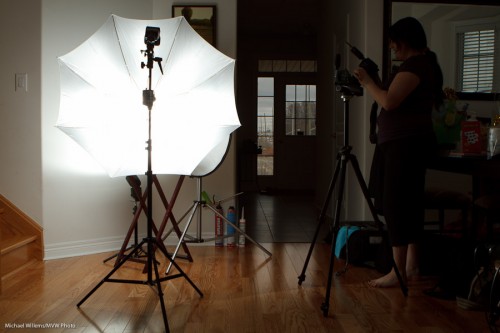
The setup was thus:


You can make out the background flash behind the product.

  • You first set the camera to f/8, 1/125th sec, 100 ISO.This means the ambient light does little or no work, just the way you want it.
  • Then try the main flash at, say, 1/4 power. Meter using a light meter set to flash mode, 100 ISO and 1/1/25th second.
  • The light meter showed a close-enough value (f/6.3). Moving the main light closer made it f/8.
  • The reflector was just moved closer to make the light nice.
  • The background light was set at 1/8th power, so the background blew out completely (but only just). A bit of trial and error and the “blinkies” on the camera LCD display was enough to get this done: no metering was needed.

Bingo, end of setup.

  • Now make sure every product is the same distance away (even an inch farther = darker!)
  • Focus carefully, using one focus spot.
  • Use a tripod to ensure all images will have the same layout.
  • Do not forget to minimize distortion by using a long-ish lens (70mm on a crop camera, in this case).

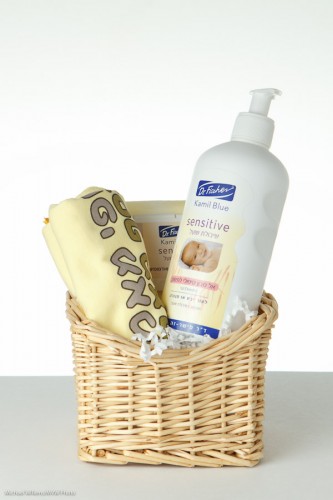
The resulting shots looked like this:

Easy, and portable. And it can all be done in a living room:

If you have never done product photography, please give it a go. It is fun and rewarding.

The One Minute Portrait

Today, my friend Steve at the car dealership asked me to do a quick headshot snap of his managing director.

No time to think: right now!

Never to be one to shy away from a challenge, I quickly did the following:

  1. Move to the available backdrop with corporate logo.
  2. I used my Canon 1Ds MkIII with a fast prime lens, the Canon 50mm f/1.2L.
  3. Quickly, as we walked to the backdrop I put a flash on it: a 580EX II speedlight.
  4. Looking around, I saw a white ceiling above me so I knew I could bounce the flash off that ceiling.
  5. I ensured I bounced the flash 45 degrees up behind me, so that the light would come from “in front” of the subject. At a slight angle to my left, so as to aim light onto his face straight on from a 45 degree up-angle. Now this is important. If I had aimed up, or even worse, in front of me (a classical beginner’s mistake!), then this gentleman would have had raccoon eyes, reflective glasses, and a shiny head. If I had aimed straight behind me I would have had “broad lighting”: also not what I wanted.
  6. To mix a bit of ambient light, I set my camera to manual, and selected 1/100th second at f/2.2 at 100 ISO. I did a test shot.
  7. I found that this mixed too many different colours for my liking (flash and tungsten and fluorescent), so I decided to go “flash only”. To do that, I selected 1/250th second at f/4.0 at 100 ISO. That made sure no ambient light took part: the light was all flash. The open aperture at f/4.0 gives me that beautiful bokeh: the creamy softness of the background.
  8. I used TTL (through-the-lens automatic) flash metering, and in view of the white background, I selected a flash exposure compensation (“FEC”) setting of +1 stop.
  9. I positioned the subject at a slight angle.
  10. Now I did my second shot. Checked it on the back. Bingo, all good. Catchlight, check. Sharp, check. Exposure, check. Loved it. Took a few more just for safety’s sake.

That is ten steps in less than one minute. As an event and news photographer, I have to be quick. “Hang on while I think” is never acceptable when photographing executives.

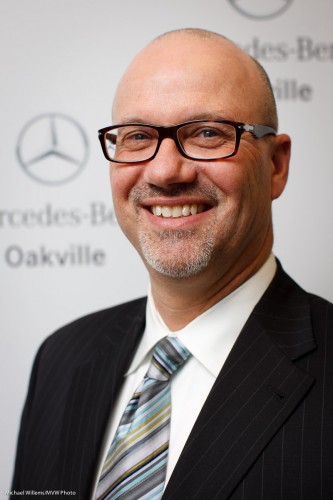
The result is below, and I think you will agree it is a shot that, especially when you click through to see it at original size (you like sharp? I give you sharp!) cannot easily be distinguished from a studio shot.(I really encourage you to click though a few times until you have the full size pic, then view it at full size).

Managing Director Mark LeRoeye

Managing Director Mark LeRoeye

All that in one minute!

If I had had time? I might have tried softboxes, a longer lens, and even more different angles. But I would have produced roughly the same. As a photographer, I need to be able to think on my feet. As you will have to – so my advice: practice a lot, until these things become automatic.

Just like in flying airplanes, where engine failure automatically results in the pilot going through a sequence like “trim up – turn with wind – look for field – check fuel switch – check primer locked – check main switch on – mags left/both/right/both – carb heat on – mixture rich – check oil T&P – check fuel sufficient – line up – use flaps if needed – brief passengers – radio mayday – main switch off”. No more complex, and no less complex, than what I did for this shot.

Practice makes perfect, they say. In photography, practice makes consistent.

Cheer for an old tool

…where “old” does not mean “outdated”.

I am talking about the light meter.

Some of you may think this is a tool that rusty old photographers used to use in the 1960s.

Not so. Modern, cool, young photographers like me (you are as young as you feel) use them too – every day.

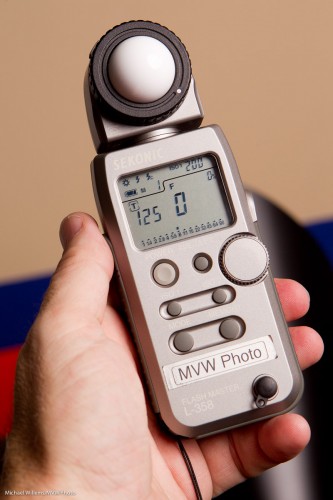
The light meter is different from the light meter built into your camera:

  • Unlike that camera meter, it is not a reflective light meter, but an incident light meter. It measures light falling onto your subject. Unlike your camera, which measures light reflected from the subject. So for the camera, the subject affects the measurement. A dark subject will reflect less, a light subject, more. So the camera will expose a dark-skinned person in a black suit differently from a light-skinned person in a white suit. And that is wrong: the camera should not care about the subject. Light is light. (Yes, true: keeping the exposure constant means that a dark subject will look darker than a light subject. But hey – that is exactly the way it should be!)
  • Also, the modern light meter is a flash meter as well. It reads the bright pulses of light emanating from a strobe (or a speedlight set to manual). Which is exactly what the photographer uses it for.
  • It is more accurate, sensitive, and quantitative. It can read light in stops or EV (exposure values), and it can read up to tenth of stops.

If you have never used a light meter, I urge you to start. When you shoot portraits, you have little choice, but even for outdoors light, and especially for mixed light, a meter will make your images’ exposure guaranteed good.

Use your mter as follows:

  1. Set the meter to the right mode (Flash, or ambient);
  2. Set the ISO to your camera’s ISO;
  3. Set the shutter speed to your camera’s shutter speed (e.g. 1/125th sec);
  4. Press the reset button, so the aperture displayed is zero;
  5. Hold the meter where your subject will be;
  6. Fire the flash;
  7. Read the value;
  8. Set that value on your camera.

You will not look back, once you get the hang of this excellent tool!

The importance of being hairlit

Portraits look better when a bit of kick is added. An edge light, or a hair light.

The following two shots, straight out of the camera and unedited, from Tuesday’s executive shoot in Toronto, service to illustrate this point quite well:

Without hair light:

And with a hair light:

The hair light is 1-2 stops overexposed. It is provided by an assistant holding a light stand with a snoot, aimed from behind at the person – and aimed carefully, or bad shadows will result.

Here is one more sample, from the same business shoot:

You see how well that shine works?

More on this in the Henry’s workshops I teach and in the Mono workshops: three more, on 2, 3 and 23 April. If you have always wanted to come on one, then act fast: these will be the last ones ever in Mono, so book now!

Since you asked…

Since some of you asked: a few more things about that type of flash portrait I talked about yesterday (and that David Honl and I showed some of you during Saturday’s workshop):

Photographer Michael Willems

Photographer Michael Willems, Self-portrait

Here’s how this shot was made:

  • It is lit with two speedlights with a grid (left and right)
  • …as well as a speedlight above and slightly off-centre in front, equipped with a Traveller 8 softbox.
  • I fired all three flashes with Pocketwizards.
  • The camera was set to my standard studio settings of 100 ISO, 1/125th sec, f/8.
  • Side lights have a grid fitted, and are overexposed by about a stop.
  • The fill light is underexposed by about a stop.
  • To achieve this, side lights were set to 1/16nd power.
  • And the front light to 1/32nd power. Why? They are all about the same distance away – why so high? Surely that should be lower, like 1/128th power? Ah – no. The softbox loses you a stop or more, so you need to increase power to compensate for that.
  • TIP: the flash in the softbox should have its “wide” adapter out.

This is done in my case by trial and error and experience, but you can of course meter the lights to get really accurate settings.

How did I manage to focus on myself? I focused on a light stand, then set focus to manual and used the 10 second self timer and while it was counting down, moved myself where the stand was.

Finally: in “post”, I used the HSL “saturation” setting to decrease orange saturation somewhat. That makes this into a “desat” portrait.

And now I am already preparing for the next few workshops: “The Art of Photographing Nudes” with Joseph Marranca on April 2, “Shooting Events” on April 3, and the last Mono workshop, “Advanced Creative Lighting”, also with Joseph, in Mono on April 23. Booking is open for all three, and they are all strictly limited in numbers.


Lunch time!

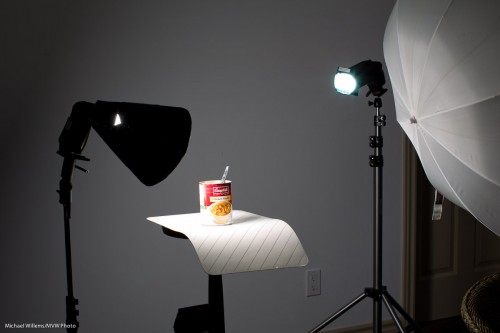
And when you are a photographer like me, you may take that as a photo op. I cannot even look at a can of soup without thinking “Hmmmmm….”. In terms of photos.

And that leads to this quick setup:

The remainder of lunch about to be photographed with speedlights (Photo: Michael Willems)

The remainder of lunch about to be photographed

That setup was a TTL setup, to save me time. (Connecting Pocketwizards and so on would take a few minutes. Hey, I was hungry – what can I say).

I have, here:

  • Main light, on our left, a 430 EX II speedlight with a Honl Photo Speed Snoot
  • Edge light, a second 430 EX speedlight with a Honl Photo Speed Snoot and a blue/green gel.
  • The umbrella is merely being used as a reflector, to fill in the right a little.
  • A striped place mat for the subject to sit on.
  • A wall, far enough away to be dark, as background.

The camera is a 1D Mark IV with a 580EX II speedlight on it.

And that gives me…:

Lunch, lit with speedlights in wireless TTL mode (photo: Michael Willems)

Lunch, lit with speedlights in wireless TTL mode

So now to bed quickly: I am teaching “Advanced Flash” with Guest Star David Honl (yes, that David Honl) today Saturday 11am-3:30pm in Toronto.

How did I do this?

This was taken in bright daylight:

Otherworldly leaves

Otherworldly leaves

This looks otherworldly because:

  • I underexposed the background by two stops
  • I used a wide open aperture of f/4
  • I used a flash

How can I do that on a sunny day? 100 ISO and f/4 gives me 1/2000th second. (If you know the “sunny sixteen rule”, you will see that this is basically just another version of that: after all, f/16 at 1/100 means f/11 at 1/200th and hence f/8 at 1/400th, f/5.6 at 1/800th and f/4 at 1/1600th).

So that is what I set. 100 ISO, f/4 and 1/2000th second.

How, when I was using the flash? You know there is a flash sync speed limit of 1/200th second, depending on your camera’s shutter, right? So how was I able to get to 1/2000th?

Here’s how: I used fast flash. High speed flash/FP flash fires a series of pulses, so the light becomes continuous. Turn it on and you will see you can go to any shutter speed (if the subject is close, since with this technique you do lose power).

High-speed flash is among the many subjects I teach at my Advanced workshops, like the David Honl Special Guest “Advanced Flash” special on Saturday in Toronto, for which I believe there are just a couple of spots left.

Another tip

One more beginners’ tip today for my readers. (The term “my readers”, it occurs to me, makes me sound a little like col. Qaddafi. whose Green Book I read when I worked in Libya for around a year, a few decades ago).

Anyway. I often see that my images are really, really sharp where others’ are often not quite as sharp. So how do you make your images sharp? I have written about this before, see here, among others. Operation, light, settings, and good (prime, or quality) lenses all come into this.

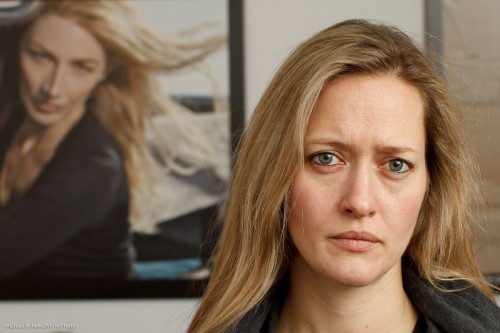
A student, photographed by Michael Willems.

Student Volunteer, photo Michael Willems. Canon 7D, f/5.6, 400 ISO, 1/125th sec.

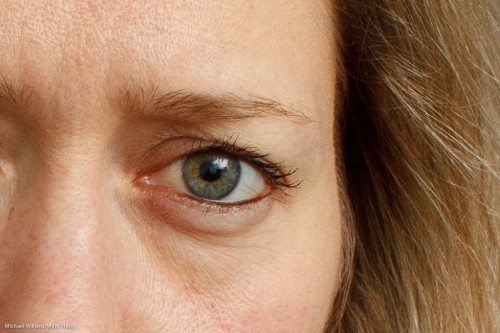
When you show that image large (original size), you see it’s sharp.

A student, photographed by Michael Willems. Detail.

Student Volunteer, photo Michael Willems. (Detail).

But today a quick tip about errors I see people make frequently.

Whenever I see people whose images, in spite of good lenses and the right settings, are not as sharp as mine, and when I then watch their technique, I often see these mistakes:

  1. People jam down on the shutter. I hear a beep, and a millisecond later, the click. This means the shooter is not giving himself or herself enough time to verify that focus was achieved on the right object. Instead, you should aim, press half way down, wait for the beep, then wait, and only once you have ensured the focus point activated properly where you wanted it, push down.
  2. The shooter leaves the beep off. This means no confirmation of focus unless you look away from the subject… bad.
  3. The shooter beeps and waits correctly – but then moves forward or backward before pushing down. Even a slight backward or forward movement shifts focus!

Watch yourself carefully when you shoot. If you discover that you are making any of the above mistakes, this will affect your sharp focus.

And that would be a shame. My people deserve sharp focus!