Kiss kiss.

Another message I iterate often is the need to keep it simple.

A good photo is often distinguished by its simplicity. Everything in the photo is there for a reason – or it’s not there.

Simple can be achieved by:

  1. Filling the frame (zooming in or stepping closer)
  2. Changing your viewpoint
  3. Blurring the background
  4. Moving things or people.

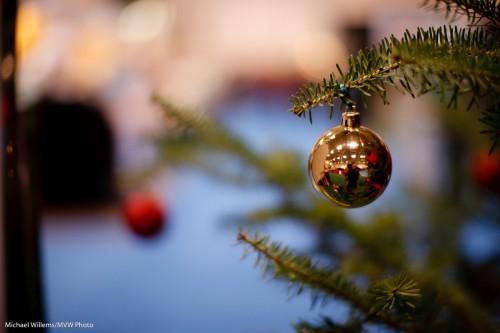
An example of blurring and subsequent cropping:

Before:

Tree and ball

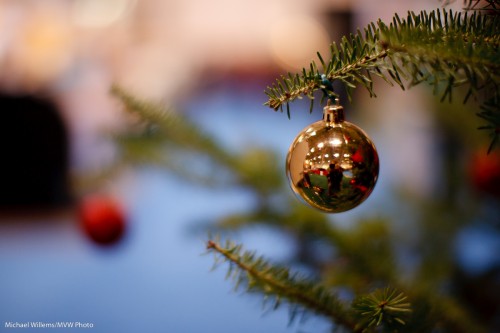
And after:

Tree and ball

As you see, a simple crop makes the picture better. The crop tool in Lightroom should be your best friend! An even tighter crop would be even better, I bet.

View the picture at full size and you can see me taking the shot.

Club Hassles!

My esteemed son asks:

So tomorrow I need to shoot pictures in a club. I’m assuming my 17 – 85 f/4 – 5.6 IS won’t be much use? And I should just stick to the 50 f/1.8? There are no ceilings less than at least 10 meters, so nothing to bounce flash off of, but occasionally there may be a wall behind me.

Any other advice?

The life of a student is tough. No seriously – it is. I remember.

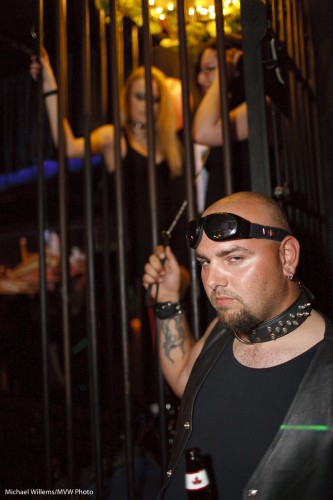
So OK, to the shoot. I often have to shoot clubs at crazy settings like 1600 ISO, f/1.4, 1/15th of a second. Clubs are dark!

The following example was shot at 1600 ISO, 1/30th second, f/1.6:

Club scene, well lit

Club scene, well lit

There are two things you need to do:

  1. Light the background
  2. Light the subject

Number 1 you do by using:

  • a high enough ISO (do not be afraid to shoot at 800 or 1600 ISO),
  • large aperture (the larger the better…), and
  • slow shutter (1/15th with a wide lens, 1/30th with a somewhat wide lens, maybe 1/60th with a longer lens).

Important technique to find the right settings for the background: You aim to see the background -2 stops from normal (i.e. you are on MANUAL, of course, and you adjust until the meter points to -2 when pointed at an average part of the room).

Number 2 you do by:

  • Bouncing your flash off the ceiling (at 1600 ISO this is easily doable), or
  • Using a Fong Lightsphere; or
  • Using a Honl bounce card (or even the two together, bounce card behind a light sphere: I’ve done it!)
  • Using an improvised paper bounce card

..or even by using straight on flash, but use flash compensation, say to -2 stops.

Now for you. Of course you need a wider lens (for club shots, 24mm on your camera, ie 35mm real, is ideal). But you also need a fast lens.

  • So I would first try your standard lens at 800 or 1600 ISO – wide open, i.e. at f/3,5 – and with IS you can use 1/15th second. See what that does. Where does the meter point? Anywhere near -2?
  • If that does not do the job then yes, go prime and since your prime is long, step back farther-  that will be the challenge. 50 will give you a head shots but in clubs you want to see, the, um, area below the head too. And two or three people in a shot, not just one. So find an area where you can step back.

Is that any help? Not just for my son but for all of you who have to shoot in dark clubs and so on?

Outside flash

As a result of yesterday’s shoot, reader Franklin asked:

Michael, I often use my flash for outdoor portraits.  Since I don’t have anywhere to bounce the flash, I often point it straight at my subject.  In many cases, I end up having to deal with the oily, overexposed skin highlights mentioned in your previous post.  Any tips you could offer to create soft, natural looking skin tone would be greatly appreciated.

Great question. Yes, outdoors flash can be challenging, so here are my tips.

  • First, outdoors you can sometimes bounce. A wall, for instance, can provide a wonderful soft ounce area. If possible, try that first. (A Gary Fong Lightsphere may make this easier if there are some small things that light could bounce off. Like people, trees, a car, a fridge, you name it. The Fong Lightsphere throws light everywhere so it sometimes works.)
  • Second: next, try to soften the light. I often use a Honl Photo Traveller 8 softbox for this. Sometimes a Honl bounce card.
  • Third: the direction of the light is important. One reason outdoor flash can look unnatural is that the flash is shooting from where the camera is. If you can take it off the camera, using an off-camera flash cord like the ones of Flashzebra.com, you will get much more natural light. Shoot with the light coming from above (even a foot), and at an angle.
  • Fourth: I often add some colour, like a quarter CTO or half CTO filter, to warm up the flash. This removes much of the objective (see yesterday’s picture).
  • Finally: it is allowed, even a good thing, to shoot with direct flash outside. And Photoshop or Lightroom can help remove the nasty skin highlights. Sometimes this is just the price you pay!

I hope that helps!

Reader post

Joel, a reader who came on a recent Creative Urban Photography walk with me, says the following – and I thought it worth it posting this today, to emphasise what I have said before:

Just circling back after the Urban Photography walk in Oakville that I did with you and the group on Oct. 23rd.
Despite the rain, it was a nice blend of technique and discussion.  I putzed around after we wrapped up down by the waterfront.

I had been on the fence about purchasing a flash after the Henrys show, but spending an afternoon with the Speedlighter had me sold.   Your quick demo about flash compensation and CTO was enough to push me over the edge.

[…for Canon users: Joel then points out there are cheap deals on for the 430EX: price match the Adens Camera offer at $274.99. I believe Henry’s also has a great offer on this flash…MW]

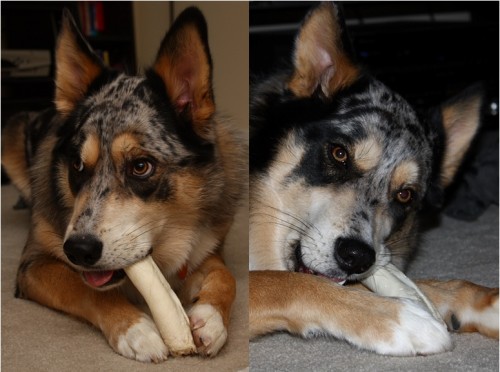
Not that you need any proof yourself, but I took a quick comparison shot (attached) to bring back to the camera guys here at work.  Images are unedited (but very compressed).  Left side is bounced behind me with the 430, right side is standard pop up flash.  Both shot at ISO 100 in my poorly lit living room at night.  Very happy with it and excited to learn more.  Keep posting on your speedlighter site – lots of good advice…

Thanks, Joel. Here’s your two shots:

Bounced vs Straight

Bounced vs Straight

(Click to see them larger).

As you can see,

  • The bounced shot is much warmer (note, if due to wall colour it is too warm, this is easily adjusted with one little tweak in Lightroom).
  • Its shadows are softer. Look at the dog on the right and at the annoying shadow on our right.
  • Its background is not inky black, unlike the direct image’s background.
  • The catch lights are more natural (the straight image has an unnatural looking tiny catch light right in the centre of the pupil; the bounced image has a much more natural looking and much more naturally positioned catch light).
  • The dog looks more natural in the left image. On people, this would be even more dramatic: the right image would have oily, overexposed skin highlights. The dog’s hair helps shield us from this.

Images like this are taken as follows:

  1. Attach the flash to the camera.
  2. Turn it on, and ensuring it is set to TTL mode (its default).
  3. Use program mode on the camera; or manual (preferred for more advanced users) or even “night portrait” mode.
  4. Turn the head so it points 45 degrees upward behind you.
  5. Shoot!

Joel adds, in a follow-up email:

Camera is Canon XSi.  Standard Kit Lens 18-55 EF-S. I’ve never seen this level of detail out of my equipment before.  It was so sharp that when zoomed in, you can see my kitchen in his eye.  Like you said – ‘A bright pixel is a sharp pixel’  J

Exactly. That is Willems’s Dictum: “Bright Pixels are sharp pixels”. Noise, grain, cockroaches and bedbugs all hide in the dark areas.

All this is subject of my next November 20 all-day course (see www.cameratraining.ca) – you will learn these techniques and many more, and go home with some great portfolio shots using a professional model.

Speed lit

Since this blog is called “speedlighter”, and I kind of specialize in lighting, I thought I might do a quick post on quick lighting.

Today, I had a student shoot me, and her dog, using one studio light (a 400 Ws Bowens light). To do this you need to do the following:

  1. Set up a light on a stand;
  2. Add an umbrella;
  3. Shoot near a wall which acts as the reflector (that is why one light is enough!);
  4. Connect the light to the camera using, for example, a cable;
  5. A light meter to measure light and hence to help you set the flash’s power;
  6. Set your camera to f/8, 1/125th second, 100 or 200 ISO;
  7. Now meter to that (i.e. adjust the light until the meter read f/8).

The first test shot should be without flash, and should be black.

Then, connect the flash cable and shoot:

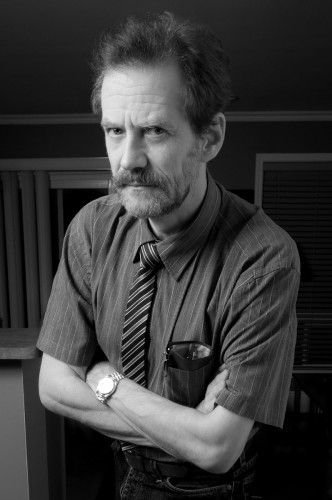
Michael Willems

Michael Willems

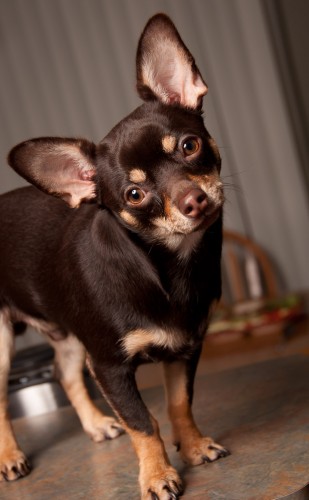
And then, after that test shot, the object of tonight’s shoot, which was not me, alas:

Duke Dog

Duke Dog

Cute, eh?

Note the simple composition, blurred background, the excellent composition and tilt (see Friday’s post), and note the catchlight from the umbrella in Duke’s eyes. (If we had shot through an umbrella, the catchlight would be even more simple, round).

Flash method

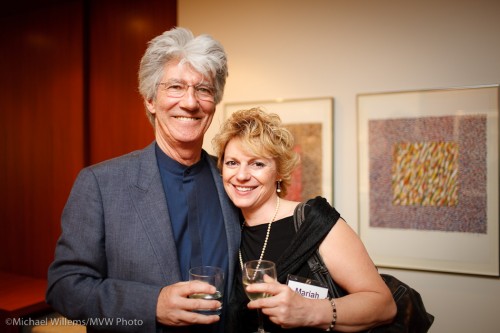
Let me reiterate a simple flash method for camera-aware (i.e. “grip-and-grin”) people pictures at events (like receptions, parties, etc).

  1. Set your camera to “manual”.
  2. Attach your flash.
  3. Bounce your flash off the ceiling or wall just behind you if you can. If you cannot do this, use a reflector (like a Honl reflector) or worst case a Fong sphere. Think about where you bounce in terms of returned light direction.
  4. Use a wider angle lens (say 35mm). I love my 35mm prime on the 1Ds for this type of photo.
  5. Start at these settings: 400 ISO, 1/30th second, f/4
  6. With those settings, aim at an average part of the room (not dark, not light). Watch your light meter. It should read roughly -2 stops. If it reads more, like zero stops, go to a faster speed. If it reads less, go to a wider aperture (and if you cannot then a higher ISO or even a slow speed).

The result will be good.

Grip and grin

Grip and grin

Note that you may, in dark environments, have to go to slow speed and wide open aperture even at high ISO.Watch the light meter and aim for -2 stops ambient light when aimed at an average room area. In a dark night club I may occasionally be shooting at f/1.4, 1/15th second, 1600 ISO!

Accountants of the wild frontier

Today was a good example of n event shoot.

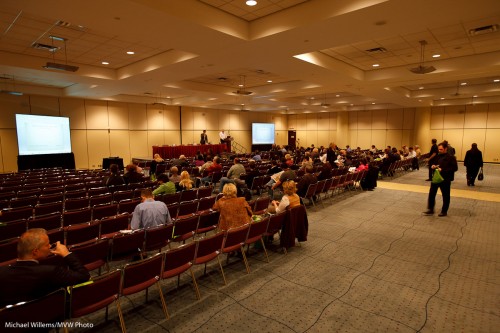
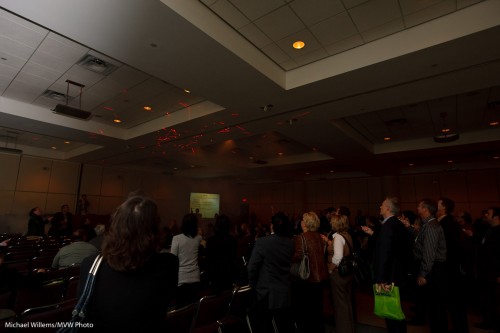
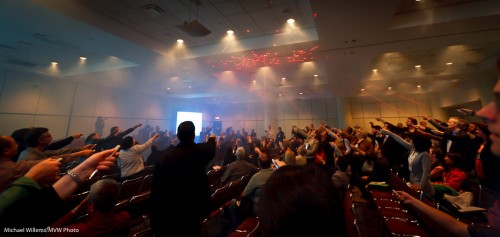
Colleague Joseph and I got to the Metro Toronto Convention centre to shoot a few hundred accountants pointing laser pointers at the ceiling. A very un-accountant-like event!

So we set up ladders and camera with the light just right. We use a combination of ambient and gobo’d flash. Test shots of the room looked like this:

Convention hall

Convention hall

The event starts. And as the fog machine we had arranged starts and on command, the accountants’ laser pointers aim… unexpectedly, someone dims the lights to just about zero.

So we get this:

Convention hall

Convention hall, lights dimmed

No time to say anything: we only have moments to shoot.

So I quickly had to:

  • open up the lens to f/2.8,
  • shoot at 1/15th second,
  • at 800 ISO,
  • I quickly set the flash to 1/16th power manual and bounced behind me (if I had had more time I would have gone up to 1/8th power),
  • ….and then at home, push the exposure another stop!

In the end, this gives this:

Convention hall with lasering accountants

Convention hall with lasering accountants

Not too shabby eh? Ever seen such a fun group of accountants?

The moral of this post: you have to be quick on your feet and problem-solved instantly when someone is hiring you for a shoot. You cannot come home with excuses: need photos instead.

And it never hurts to shoot RAW.

Side lighting

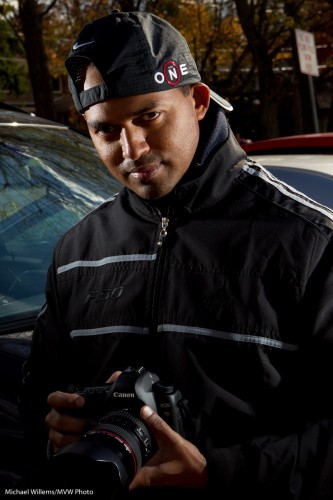
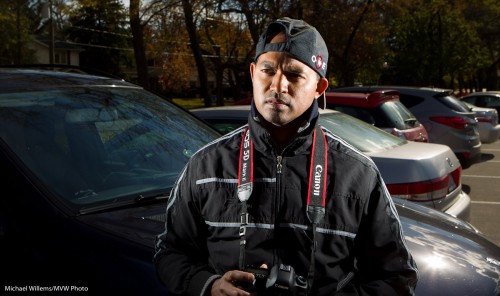
Look at this picture, of a photographer student I shall call “Rapper MA” (although he is not a rapper of course – it is just the look and the light and the hat!):

Edge-lit Photographer (Photo: Michael Willems)

Edge-lit Photographer

This was made in bright sunny daylight.

How did I light it?

  • Camera on manual
  • 100 ISO, 1/160th second.
  • Now set aperture to expose for the background. In this case f/13.
  • Use two flashes, left and right, slightly behind the subject.
  • Flashes on stands, aimed at subject.
  • Connected to Pocketwizards via Flashzebra cables.
  • Pocketwizard on the camera.
  • Set power to that aperture (using the light meter). Adjust shutter/aperture as needed.

That’s how.

Here’s one more illustration with a bit more background:

Edge-lit Photographer (Photo: Michael Willems)

Edge-lit Photographer

Small speedlites can overpower the sun. That is why this site is called “speedlighter”. Have fun with your speedlights!

Meter the light

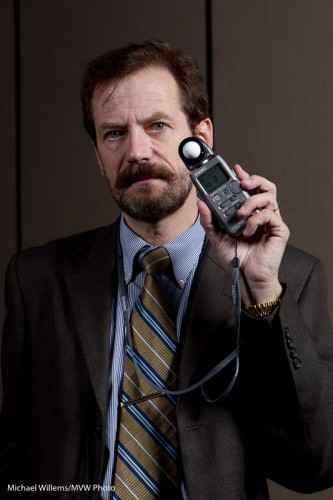
You know how in 1970 photographers always used to use light meters?

Like this one, in a pic from the recent photo show:
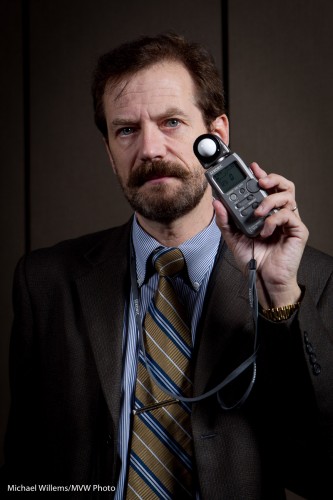
Michael Willems holding a light meter

Michael Willems holding a light meter

Yes that is right: I am using a light meter. In 2010. And like most working photographers, I use one often.

Why?

Here’s why.

1. Type of meter. The light meter built into your camera is a reflective meter. It meters light that is reflected off the subject.  So if the subject is dark you might get a long exposure time (little light is reflected off it, so your camera sees little light), while if the subject is bright, you might get a short exposure time (a lot of light is reflected, so your camera sees a lot of light).

This means that the subject affects the metering. This is wrong. Think of a bride or a groom in a room. The bride would cause a fast shutter speed (see above), causing the room to be too dark, while conversely the groom would cause the room too bright. Clearly the subject’s brightness is absolute and should not cause the exposure to vary.

An incident light meter, and that is what hand held light meters are, measures the light falling onto the scene. The subject’s brightness has no effect at all. Problem solved!

2. Flash. The only way to meter a flash of light is by using  flash meter. You can use the histogram and a lot of trial and error, but that is just that: trial and error. A light meter gives you the right result.

So in a studio setting, or when using manual flash, you use a light meter. Now you turn it to “flash meter”. And again, guaranteed results.

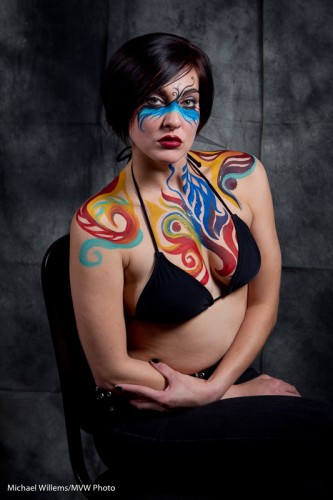
And that is why we use them still. Like in this shot from this weekend’s show:
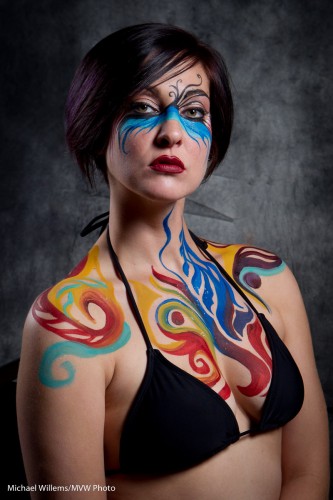
Bodypaint Model

Bodypaint Model

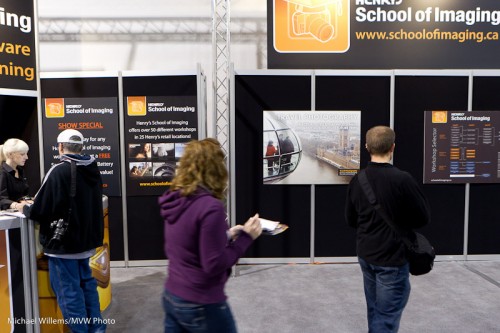
Photo Show

So I am talking at the Photo Show on Sunday again, after two days doing the same. Inspiring to see how many people like photography.

Photo Show Fall 2010

Photo Show Fall 2010

That image from the London Eye in the background is mine. And here, me, holding a light meter:

Michael Willems

Michael Willems

A key lights, set to f/6.3, and a fill light set to f3.5, two stops below.

And the same with a more decorative model and a backdrop:

Bodypaint model

Bodypaint model

And finally a note: if you have questions, please ask. I am happy to help.