Digital SLR Gotchas: LCD

The LCD on your digital SLR is fabulous.

But do not use it to judge exposure, for one main reason: it is not objective. Its apparent brightness is affected by ambient light as well as by your LCD’s brightness settings, and this can easily lead you astray. I see this all the time in classes. “Why is my camera overexposing every shot?” is usually answered by “it’s not, but you have set your LCD to full brightness”.

My tip:

  1. Expose well (use the tips on this blog; learn exposure compensation; learn to use the spot meter).
  2. Use the histogram to judge whether you got it right.
  3. When using the LCD, use a Hoodman Hood Loupe.
  4. Set the LCD to “average” brightness.

I like to “expose to the right” – your preference may be different. Either way: do not judge a photo by the LCD on the back of your camera.

Flash: TTL or manual?

Do I set my flash to TTL or manual?

Both.

TTL (fully automatic flash measuring) is a revolution, and you should use it whenever:

  • The subject moves
  • You move
  • You have little time
  • You use one flash on camera
  • You use multiple flashes but they are within eyesight of each other

Use it as is (your flash shows “TTL” on the back display), and do not forget to use Flash compensation to adjust to taste (or when shooting dark or light subjects).

I used TTL here, Sunday night (with -2 stops flash compensation, or it would have been too bright):

Berlin Nightclub in Oakville

Berlin Nightclub in Oakville

Manual (your flash displays “M” at the back and you set the power level to 1/1, or 1/2, 1/4, etc) is useful in cases almost opposite to the previous, namely:

  • You and your subject are stationary
  • Things are predictable and you want full control
  • You have time to meter, try, and iterate
  • You use multiple flashes and they cannot see each other
  • You use Pocketwizards

You can even mix: use TTL for most flashes but fire small accent lights using Pocketwizards and manually set flashes.

Earlier that same Sunday night, when I had time, I used three speedlites set to manual and fired by Pocketwizards, here:

Berlin Nightclub in Oakville

Berlin Nightclub in Oakville

You can probably see I also used some Honl gels: one red and one purple. And one flash was zoomed in to light the picture.

A good photographer knows both TTL and manual. Practice with both, and make them “your own”.

Reader question: Focus

RG, a regular reader, asks:

I just still struggle getting my subject in sharp focus.

I shoot in Auto Focus mode on my Canon Rebel XSi (usually in Program Mode). I manually select my “red” indicator and try my best to focus on what I want sharp. But what do I focus on when my subject doesn’t fall neatly on one of the AF points? I tried to pick the nearest one to my subject — sometimes it comes in focus, sometimes not.

If I am taking a portrait of two people’s faces and they are cheek-to-cheek — sometimes one face is sharp while the other is not! Annoying! In that case, where do I place the red mark on?

Great questions. And the answer comes in three parts: motion blur, focus blur, and depth of field.

Let me start by saying “it’s not just you”. Everyone struggles with focus. I do, too.

  1. One important reason is that we are more critical today than in the past – we zoom in. Take your blurry picture and print it at 4×6 and it will probably look just great!
  2. We take many more pictures in low light, where we would not have tried in the past.
  3. We have two distinct kinds of blur: focus blur and motion blur. They are easy to confuse.

So then let’s start with motion blur. Your first picture’s unsharpness was mainly due to motion blur: it’s a shaky picture. It was taken at 1/30th at f/1.8 on a 50mm lens. The 50mm lens works like an 80mm lens on your Canon Digital Rebel. To get sharp pictures, a rough rule of thumb is: “stay at one divided by the ‘real’ lens length – preferably twice that”. So you should be at 1/80th second, maybe even 1/160th second, when handheld. 1/30th is  pushing it. No problem trying, but steady the camera, lock it onto your face, don’t breathe, and take the picture ten times, then pick the sharpest one. Or… use a tripod. Or go up to a higher ISO value to increase the shutter speed.

Now to focus blur. The second picture is blurred mainly due to focus: the closer part of the girl’s clothing is sharp while her face is not. That could also be motion (her motion this time – not yours; she is turning her head) but it is to a large extent it is focus.

You are focusing with one focus point: this is always the way to do it! But what if there is no focus point where your subject is?

How, in other words, do you take a picture like this?

Selective focus

Focus-recompose-shoot

Actually that is quite simple and I want you to reproduce that picture now. Use a technique called “focus – recompose – shoot”:

  1. Select a focus point near the subject;
  2. Aim that focus point at the subject;
  3. Focus by pressing half way down. Wait for the beep that indicates “in focus”. A green dot appears too, at the same time.
  4. Hold your finger there – do NOT let go! But also do not push all the way down.
  5. Now recompose the picture (while still holding your finger down).
  6. Now finally push down to take the picture

Hah – your hand is now still sharp, since pushing half way and holding your finger there locked the focus distance, until you either let go or push down.

Finally to depth of field. What if you want more than one thing to be sharp?

  1. Use Aperture mode (Av), and select a not-too-small Av Number. f/1.8 will give you very very shallow, selective, depth of field. f/5.6 gives you much more sharpness (but slower speed); f/16 and much of your picture is sharp (but now even longer shutter speed so you must use a tripod and tell people to not move).
  2. Aim at a point in the middle, So if you have to shoot three rows of hockey kids, focus on a kid in the middle.

So now you know how to avoid blur, how to focus accurately, and how to get enough in focus.

All you need to do know – and you know what I am going to say: practice!

Black and white

And this time I do not mean “as opposed to colour”. I am repeating myself here, but it is worth doing: a few words about metering light and how your camera does it, and how to fix it when it does a less than stellar job. I get so many questions abut this, it seems worth going over it again.

Let’s analyze this exposure puzzle. It has three elements.

ONE. Your camera’s light meter is a reflective meter. It measures light reflected off your subject. So it does not know how much light is hitting your subject – it only knows how much is reflected. That is one part of the puzzle.

TWO. Your camera also does not know what the subject is. That is the second part of the puzzle.

THREE. Your camera’s job is to:

  1. See how much light there is
  2. Then set aperture, shutter, ISO (or some of those – depending on what exposure mode you are in) to ensure that that observed quantity of light gives you a well-exposed picture: not too bright, not too dark. This is a narrow range of acceptable light on your sensor: a bit too little and it’s underexposed; a tad too much and it’s overexposed. Your camera’s job is to keep the light on your sensor within that range.

That is the third part of the puzzle.

So let’s put them together.

Usually, they go together well and you get a nice picture of whatever you are aiming at. Done.

But when does this not work? When your subject is meant to be dark – because it is. Or when your subject is meant to be bright – because it is.

Exercise. in Program mode “P”), and using no flash, and taking care to fully fill your viewfinder with it, shoot a ski hill. Or a white sheet of paper made to look like one:

Looks grey! Because that is the camera’s job.

Now shoot a coal mine. Or a coat that is as black as one:

What the… that also looks grey!

That is because the camera does not know it is meant to be black. By default, your camera makes everything “in between” in terms of brightness.

Solution. Now find the Exposure Compensation button on your camera. It looks like a “+” and a “-” with a diagonal line separating them. Plus means “turn up the brightness”, minus means “turn down the brightness”. (It does this by varying whatever it is varying of shutter speed, aperture or ISO, but only “more so”). You may have to hold the button while turning a wheel, and you can see what you are doing as a number or as a graph on the top of back of your camera, depending on which camera you have.

Find the control and turn the value up to +2 and re-shoot the ski hill. Now you get:

That’s better. Check the histogram to ensure it is not stuck against the right side (“overexposed”).

Now set the Exposure Compensation to -2 (minus two). Re-shoot the black coat. You get this:
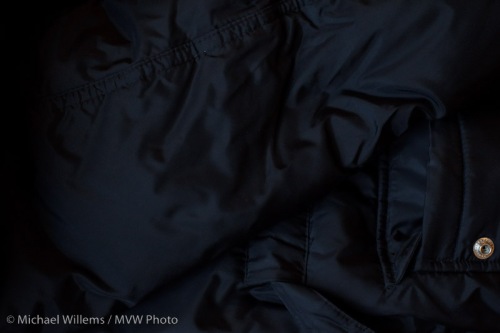
Finally. A black coat!

So now you know:

  • When your picture looks too dark, use +/- set to plus and retake the picture
  • When your picture looks too bright, use +/- set to minus and retake the picture
  • This is most likely to be needed when your subject is very dark (coal mine, black coat, dark night) or very bright (beach, snow, white marble room, piece of paper, person against a white wall).

That is actually quite simple!

Notes:

  • Do not use flash – that’s a separate subject (and it has a separate adjustment)
  • You can also spot meter to a grey subject to avoid the need for exp comp
  • You can use manual and use the displayed meter in the same way (minus mens darker, plus means brighter).

Try it and you should, from now on, have no problem exposing right.

See the light!

Tip of the day:

To see the colour of the light you are shooting in, to really see it, take a first test-shot in every shoot with the white balance set to daylight (the sun symbol). That will show you the real colour of the light. Then you can take it from there.

You can judge by yourself, by looking at the back of  your camera, or you can look at the colour histogram, if your camera supports that.

Why would you use flash outdoors?

So why would you use flash outdoors during the day?

Sometimes it is obvious: to fill in shadows on backlit subjects. Or to soften hard shadows. But sometimes you do it for more artistic reasons.

Let me illustrate this with a shot taken during the Get Out and Shoot run we did in Toronto early this week – the workshop I wrote recently.

Imagine you are shooting someone – me, say – on a bright day, but in a spot where I am in the shade against the shady side of a grey building. Before you know it you get a dull picture: grey and low-contrast on all counts: blaah.

So that’s when you bring out the flashes. Say, two remote “slave” flashes, fired by a “master” flash on the camera. One slave to the camera’s left, shining into a Honl reflector, and aimed at the subject’s face, to add bright light to the subject. The second flash is equipped with a Honl Speedstrap and on it, a green gel, and this flash is aimed at the grey wall behind the subject to make it less grey.

Now you get this:

Outdoors Flash

Outdoors Flash Used During the Day

You will agree, I hope, that this is a lot better than it would have been without the help of flash. Even, no, especially, on this bright day.

Want to learn about all this stuff: read here of course, but also: join me for training.

(Thanks to colleague photographer Rob Corrado for the picture)

A reader asks: Manual? Why?

A reader asks:

“Question: I understand why you would use most of the modes ( av, tv, etc.) but what are the main applications where one would/should use the manual mode? Thks”

Great question.Why use manual? Here’s why you want to use manual (“M”) exposure mode (the dial on top of your camera).

  • Predictability. If you set the camera to manual exposure mode, your settings are, well, set. Turning your camera a little to the right or left will not now change your exposure. Imaging you are shooting in a room with predictable light, but your subjects walk in wearing white suits, then black suits, then white suits again.
  • Hard to measure subjects. How are you going to measure fireworks? It cannot be done in any automatic mode since when the metering is done, it’s all over.

That means you will want to use manual exposure mode in the following circumstamces:

Some photographers say “always, and use a meter”, but for me, the above captures it nicely.

PS: be careful: there are many types of manual. See here: http://blog.michaelwillems.ca/2010/03/11/manual/

Tip time: studio setup

A few quick setup tips – for portable studios like mine, here today for a corporate shoot:

Portable Photo Studio Setup Tips

Portable Photo Studio Setup

In no particular order:

  • Roll the paper the way I am showing here. Like a toilet roll: roll from the top. That way you get more available height.
  • The backdrop stand goes in a bag. Ensure that when you put it back in the bag, the large holes show. That way you can see which sidebar is the middle one – you may not need it (like me here).
  • Ensure cables are out of the way. Wrap them around light stands to avoid them hanging out too far where people can trip over them.
  • Always bring a power bar.
  • Use tape or something large on the floor to tell models where to stand and how to orient themselves.
  • Tell subjects “baby steps only when I ask for adjustments”. Else they always turn too far.
  • Start with the body. Then the head. Then the eyes.
  • Arrange to have a test subject available. Else your first client is the test, and that looks unpfofessional.
  • Use a tripod. Adjust height as needed.
  • Camera to 100 ISO and auto ISO off.
  • Camera on manual, 1/125th second, f/8, and use a meter to adjust the lights to that.
  • Test shot one: no flash. It has to be dark!
  • Test shot two: flash, but no subject (focus manually). It has to be white!

That is, I trust, helpful. Efficiency is all, or a two-hour shoot can turn into four hours with setup and takedown.

A studio like this one, the one I built this morning, took me half an hour to build and 15 minutes to take down.

Three-Dee in flatland

Photographs are like flatland. There are just two dimensions. No depth.

That is why the pictures you take of the Grand Canyon or Cologne Cathedral look so boring when you see them at home. When you are on location, your brain gets clues from your stereoscopic vision, and from you moving, and even from sound. In a picture, all of those are missing.

The solution: use relative size. When a close object is really close, it looks large, and the background looks smaller. It is this that tells your brain that there is depth in the picture.

Like here, on the Golan Heights:

Every time something jumps out of the picture, it was taken like this:

  1. With a wide angle lens (say, 10-20mm on a crop camera; 16-35mm on a full-frame camera),
  2. With the photographer very close to the close object (in this case the barrel).

Another example:

As you see, this also distorts angles, which can give a pleasing dramatic effect.

And one more:

So if you want depth, zoom out and get close.

A quick product shot

Today, I am sharing a quick product shot.

Here’s the shot, of my “nifty fifty”, a 50mm f/1.4 lens:

And here’s how I shot it:

  • I used a Canon 5D camera on manual at 100 ISO, f/4 and 1/125th second.
  • The lens was on a table with a white sheet of Bristol Board underneath.
  • The background was an improvised white background (I used a reflector).
  • I used a 430EX flash with a Honl grid, diagonally above the lens, as the main light. The grid causes the dropoff from the centre.
  • I used a 430EX flash with a Honl blue gel and a Speed Gobo to illuminate the background.
  • I used e-TTL to fire the flashes, from my 7D’s pop-up flash (the 7D will support this, like Nikon cameras. On other Canon cameras I need to use a 580 EX flash on the camera to drive the remote flashes).
  • I set a flash ratio of 8:1 a:b, where A was the main flash and B was the product flash.

All of which looked like this:

Simple. It only took a few minutes to set up, which is good since I was tired.

One tip: when shooting this type of product clean it well using a soft brush, or else you will spend hours in Photoshop or Lightroom aftereard, cleaning dust.