No tie

As reader Robert G pointed out, the other day I posted apicture of me without a tie.

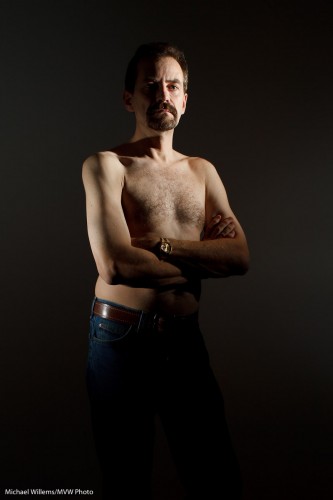
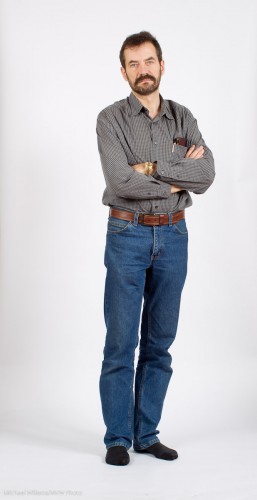
Yes, sometimes I catch myself unawares. I am my own frequent model, and today’s image is myself, again without a tie, to demonstrate an illustration of a different lighting technique from the onein the recent posts.

This time I am using two speedlights from the side. Both speedlights are fitted with a Honl Photo Speed Strap and 1/4″ grid to soften the light and to avoid it spilling onto the white wall. This gives you a dramatic light which can be very good when shooting males:

Michael Willems (by Michael Willems)

Yup. No tie.

See what this edge lighting technique provides?

  • Shape (muscles)
  • Texture (you want this for males, not so much for females)
  • Dark backgrounds
  • The ability to make other areas dark.

This latter ability is often useful. Rememer: lighting is not so much about what you light – it is at least as much about what you do not light.

Classic Portraits

Here’s one tip for classic portraits: you can use classic backgrounds.

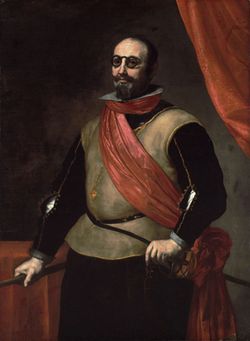
In the 17th century, that meant an elegant drape behind the subject, to provide:

  1. Nice texture;
  2. Elegance;
  3. A sign of wealth and comfort;
  4. A nice curve.

Somewhat like this:

1630 - portrait

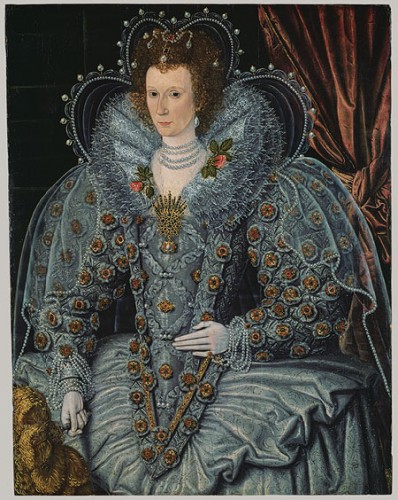
You do wonder how people walked around in those Halloween costumes. But anyway, back to backdrops. Why not do that today?

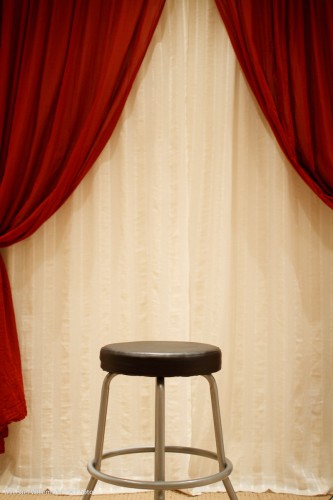
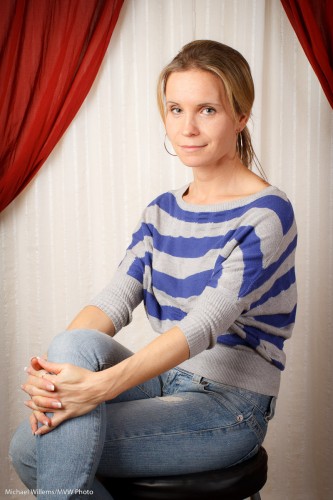
My student Melony built this in her home studio.

Home Studio Backdrop System

Against a wall, two curtain rods: the back one with white curtain hanging from it, and the front one with red curtain. Both operable independently so you can open or close either or both. Easy, and it is not in the way of normal use of the room.

And with proper, light and white balance, this results in portraits like this:

Student Melony in home studio

That kind of setting is very suitable for family portraits. Even in 2010. Many times, I much prefer this to a standard white or black backdrop, or to a muslin.

I might even say especially in 2010. Tip: go to an art museum if you want to see great portraits.

How did we light that portrait?

  1. A softbox to camera left
  2. A fill light behind me to camera right

Questions?

  • Why a softbox? Because it does not spill light everywhere, like an umbrella. Umbrella = safe; softbox = more controllable, and hence more for art.
  • Why the fill light? Because without it, even in a small studio, the non-lit side of your subject can get a bit dark.
  • And if the light is too bright even at the lowest setting? Move it back.
  • Could we have used a reflector instead of a fill light? Absolutely.
  • But will you sometimes want a roll of paper for a neutral, simple background? Of course. Having a drape does not mean you have to use it every time.
  • What kind of lens were you using? A prime (fixed) 35mm lens on a crop camera (the Canon 7D). That means effectively a 50mm lens, which is perfect for half body portraits like this.

So, a classic portrait does not have to be complicated: a few simple tools and you have great options.

Learn light before the holidays!

You can learn now… before the holiday season. Make GREAT portraits and party shots using flash. The festival of lights seems an appropriate time to tell you about light!

So here’s how you can see me in action in December:

  1. There are a few more chances to see me at Henrys this week. After that, a break until the new year.
  2. Big news: Joseph Marranca and I have added an extra “Advanced Lighting” course in Mono, Ontario, on December 19. Indoors as well as outdoors “Winter Wonderland” shooting using small flashes, large strobes, and a combination of all of those. Learn the theory and “do it!” – and go home with great portfolio shots, in a Winter Wonderland setting in Mono, Ontario.

If you want to partake in Mono, be quick: we will limit this all-day course to a maximum of just 8 participants, since with snow we’ll need more individual attention.

If you understand your camera and know what aperture is but have always wanted to learn professional lighting, now is your chance. Read about it, and book, by clicking right here.

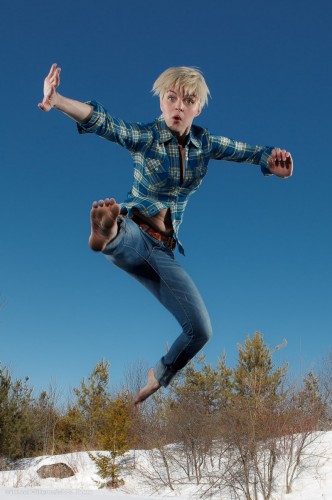
Model Lindsay in Mono Snow

…and dust off your camera, gloves, and boots. And use your camera to make some amazing shots during the holidays.

Simpler then.

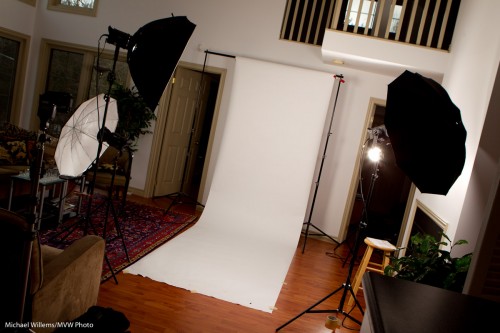
You may recall yesterday I asked whether you could do professional lighting with simpler means than this:

Mono Studio (Photo Michael Willems)

And indeed, you can.

The secret is to think about

  1. The background. If not simple, then make an environmental portrait and use the environment.
  2. The number of lights. In the studio above, my lights are doing it all. So I need many lights. So how about using ambient light as one source?

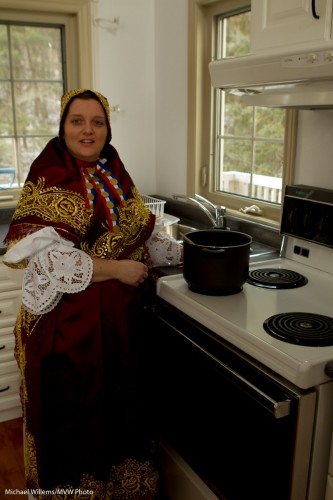
Here’s ambient light in an environmental subject (environment is relevant here – you’d have to know the story):

Ambient light

That’s good for ambient, but how about the subject? So, add one flash in a softbox. This gives you a finished shot. Just one light!

Kitchen Surprise (Ambient and softbox)

The recipe here is simple.

  1. Meter for outside light.
  2. Check what aperture that gives you – set sped to between 1/100th and 1/200th second on manual and aim for, say, f/8
  3. Now use your light meter to adjust the flash to that aperture (use your light meter).

Another light lit with the same technique (and again using just one softbox):

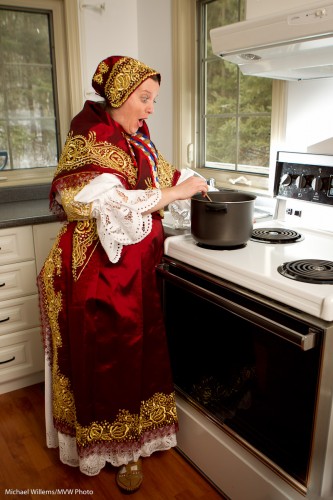
Dress in room

So while all the equipment is nice, by combining ambient and flash, you can do a lot with just one light. Keep that in mind over the holiday period.

If this all sounds complicated, at first glance it is, but once you know how to do it, it is simple. This is the kind of technique I teach at my advanced flash workshops, and at the advanced lighting courses Joseph Marranca and I teach together. The new schedule will be posted soon!

(Home) Studio

Sometimes I use big lights, not speedlights. Here’s my studio for a shoot Friday:

Mono Studio (Photo Michael Willems)

That is a tad complex:

  • Three and a bit lights. I use Bowens lights – love them.
  • A way to fire them (cable or pocket wizards – I use the latter).
  • Modifiers (softbox for the main light, and umbrella, perhaps also a snoot)
  • A backdrop stand.
  • Paper roll. White, grey or black, depending.
  • Tape to hold the roll down.
  • Clamps to stop the roll from rolling down.
  • A light meter.
  • A tripod.
  • A camera with a lens of the right range (50-150mm)

It takes up to an hour to set that up, and a good half hour to take it down (ask why photography costs money).

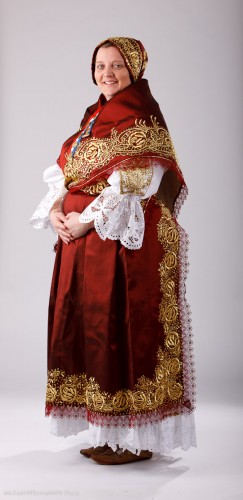
And all this results in pictures like this:

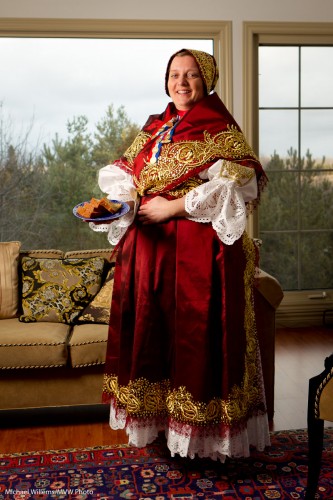
Traditional Dress

For a studio like this you need, above all, lots of space. Especially when using powerful studio lights and long lenses like my favourite 70-200. Vertical space (ceiling height) as well as lots and lots of horizontal space. In this case, also space to move the subject away from the backdrop, in order to make it darker. Otherwise, if the subject is close to a white backdrop, the backdrop turns very white:

Michael Willems, self portrait

Michael Willems, self portrait

I like that look a lot, but the dress in the shot above had white, so we needed to create separation between it and the backdrop. Meaning we needed a darker backdrop.

So an important question: can you do anything with less?

Sure you can. Tomorrow I’ll show you some examples from the same shoot.

Bring a spare!

If you are shooting an important event (and ALL paid shoots are important), take some basic precautions, and bring spares.

Here is my advice:

Camera:

  1. Format memory cards before you shoot.
  2. Bring spare memory cards.
  3. Ensure that your camera batteries are 100% charged the night before. Check this!
  4. Bring spare camera batteries. At least one spare per camera.
  5. Bring a charger too, just in case.
  6. Bring a spare camera. This can be a starter camera or an old camera – just something you can grab when bad things happen.
  7. Bring a spare lens (what if your one lens’s aperture blades gets stuck? You need an alternate!).

Flash:

  1. Bring a flash – but also a spare flash of the same type. Canon TTL shooters, unless they use a 7D or a 60D, must use an IR transmitter or a 580EX flash on the camera: when that fails, your entire system is down since you can no longer remote-fire the other flashes. My 580EX II failed recently… good thing we had lots of spares.
  2. Bring charged (ideally, conditioned, i.e. discharged-then-charged) NiMH flash batteries.
  3. Bring lots of spares of those. No, I mean lots.
  4. Also, always keep a few (8?) Alkaline batteries in your bag as emergency backup. These do not cycle as fast as NiMH batteries, but they will keep their charge for many years.

Other:

  1. If you use big lights, bring more than you need. You know that your light’s flash tube will die during a shoot, not when the light is in a bag!
  2. Bring a spare photographer, if you can. If you cannot, then at least bring headache and tummy-ache pills just in case.
  3. Bring a charger for your cell phone.
  4. Here’s one most photographers forget: Bring spares for each type of cable you use. USB if you are tethered. Remote flash cable if you use that. Flash X-type. And so on. Whatever you use – bring a spare. Cables break, or go bad, all the time.

During the shoot:

  1. Change flash batteries before each segment of a shoot, even if not empty.
  2. Change your camera’s memory cards every now and then in case a card malfunctions. On some high-end cameras, like my 1-series Canon bodies, you can write to two cards at once.

These simple precautions will not only save your hide sometimes – they will. But more importantly, every shoot you do will involveless stomach acid and headache. Although of course you carry pills for those.

Final bit of advice: make a personalized checklist for shoots. This too gives you peace of mind.

Cheers.

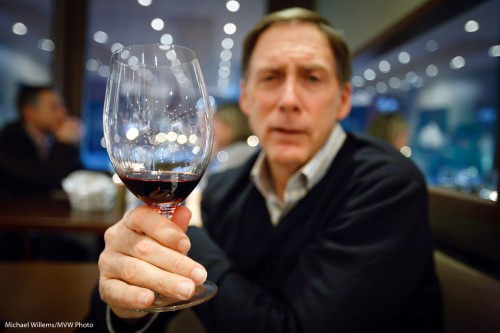
The other day, before a course I taught, here’s a friend and student holding out his glass of Merlot – no, it was not a Merlot, it was an Italian red:

Bruce holding glass

Isn’t that a nice shot?

So here are a few notes, numbered for your convenience, to help you take the same.

    1. As I point out time and time again, a shot that “makes the viewer put it together” is often great.
    2. A blurry person is often also appreciated by… the person, if they are shy. When people (ladies and teenagers, often!) say a panicked “no pictures”, try this.
    3. I used a 16-35 mm lens set to 30mm on a full frame camera, set to f/2.8.  On a crop camera, you could use a 24mm prime lens, for example. On my 1Ds I could also have used the 35mm prime. This would have been my favourite lens for this shot.
    4. The wide angle gives you those wonderful converging lines.
    5. The wide open aperture of f/2.8 enabled me to shoot at 1/15th of a second using available light – at 3200 ISO.
    6. The blur also gives me a simple image with no distractions.
    7. It is very important that the lens is wide open. Look at the out-of-focus lights. They are circles. If the lens had been partly stopped down (to f/3.2, or f/4, say) you would have seen octagons or hexagons instead of circles.
    8. And yes, you can shoot at 3200 ISO with a good camera. Point-and-shoots will not do this, even with Lightroom noise reduction.
    9. That speed of 1/15th second is still a bit slow. You could easily get motion blur. So I took 3 or 4 pictures, of which this one was razor sharp.
    10. I focused carefully, using one focus point, on the glass.
    11. I had the subject move his glass forward, and I moved as close as the camera would let me focus. This makes the background go blurrier.
    12. Finally, I had to get the white balance right in post. This is very important with available light shots, which can otherwise take on an orange/yellow cast.

      A little work – some thought goes into even a simple snap. But do it, think, and you get nice shots where you would not have expected them. And that is what sets you apart from Uncle Fred.

      Be Not Uncle Fred

      You know Uncle Fred. He carries a camera and thinks he knows about photography, but he does not. None of you are Uncle Fred, or you would not be reading this.

      Uncle Fred takes snaps like this, where everything is wrong. See if you can spot the problems in this recent snap of a student:

      Uncle Fred Takes A Picture

      And there are many, including:

      • The picture is blurry (both out of focus as well as motion-blurred due to a slow shutter speed).
      • The orientation is wrong.
      • There is too much mess.
      • Fred puts the subject right in the centre and cuts off the bottom.

      Uncle Mike, on the other hand, does the following:

      • He turns the camera to a vertical position.
      • He gets closer.
      • He watches the background and simplifies.
      • He uses good composition rules, like the Rule of Thirds.
      • He uses a fast lens – a lens with a low “f”-number.
      • If he uses a flash, he bounces the light off a wall or ceiling behind him.
      • Using one focus point, he focuses on the eyes – the closest eye, to be precise.

      Uncle Mike Takes a Picture

      That is simple. None of this needs a lot of knowledge, does it?

      Here’s another one, of a lovely student the other night,taken with a 50mm lens:

      Student Robbin

      So for your next portrait, please try to get close, fill the frame, shoot vertical, and use a fast lens, focused on the closest eye, using either available soft light or a bounced flash. See the difference!

      Is brand important?

      A student asks me this via email:

      Hi Michael, hope you are well. I wanted to send this email as I enjoyed the class you taught and enjoy reading your blogs!

      As an amateur photographer the very first camera I started out with was a 35mm Minolta. Hence the reason I purchased my digital Sony, as my lenses were compatible.  I’ve have been building my equipment around “Sony” but have come to so many roadblocks.

      I’m not sure if you remember me but I had to borrow your camera in class because I did not have a Nikon or Canon which was compatible to your remote flash. I would love to attend your workshops but I have no knowledge of Nikon or Canon. There has also been some part time job opportunities that I could not apply for because they preferred Nikon or Canon.

      So therefore my question is…should I trade in all the Sony equipment and begin with Nikon or Canon? If so, which brand and model would you recommend?

      Currently I have the Sony A700 model with 3 lenses (16-105, 50, 70-200macro).

      Any recommendations would be greatly appreciated!  (Can’t wait to attend one of workshops, need more help with lighting theory).

      Great question, and one that occurs regularly.

      And a tough question, too. And it is one to which the answer, as so often in life, is “it depends”.

      Let’s go through the various aspects to this choice.

      1. Technology. The A700 is a great camera. In general, though, there is little difference in quality between brands. Sure, Canon and Nikon, as market leaders, have larger R&D budgets, but in the end, all cameras end up with the same features. Differences are minimal. Do not discount Sony, they want to be number two soon, and who knows. If Canon has benefits (very extensive lens selection) and Nikon has advantages (low ISO), Sony also has advantages (available Zeiss lenses). Where Canon has drawbacks, so does Nikon and so does Sony (ask me if I like the Sony proprietary flash socket, or if I like Sony’s menu navigation). All cameras have aperture, shutter and ISO settings, so in the end, technology is not the decisive factor – either way. More important than “what brand is this camera” is “how modern is this camera”. They all get better every year.
      2. Backward Compatibility. Clearly a big one: if you have many thousands of dollars in one equipment maker’s hardware (say, Minolta lenses, which work on Sony cameras, since Sony bought Minolta) that is a factor to be taken into account.
      3. Market. Now we come to a biggie. The market leaders, Canon and Nikon, have a huge advantage over others, since the pro photography pretty much is Nikon and Canon. You have seen it yourself: if you cannot operate Nikon or Canon, many people do not want to know you. This is unjustified – but “it is what it is”.
      4. Peripherals. From available third-party lenses to Pocketwizards, all peripherals are available for Canon and Nikon. So that too can be, for pro shooters, a benefit of switching.
      5. Knowledge, Support, Expertise. An offshoot of the previous point. Books. Courses. Technical support. “Hey guys, my flash just died: anyone have one I can use?”. “Guys, who knows how I turn on this custom feature on my camera?” – Availability of used gear on Craigslist. Reviews on the magazines and online (like my blog). All these are easy if you use Nikon or Canon.

      So what would I advise you?

      If you are considering a switch for technical reasons, I would say “wait”. I have shot with Olympus, Panasonic, Asahi Pentax: Nikon, Canon, and I teach all others: all cameras are great. The camera is not the important thing, the lens is – and the photographer.

      But since you want to be a pro shooter who has already run into roadblocks, I would seriously consider the switch.

      To what? Canon or Nikon is a personal choice. What feels better?

      Then you choose the level: for you I would say

      • Starter level (Rebel, or 3000/5000) – avoid. These cameras need more pro features
      • Mid-level: 60D or D90, say: great options.
      • Basic pro: 5D, 7D, D300s, etc: great options.
      • Pro: 1D, 1Ds or D3 etc: overkill, I would say, at this point, and in general, overkill for most users (but that said: I use a 1D as well as a 1Ds).

      My advice: Check out dpreview.com. When you have a particular camera in mind, ask me about that one. Ask your friends and ask other photographers.

      I hope that helps.

      Rescue!

      Black and White, as I mentioned yesterday, can also, as an additional benefit, come to the rescue when an image is not very good. Like in this image of Tara, where the flash failed to fire (my 580 EX II malfunctioned).

      So since it is RAW, I can  convert to black and white, push it – wait for it – a full 3.5 stops (!), remove noise, crop, then add some film grain – and hey presto, a usable image:

      So when you have a not-very-good image, try to convert to black and white, and see what you get.

      Chances are, a very usable image.

      The lesson: do not throw away “bad images. Shoot RAW. And convert to B&W when all else fails.