Group Tips

Today, a few group tips—an excerpt from my “Portrait Photography” book, whose thoird edition comes out soon.

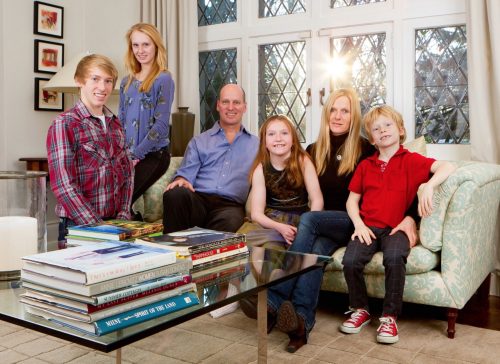
Tips for posing the family and other groups.

  • Avoid straight lines: each head should be at a different vertical position.

  • Sit–stand–lean: Create a combination of sitting, standing and leaning to achieve this.
  • Avoid having people face the camera straight on; Place people at an angle.
  • Alternate those angles. See who fits with whom, both in terms of relationship and in terms of the “look” of the photo. For individuals, have them turn around and see what flatters them most.
  • Create little groups, by having people face each other, or stand back-to-back.
    “If it has a joint, it is meant to be bent”. Bend at the knees, elbows, wrists, whatever has a joint should be bent somehow,. This gives the photo a much more realistic look and feel.
  • If you have limited space, squeeze people in as much as you can.
  • If you are outside, have the sun in your group’s back, and light the front with flash or reflectors. Do not have your subjects face into the sun (wrinkles show, and people squint).
  • If at all possible, find an elevated position to shoot from. That way, you get a more dynamic picture and you get everyone in easily, without heads being hidden behind other heads.

See? Nothing to it!  🙂

Macro fun

Canada’s silver dollar used to carry the “Voyageur” design on the obverse side. This year, a special 150 year anniversary edition, with the same design in the centre:

The original looked like this:

Those are simple iPhone shots. But proper shots of coins are taken with a macro (or as Nikon calls it, a Micro)  lens, i.e. a close up lens.

And once I do that, I see something amusing. Look at the native person in the front of the canoe.

In the original, he is traveling nude:

In the re-issued coin, he is wearing a loincloth!

I can just imagine the meetings that must have happened on this subject at the Royal Mint of Canada. Though I do wonder about the political correctness aspect: why is nudity so bad?

In any case: it is only the macro lens, in my case the 100mm f/2.8, that allowed us to see this design change. Who knew?


Adobye?

“Corporations are evil”, is what we hear around us often enough. I have often thought that this was at best an exaggeration, but now I am not so sure: Adobe is doing a good job of appearing to be as evil as possible.

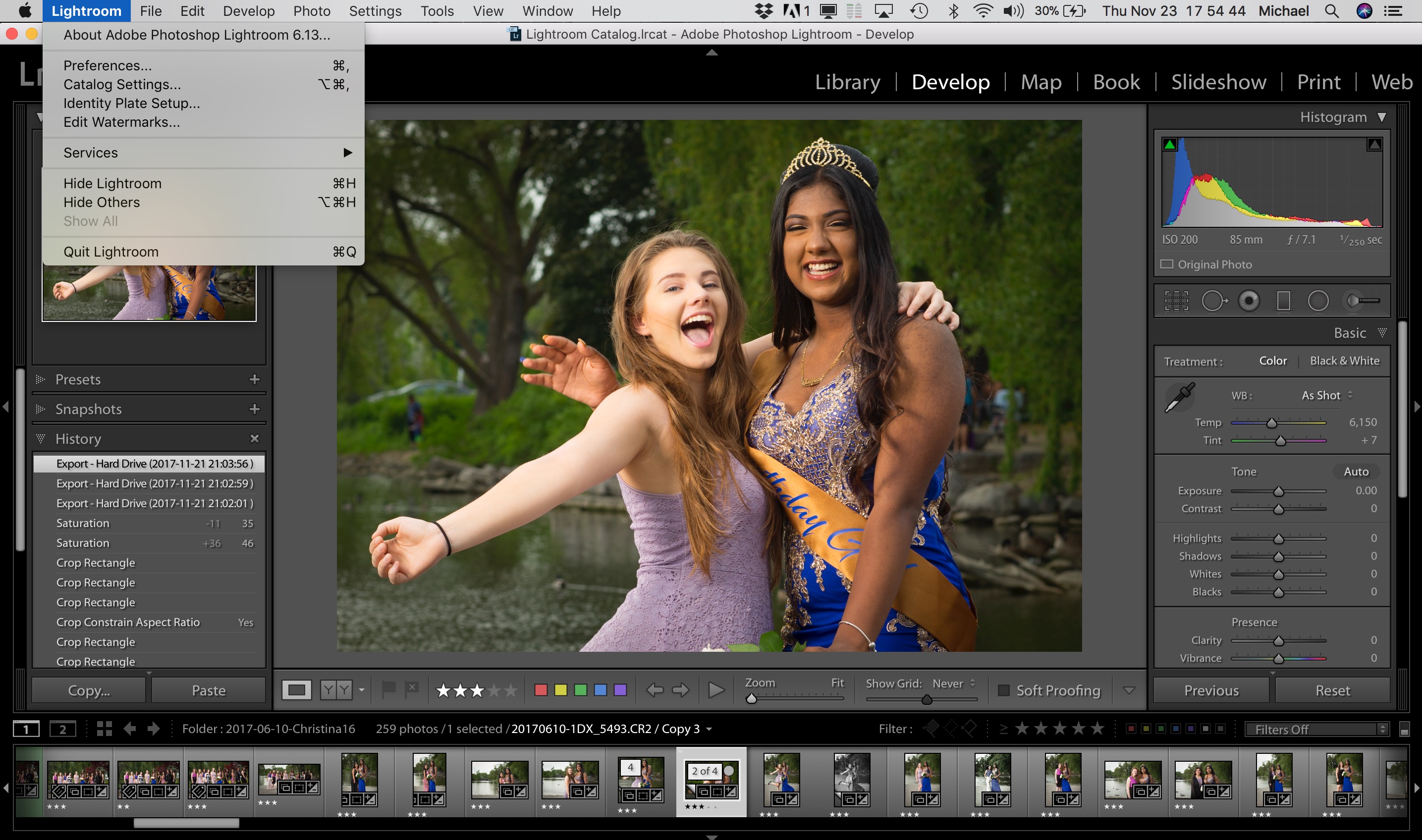
I am talking about Adobe Lightroom, the application that I, my students, and most professional photographers use to run their business. Lightroom rocks. Or rather, it used to rock.

There are now three versions:

  1. The almost-impossible-to-find standalone version. This version is now at 6.13 and, even though it is already missing features, will not be updated anymore. So if you run this, do upgrade, but expect nothing new, now or ever.
  2. Lightroom CC. This is a dumbed-down version for web- and portable-based use. It is missing many essential features: it is basically a toy for people who are unable to learn file management and similar sophisticated features. CC means Creative Cloud: meaning you get to pay Adobe US$10 (which will go up, no doubt) each and every month for the rest of your life (yeah, do the math). Worse, it will need regular permission from Adobe to run. Who on earth would allow their business to be held hostage by some US mega-corporation in this way? Your payment does not reach them, or the login server malfunctions, or Adobe goes broke (you can always hope), or your Internet connection is down when it is most needed – and wham, you are not given permission by Adobe to see your own work.
  3. Lightroom Classic CC. This is basically the existing Lightroom, but with upgrades, and alas, also with the same huge “CC” drawbacks.

Both versions 2 and 3 do everything they can to drive you to the web and to mobile devices. From my perspective, this is dumb, dumb, dumb. Mobile devices are limited, and the last thing a pro needs is “limited”. Why would I handcuff myself? I’ll edit on my Mac, thanks.

And web-based: right. I have 8 TB of photos. which would take about 8 months to upload, with my Internet connection pinned at full capacity for all of those eight months. Not gonna happen. Also, with the top version of the app you get 1 TB of capacity, not 8.

My strategy is simple.

  1. Continue to use 6.13 for as long as I can.
  2. Wait desperately for a competitor (and many companies are working on it)
  3. Change from a Pro-Lightroom evangelist into an Anti-Adobe evangelist.

The Adobe support person who just confirmed all this to me said “if I were you I would feel the same way”. Who knows, if enough of us refuse to move to CC, Adobe may yet reverse their decision. But I am not holding my breath.


Equipment

Equipment matters in flash photography. It’s not everything, but sometimes you just need it. And I mean the stuff around the flash and camera. Like light stands, brackets, and so on.

A scene like this:

Turns into this…:

…if you use a flash on a light stand, like this:

The work behind the shot

Not a lot of gear, but you cannot do without this, my usual minimum kit;

  1. Camera
  2. 2x Pocketwizard
  3. Hotshoe cable (from flashzebra.com or from Pocketwizard)
  4. Light Stand
  5. Bracket for mounting flash and umbrella
  6. Umbrella

That’s all. Small, folds up to nothing, so it’s easy to carry.

But I have a lot more… things I occasionally use. I collected these over the years; you can simply pick up an item every now and the, or you can get it all at once.

On that subject, a recent student in Guelph is selling this-an extensive kit. If you’re near Guelph, you may wish to take advantage.

TRAVEL THOUGHTS — I am just sitting down after an uneventful 11 hour drive back from the Dordogne to the Netherlands. Wake up in Bergerac; go to sleep just outside Gouda. And this trip reminded me of a few things; primarily why, as a “third culture kid”, I like travel so much.

Also this. I loved lunch in a small French village, where it is *assumed* that on a weekday you will have an apéritif before lunch (and wine with lunch). And where the Onion Soup pan is left on the table so you can help yourself. God give that France never becomes like the rest of the world, please.

Also, I was able to drive all day at 130 km/h. In all these countries the maximum speed is 120 or 130 km/h. (Ask me why I get speeding tickets in Ontario, which has the lowest top speeds in the developed world. Absurd, and no surprise no-one sticks to that maximum of 100 m/h, 62 mph, in a province larger than Europe. And they act so holy, like 120 is “so dangerous it is not allowed anywhere in Canada”. Fuck off!).

Also, I see how France *is* changing. Nothing like the highways to see what is happening in a country. France is being dragged (willy-nilly, I presume) into the globalized economy: one “logistics” truck and advert after another. And wow, trucks from Poland, Lithuania, Portugal, you name it. All very international. Join, or be left behind.

And I muse over how I will never go back to the UK. Example: all European cars have a small blue “Europe” part of their license plate, where they show the European flag and their country designator (“F” for France, “B” for Belgium, etc). Only the British cars overwhelmingly do *not* do this. If there is ONE thing I hate in life, it is people who think they are superior due to their stupid nationality, and the Brits are foremost in that list. Have been since the “empire”. Screw that, and end up in isolation, Brexit idiots: I will *never* go back to the country where I spent my formative years – unless they pay me.


I would share, but…

Adobe Lightroom is the only game in town.

Hence, Adobe has zero incentive to fix large bugs. Like this apparent bug: slideshow export fails if both portrait and landscape mode slides are included. It is incredible that a corporation would let a huge bug like that just sit there, but I too cannot make an export of a slideshow that contains both portrait and landscape images. It just hangs at 1% or thereabouts.

On top of that, Adobe tries to force everyone to sign up for the Creative Suite, i.e. online software as a service with regular payments, and pay at least double what you would pay for a simple app.

Don’t be evil, anyone? Adobe does not even pretend to not want to be evil. The global dislike of corporations really is not a surprise, when you look at this.

Personally, I would not mind paying fair prices for Lightroom. Even high prices. But being manipulated and ignored at the same time by a huge corporation leaves a bad taste in my mouth.


Photos are time travel

Many years ago, my friend Chris Quirke died tragically. A great loss: he was a kind person. I have always remembered him fondly. Some people do that to you. You know how they say that only the good die young? Well, that applied to Chris.

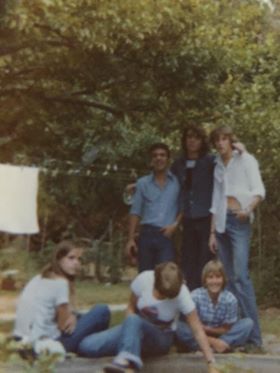
Recently, his niece, and later his sister contacted me after reading an old post where I mentioned him. His sister subsequently sent me a photo of Chris with a few other people, and it is incredible how Chris’s stance reminded me of him. Incredible, it’s like I am there.

That’s Chris, in the white shirt on the right:

And that is why photos are so important. One blurry old photo is left, and it’s an amazing thing to see how powerful that blurry old photo is. And that’s why you should photograph your life. One day, time travel will take you back to today. And you will be grateful.

And share your photos. Print them. Do not just keep them on your iPhone. This is the only time travel you’ll ever do. Except of course the one we all do, the one that leads inevitably to the end. So remember your life: make that photographic record.


Again: No Deleting

As I said in 2016: Today, I present to you an excerpt from my classes at Sheridan College and from my private classes. The subject: “Should I habitually delete my bad pictures?”

And the answer, my photographing friends, is a strong “no”. Deleting, whether “from the camera”, “afterward”, or “instead of formatting”, is always unwise!

So why is that? Let’s look at all three reasons in turn.

[A] Why not delete from your camera?

Well,

  • First of all, it is a waste of time. When you spend your time deleting images, that means that you are “chimping”, i.e. looking at the images instead of looking at the things you are photographing! You should use the time you have on location to be at that location.
  • Also, by all this looking you are wasting valuable battery power; power you may well need later on in the day.
  • And you are losing learning opportunities: why exactly were they bad? The EXIF data usually shows you why—and without the image you may never know.
  • It may be As Good As It Gets: The bad image of uncle Joe may be the last image you have of him.
  • You may be mistaken: Often, you cannot really tell how good or bad the image actually is.
  • And finally, when you make a habit of deleting, you will delete the wrong image soon enough. Guaranteed. Law of nature.

[B] OK. So why not delete afterward?

This too is simple once you think it over…

  • Statistics, is one reason. “How many pictures do you take with wide angle lenses? What proportion if your images is out of focus? How many photos has your camera taken? All these are questions you cannot answer if you have deleted bad images.
  • As before: maybe it’s the only picture you will ever get of this person, even if it is out of focus. I would love too have an out of focus or badly composed picture of Lee Harvey Oswald the day before he shot the president.
  • Processing techniques improve with every iteration of Lightroom/ACR. Maybe that terrible image will be usable 10 years from now.
  • They don’t matter. The drawback of “they get in the way and slow things down or make my photos hard to work with” no longer holds at all with modern image resource management tools like Adobe Lightroom.

So you use 1TB of your 8TB drive for bad stuff. Who cares! Storage is cheap today.

[C] OK then. But why not “delete the card when importing”, or “delete after use”?

  • Because formatting is much, much better than merely marking as deleted (that is all that happens when you “delete”) . It removes lost clusters, fragmentation, and all the other disk error that occur naturally over time on every disk, even virtual disks. Formatting fixes all these and is much safer. It actually deletes.
  • “Deleting when importing” is also unsafe because “what if the import fails”?

But remember, friends, do not format until you have made at least one backup of your images: one main copy, and one backup on other media. All hard drives fail—then question is when, not whether.

So my conclusion: there are lots of reasons to not delete your work. Leave all the bad images intact; format card after backup.

Trust me on this. You will be happy you listened, one day.

Next question.

Q: Should I format the memory card? And where?

A: Yes. After you copy the pictures to a computer and make a backup, and only then: put the card back into the camera and format it. Yes, in the camera, not in the computer. And every time. After your pictures are backed up.

‘Nuff said.

Michael