TTL Flash and Batteries

A couple of days ago, a reader asked me this:

I did your flash course about a month ago and enjoyed it so much, I actually bought a flash 😀  I got the 430EX II.  I do have a question about it.  I used it this past weekend doing some Christmas photos and I found that I just ran through batteries REALLY fast.  I’m wondering why.  I thought that the battery life would be longer than an hour or so (continuous shooting but I had it set to ETTL which I thought would adjust for my lighting).  Do I need to set the flash in some way?  Am I firing too high?  I just pulled it out of the box and started using it and made no adjustments and I am wondering if that is my problem.  I used Energizer rechargeable batteries, that were fully charged.  In total I took about 650 photos (was doing shoots for different families) and went through three changes of batteries.

Well… I would say that is roughly about the expected battery life for a shoot where you use the flash at high power. An hour of non-stop shooting takes a lot of power, so you need to carry lots of batteries.

If you had a 580EX, it has twice the power, if you should need it – but it can take an optional battery pack. Whether this warrants the price difference I am not sure: this is a decision only you can make.

You are using your flash right. And the mode you use your flash in makes no difference to battery life: after all, whether you set the flash power level (“M” on the back of the flash) or whether you let the camera do it (“ETTL” on the back of the flash), it’s still going to be the same power level!

So what does affect the power level the flash needs to emit? Factors include:

  1. The size and reflectivity of the room, if you are bouncing your flash. A dark high ceiling eats power; a small room with white ceilings and walls reflects more, so needs less flash power.
  2. Or if you are shooting direct, which I hope you are not, then the zoom angle of your lens and the proximity to the subject determine power needed.
  3. ISO. The higher the ISO, the less power the flash needs. (Set it to at least 400 for indoors flash – often, you may need 800).
  4. Aperture – the smaller the “f-number”, the longer your flash will last. Shoot at f/4 if you can, and if your subjects are in one plane).

So you can help the flash along by bouncing wisely, increasing ISO, and decreasing the “F-number”. But in essence, yes, a flash will use batteries – which is why you (a) use rechargeables, and (b) carry many of them.
 

What does Exposure Compensation do?

I get the following question a lot:

What exactly does exposure compensation do? Can I do the same myself in manual mode, or does it do some magic using amplification or something?

Good question.

Exposure Compensation (the “plus/minus button” on your camera) simply lets the camera do its usual thing – it sets whatever it is setting – except more (or less) so.

As you know, if you are in Aperture Priority mode (A/Av), the camera sets the shutter. In Shutter Priority mode (S/Tv), the camera sets the aperture. In Program Mode (P), it sets both.

An example. Assume that you are, say, in aperture mode and the camera decides on 1/125th second for a given shot, after metering. If you now set exposure compensation to -1 (minus one), the camera chooses 1/250th sec instead. Selecting +1 (plus one) would make it choose 1/60th. And so on.

Similarly, in Shutter Priority mode the camera would change to a different aperture, and in program mode, it can choose to alter either, according to its exposure program algorithms.

And to make it more complex – exposure compensation can even change the ISO if you are in auto ISO.  This too is up to the camera’s logic algorithms.

So in you are in manual mode, YOU are the exposure compensation. If 1/125th second shows your meter at “zero”, then setting the speed to 1/250th would show the meter at -1 stop. You have set “exposure compensation” of -1 stop, i.e. you exposed to a meter reading of -1 stop below what the camera thinks is normal.

So.. no magic. The camera is just doing what you can perfectly well do yourself too, if you use Manual exposure mode.

Solved?


Gift season upon you? Want a cool gift? Consider giving a private coaching voucher (for a session in person or via Skype) with Michael by return. Order now and an individualized PDF certificate will be emailed to you! Contact Michael for ordering and information.

Filters

Long-time reader Laura W. asks:

Can you expand a bit more on ND filters.  I have never used any type of filter, and I know you are not a big advocate of them.  But I have read so much mixed information on them, just wondering what your take is?  Ever in Studio?  I would think not but, I have heard some arguments for.

Sure, good question.

I avoid using filters unless necessary. But sometimes it is necessary. Here’s a few examples of when that might be:

  • A protection filter (“clear”, “UV”, “skylight”), when there’s rain, sand or snow flying about. Else, I leave them off – they can increase flare and reflections.
  • A polarizer (“C-pol”, “Circular Polarizer”) when you want to enhance contrast in blue skies, and reduce reflections, eg on water. Turn. Take it off when not using it. Buy good filters – thin, if you are using wide angle lenses.
  • An ND filter (Neutral Density Filter) to cut light. Imagine this – you want a 1/30th sec exposure for panning during the day at f/2.8. Even at 100 ISO, there is no way you will get this. Or a waterfall pic, 2 seconds. Or a daytime or early evening lightning shot – the shutter should be open for maybe 10 seconds. There is no way you can do these shots – even at 100 ISO there is too light. So an ND filter cuts that light – problem solved. Or in a studio if your lights are too powerful even at the lowest setting. All good reasons to own a few ND filters that cut, say, 2 or 4 or even more stops.

Does that help?

Michael


SB-900 update

Nikon has just announced the SB-910 flash. An update designed mainly, I imagine, to address the main problem that haunted both the SB-900 and SB-800 flashes: they readily overheated. The SB-800 would break; the SB-900 would shut down and beep.

So the SB910 will, I hope for Nikon shooters, do better.

But let’s say you are an SB-800 or SB-900 owner. It is relatively easy to avoid a flash overheating (which by the way my Canon flashes do not suffer from). Here’s a few ideas, and you can combine them:

  • Do not flash continuously. Build in a little pause between flashes.
  • Use multiple flashes instead of one.
  • If you have to, flash direct instead of via modifiers.
  • Use the flash in cooler temperatures.
  • Use lower power: get closer to your subjects.
  • Use lower power: increase your camera’s ISO.

Tip: Use the tools you have. Every tool has its limits. Know what those limits are and work with them, or work around them. Waiting for the ideal tool is not always the best idea: it will never arrive.

So if you now have, say, an SB-900: my advice is, keep it, work with it.


Slow flash – a misnomer

Nikon calls it “slow flash” when you use a slow shutter speed while using flash. You engage this in semi-automatic and automatic camera modes (P and A) by pressing the flash button an turning the wheel until you see the word “slow” on the top LCD display in the flash area.

This is a misnomer. The flash is fast – in the order of 1/1000th second. It is the shutter that is allowed to be slow in this “mode” (really just a technique). That is why another, more correct, term for this technique is “dragging the shutter”.

And you want to do that why? As readers here now, you want that in order to allow enough ambient light in, to avoid those dark backgrounds.

But can you use a slow shutter speed when using flash? Surely a shot at, say, 1/30th second will be all blurry?

Not necessarily. While there may be a little ghosting, if your subject is mainly lit by the flash, it will be as though it was shot at 1/1000th second.

That is why “slow flash” is such an unfortunate misnomer: it is”fast flash in a slow shutter image”. Which is why the Willems 444 Rule for indoors flash (400 ISO, 1/40th sec, f/4) usually results in crisp images.  Have you tried it yet?


Sensor sizes and DOF

One factor that affects depth of field is the sensor size. Simply put: the smaller the sensor, the more extended your depth of field in any given image.

This is an approximation and simplification (it also depends on angle of view, point of view, etc)  but it is good for us as photographers.

Clearly, this means that if we want blurry backgrounds, we want large sensors. So what are the choices?

  1. Lower-end (and many higher-end!) point-and-shoot cameras usually have very small sensors. These do not make it easy to get blurry backgrounds!
  2. Then there are “almost-APS-C” sensors such as the “Micro four thirds” format – these are almost as big as a crop camera’s sensor. Micro four third cameras are twice as small as a negative. This is the trend in small cameras.
  3. The next step up is the APS-C crop sensor – 1.6 times smaller than a negative for Canon; 1.5 times for a Nikon. Most DSLRs have this size sensor. Some small cameras now also do (like my Fuji X100).
  4. Next, there is a Canon-only size that is 1.3 smaller than a negative – this is the 1D’s format.
  5. And finally, there is the full-frame sensor – it is exactly the size of a 35mm negative.

The bigger the better – also because a larger sensor gives you lower noice and hence higher ISO capability, and a larger, brighter viewfinder.

And this is why we are seeing today’s wonderful move to larger sensors. So my advice: when buying your new camera, do ask how large the sensor is, and go for the largest one you can afford.


Alternative ways

On most modern cameras, there are many ways you can tune the camera to your own needs.

One such way is how to focus.

The standard, of course, is: “shutter button focuses (and meters) when held half way down”.

I have a 1Ds Mark 3 with a “noisy” shutter button: it lets go of the focus even when I am holding the shutter button down.

So, custom functions come to the rescue. I have just switched that camera to an alternate way:

  1. The shutter button, when pressed half way down, only meters.
  2. It is now the asterisk (“*”) on the back that focuses when I press it (on Nikon cameras, this could be the equally customizable AE-L/AF-L button).

Now I focus with the button on the back. Takes only a few moments to get used to – for me, anyway – and I have worked around the problem.

The point is that you often have alternate ways to operate your camera, and it pays for you to know all these ways. Read the manual and check out all your custom operation functions!


The best camera…

…it is often said, is the camera you have on you.

But you need to use it well. I shall share with you an example of an iPhone picture I took, to illustrate this.

To do an iPhone picture is easy. But to do it well, you need to:

  1. Compose well. Do not take a pic with the subject in the centre – use the Rule of Thirds, tilt, get clos, do what you need.
  2. But do not get too close or you will distort.
  3. Light well. Not the intensity – this pic was taken in very low light with no flash – but the direction (I turned the subject to the light and tilter her head up to catch that light)
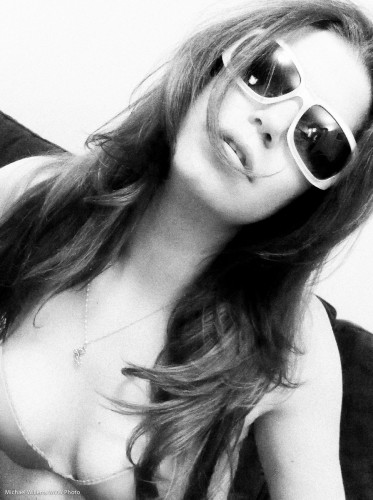
  4. Post-process – in my case, in Lightroom. First, I converted the image to black and white.
  5. Then I applied an enhanced contrast style.
  6. Then I reduced the noise
  7. But then I applied lots of film grain. Love that grainy look (view full size to see it):

The result:

Model Kim Gorenko (Photo: Michael Willems)

Not a bad shot eh, and taken with an iPhone in low light.

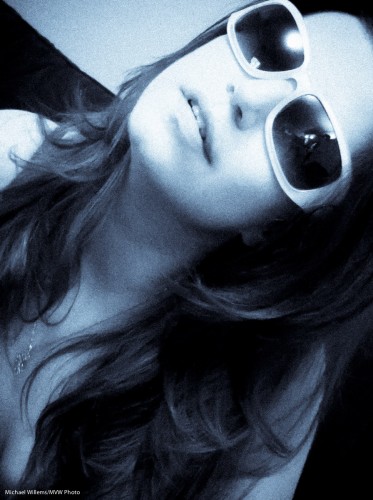
Here is another example, with Selenium Tone style applied (and the same other tuning done):

Model Kim Gorenko (Photo: Michael Willems)

So do not make the mistake of thinking a good photographer is nothing without great equipment. Yes, it expands your possibilities, but if all you have is an iPhone, use it well!


Studio tip

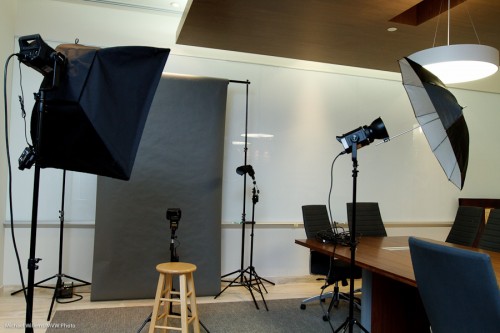
In a studio setup, we usually use strobes – big, outlet-powered lights. Like the two main lights here, with softbox and umbrella:

Studio (Photo: Michael Willems)

Fired by a pocketwizrds: you can see one on the left.

But if you look carefully, you will also see two speedlights there.

Speedlights? Yes, but fired manually, also via pocketwizards. For which you need a pocketwizard and a cable from www.flashzebra.com for each one.

Why do I small flashes for hairlight and background light?

  • Smaller
  • Lighter
  • Less cabling, since they are battery-powered
  • And not least, the ability to use Honl Photo small flash modifiers such as grids, snoots, and gels.

All of which I use here, and the resulting photos look like this (shot on a 1Ds MkIII with a 70-200mm lens):

Studio shot (Photo: Michael Willems)

(PS if you are buying those modifiers, and I recommend you do, as a reader of this site you are entitled to use the Honl Photo web order discount code which Dave just made available for you: enter code mvw2011 which gives you 10% off the price!)


Consider a splash…

…of colour for visual interest?

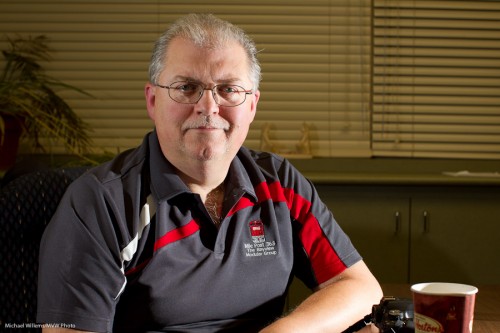
Take this off-camera flash picture, for example (taken with speedlites, of course):

Good, because it is using off-camera flash. But you might try to add some colour by using gels. I use the excellent HonlPhoto gels, part of the Honl Photo small flash modifier systems.

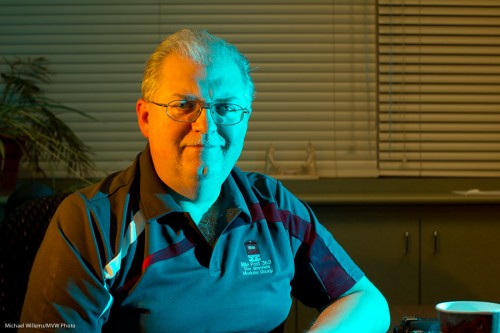
No, not like that.

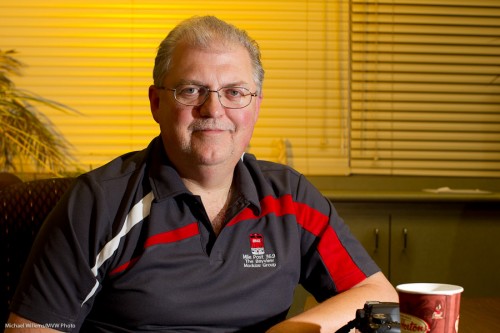
But perhaps like this:

Much better, I think. And all that is needed is a simple gel on the background flash (ask me about the Honl Photo discount, by the way, if like me you are considering those flash modifiers).