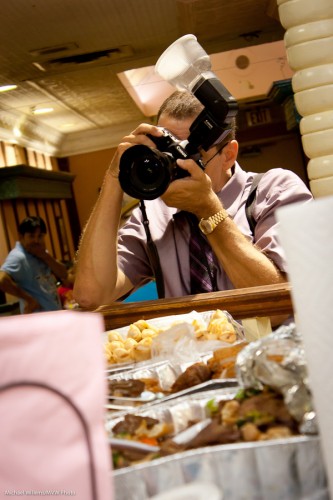
TTL magic

When you use an automatic, TTL (“Through The Lens”) metered flash, how does your flash know how much power to emit?

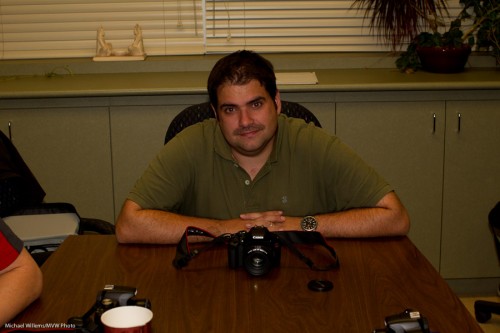
I.e. when I set my camera to , say, 1/200th second, f/5.6, and 400 ISO, now the camera needs a certain amount of power to come from the flash to match that. If the flash emits too little power, you would get this too-dark picture:
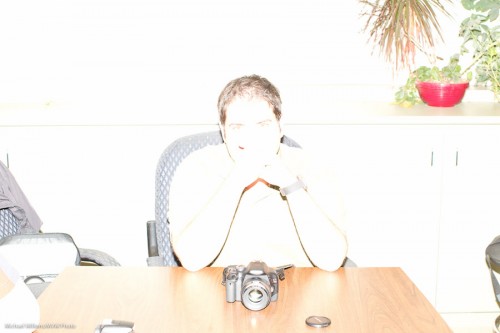
If on the other hand it emits too much power, you would get this instead:
And yet, when you click, time and time again, you get something more like this:
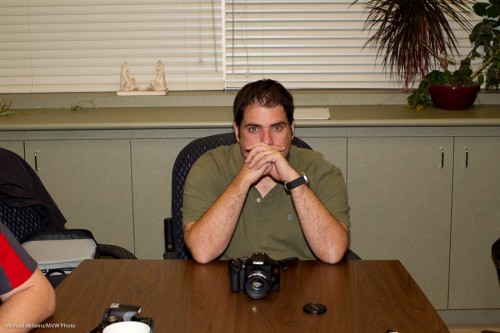
So how does the camera magically know the power should be at that level for this shot? After all, for each shot it is different. Get closer to the subject, and you would need less power. Farther away, and you would need more.

OK – here is how the camera knows.

When you click, the following happens:

  1. The camera tells the flash to emit a little pre-flash.
  2. The camera measures the light returned from that pre-flash.
  3. It uses that amount of returned light to calculate the power needed for the shot.
  4. Only now does it raise its mirror and open the shutter.
  5. Then, it tells the flash to fire at that calculated power level.
  6. The flash does as it is told.
  7. Afterward, the camera closes the shutter and drops the mirror.
  8. Done.

A whole lot of stuff here to ensure you get correct flash exposures.

So yes – every time you see a flash, you are actually seeing two flashes, This also explains why you appear to see theflash through your viewfinder – you are seeing your preflash.
 

Tick tock

And here, from “Time”, Pink Floyd:

Ticking away the moments that make up a dull day
You fritter and waste the hours in an off-hand way
Kicking around on a piece of ground in your home town
Waiting for someone or something to show you the way

Which reminds me to show you the way… in a small way. Have you set all your cameras’ time to winter time yet?

If not, go adjust them now. The date and time setting is in your camera’s menu. Go ensure that time is correct, on every camera you own. I’m doing the same!


Fuji X100 update

Those of you who have a Fuji X100: the new 1.11 firmware is out. Download it from here.

Then upgrade, ignoring the Fuji instructions – you do not need the extra file. Just the FPUPDATE.DAT file. Once you have that:

  1. Insert a fully charged NP-95 battery into your X100.
  2. Format your SD card in your camera. (Backup your data first!)
  3. Connect the card to your computer.
  4. Copy the FPUPDATE.DAT file to the root directory of the SD card.
  5. Insert the SD card into your camera.
  6. Turn the camera on while holding down the [BACK] button to start the firmware update process, and follow the on screen instructions.

You will need to reset date/time and all custom fuctions.

And you will now have a camera with faster close-by AF.


Light = photons

Light consists of photons. And photons are photons, whether they were emitted from a large strobe-type flash or from a small speedlight.

To see what I mean, look here, at a few pictures I took of kind volunteers, during classes I taught at the Exposure Show today (note – tomorrow is day three, and I will still be there teaching – come catch this it, is worth it!):

Portrait (Photo: Michael Willems)

Portrait (Photo: Michael Willems)

Portrait (Photo: Michael Willems)

Portrait (Photo: Michael Willems)

Portrait (Photo: Michael Willems)

All extremely attractive and wonderful people.

But can you tell me….

  • Which ones were shot with studio flashes (strobes) and a reflector?
  • And which were shot with one small off-camera flash and a reflector?

Answer below the line, after you click:

Continue reading

How to hold your camera

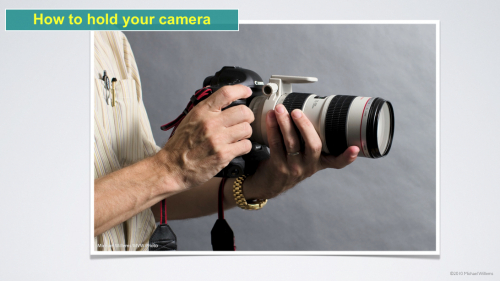
Look at how I am holding my camera here:

Holding a lens (Photo: Michael Willems)

Even without the long lens, that is how you should normally hold your camera: left hand under the lens, and turned so that the four fingers are below the lens, and the thumb left/above.

Why? Because this way, you stabilise the camera more. And unless you are using a tripod, stability is everything.

To zoom, use thumb and ring finger of your left hand – hand stays where it is. And to take a portrait shot, with your right hand, move your camera a quarter turn up – the left hand stays as it is.


Vignette

I admit to a guilty pleasure: I like vignettes. In other words, I like a dark area around my subject, to make it stand out.

Like this:

Which , when subtle enough (yes, I am laying it on a little thick here so you can see it clearly), looks better to me than this, the original:

You can achieve a vignette like this by using the “Post Crop Vignette” function in the Lightroom Develop module’s “Efects” pane. Or in Photoshop.

But you can also do it with your lens. And in some cases, like when I shoot news, this is the only way: when shooting any editorial picture, you may not change anything (other than cropping, white balance and exposure adjustments). Distorting is not allowed!

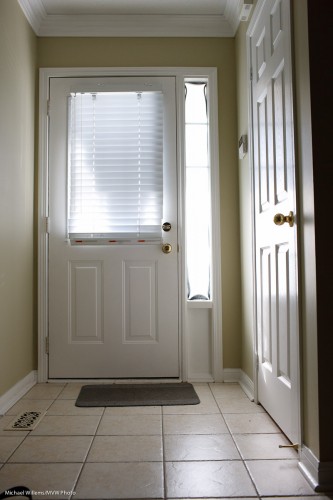
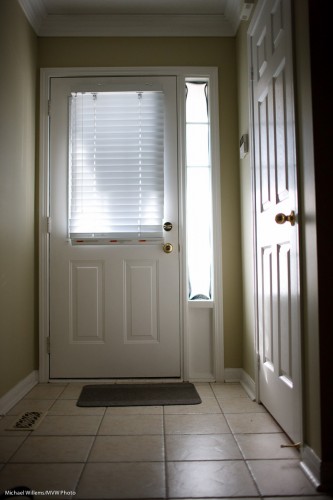
But if I shoot with a fast lens wide open, I can get the same. Here’s my 35mm lens at f/4:

Hallway (Photo: Michael Willems)

And here it is at f/1.4 – wide open. See the effect?

Hallway (Photo: Michael Willems)

And no editing was done here – so I can do this for news pictures when I like.

Of course the drawbacks are obvious: very narrow depth of field can be too narrow.  But often, the vignetting effect is beneficial, which is one reason I sometimes shoot wide open.


Do you need fast lenses?

A recent comment on a post prompts me to remind you of what I have explained here many times before: it ain’t all aperture that makes blurry backgrounds.

Of course aperture is a main factor: the larger the aperture (i.e. the smaller the “f-number”), the blurrier the background. So an f/1.4 lens sure is handy that way.

But other factors count too!

  • Sensor: the larger the sensor, the blurrier your backgrounds can be. (Try to get blurry backgrounds with a little small-sensor point-and-shoot camera: good luck!)
  • Proximity: the closer you are, the blurrier your backgrounds can be.
  • Focal length: the more you zoom in, the blurrier your backgrounds can be.

Here, my food the other day at f/2.8: blurry background because I am close. I did not need f/1.4 (even f/4 would leave the background perfectly blurred).

Food at Julia's in Oakville (Photo: Michael Willems)

And here, the priest at St Andrews at f/2.8. This time, blur because I am zooming in, using a 200mm focal length. Again no need for f/1.4.

Fr Coughlin at St Andrews in Oakville (Photo: Michael Willems)

OK, so you do not always need an f/1.4 lens for blurred backgrounds.

In that case, why do I love my primes?

  • Light. A faster lens lets in more light, meaning you can get reasonable shutter speeds without crazy high ISO values.
  • Quality. A lens is usually best when stopped down a couple of stops from wide open. So an f/1.4 lens at f/2.8 is likely to be better than an f/2.8 lens at f/2.8.
  • And yes, sometimes you do want blurred background when you cannot get closer or use a longer lens!

I hope that clarifies things. You see, to be a competent photographer you need to fully understand this – it has to become part of your DNA, as I told my Sheridan College class the other day.


Long or wide?

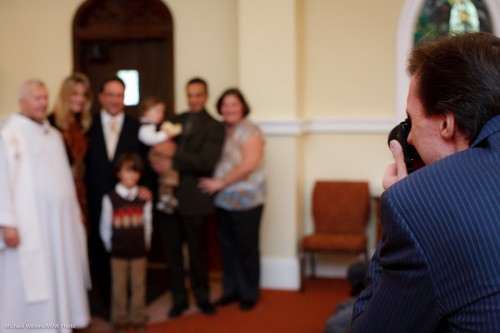
When I shoot an event, like last Saturday’s Christening, I usually shoot with both long and wide lenses.

So here I had:

  1. A Canon 1Ds3 with a 50mm f/1.2 lens
  2. A Canon 1D4 with a 70-200mm f/2.8 lens (meaning really a 90-260, since the 1D has a 1.3 crop factor).

I shoot the 50mm lens when I need:

  • More light – if I shoot at f/2.0 I let in a stop more than the 70-200 f/2.8 can, and at f/1.4 another stop. This can come in handy.
  • Consistency.
  • Super Blurry backgrounds.

And I use the long lens when I need:

  • Grabbed shots of expressions: “candids”.
  • Distance – because I cannot come too close during a solemn ceremony without spoiling the mood for everyone.

An example of the long lens:

And one of the 50mm lens:

Could you shoot an event with just one lens? Sure. That just means you will be shooting one type of photo. not all types of photo. If you only bring a wide lens, for instance, you will need to forgo the candids and get closer, instead. But of course it can be done. Do not get into gear too the extent that you think the gear determines how good you are. It doesn’t – it just helps bring it out by extending the range of options at your disposal.


OS X Lion: Apple’s Vista? No – worse.

I’m an Apple user, and I have been for a while – happily so far.

But the more I see OS X Lion, Apple’s new OS, the less I like it. No – the more I hate it. It is a dumb downgrade, designed to make your powerful computer into a dumb iPad.

Apart from the many cosmetics, the silly seven-finger (or whatever – after three I stop counting) swiping gestures, the “Full screen nonsense”, the “Launch pad”, the “App store”  – in general, the drive to use a computer as an iPad, not as a powerful work computer – there are many big issues that stop me from switching.

The lack of a “save as” function, and the fact that Apple in its app now always saves multiple versions of files unasked, is a show-stopper for me. The lack of a scroll bar, the unnatural scroll direction, and in general the dumbing down and the emphasis of scroll pads and de-emphasis of anything mouse-related are big factors too.

It seems to me that Lion was made for people with an IQ of 85 – unfortunately, those of us who know things are now reduced to the same level. It’s like you make a Boeing 747 that is able to be flown by Granny – that unfortunately means that a real pilot is going to be severely restricted in what he can do.

And to top it off, now I was told by Apple that iCloud will be unavailable if you do not use Lion or iOS 5. This is a cynical abuse of power – upgrade or lose your email address and any calendar synching, and so on. So Apple does not want people to use Lion because they like it – they will instead force you to use Lion if you want synching (which is 100% central to my life in the case of synching Calendar events). For no reason other than bullying, Apple now says “switch to Lion or use that ability”.

I didn’t think I would ever say this, but this may very well drive me back to Windows or Linux. The “save as” function is deeply ingrained in my workflow – it has been a staple function since early computers – and iWeb runs all my web sites.

When I was just telling Apple advisor “Yashika” this on Live Chat, she abruptly cut the connection. It seems that Apple staff, like scientologists, do not like to have anyone interfere with their reality distortion field.

So either I live with a severe dumbing down and a permanent impoverishment of my computing, or I switch to Windows, which has some pretty severe drawbacks of its own. Or to Linux, which lacks the apps.

Don’t take my word for it. Many pundits agree with me. Here’s a few:

http://gizmodo.com/5819418/mac-os-x-lion-this-is-not-the-future-we-were-hoping-for

http://todmaffin.com/lionsucks

http://smilingmac.wordpress.com/2011/09/06/personal-thought-dont-upgrade-to-lion/

http://www.reghardware.com/2011/09/07/apple_mac_os_x_lion_the_nanny_os/

Well – I have until June 2012 to decide on other options. What wil be my new operating environment? Ideas?


Tools

As I recently said here, you need to do what you need to do with whatever tools do it. And sometimes those are not the ideal tools.

And once again, let me say that the tool of last resort for me is the Gary Fong Lightsphere. I can be seen here using it at a recent shoot:

That is needed in an environment where it is hard to bounce. So then I get acceptable pictures by all acounts: not art but not bad either:

As you see. a shadow, but not a hideous one. This is light I can live with, and you will see me using this kind of light in events regularly – but only until I can find a place to bounce.