Newsflash: Flash News—Vistek Toronto, Saturday

Flash newsflash: I am teaching a flash workshop at Vistek in Toronto on Saturday, May 16, at 10AM. This is a workshop that covers everything from first principles to creative techniques, so expect an intensive three hours.

Book here:

www.vistek.ca/events/seminars/1449/Mastering-Flash-Workshop-with-Michael-Willems.aspx

There is space but seating is strictly limited, so if you plan to attend, book soon. And bring your (SLR or similar) camera and especially, your flash.


Lightroom 6

Lightroom 6 is the latest and greatest in the version history of Lightroom, the best thing since sliced bread. Asset management, editing, and production all rolled into one.

LR 6 is a worthwhile upgrade; as I mentioned in an earlier post, it has lots of new stuff. For me, the main features for me are:

  1. Face recognition. You can now recognize faces, so that all photos that feature uncle Bob can be quickly found. Remarkably accurate
  2. Panoramas. Stick together 2, 3, 4, or more overlapping photos that you have shot.
  3. HDR. Stake one normal shot, and one more more darker and one or more lighter, and pull them together to get either artistic “paint” effects, or just more dynamic range (i..e. the detail in the dark areas will be visible, as well as detail in the light areas).
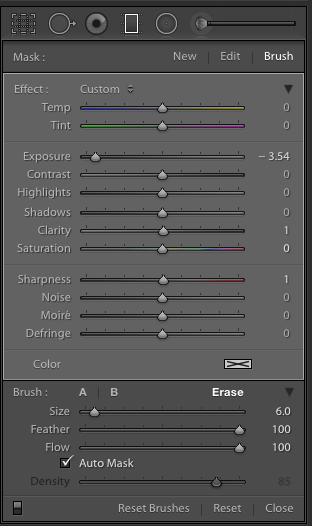
  4. Brush in filters: you can now use a graduated filter and remove it (or add it) in specific, brushed areas:
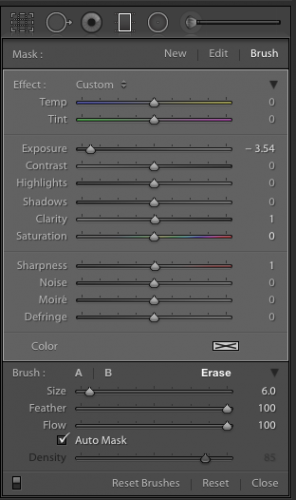
(The graduated filter here has the new BRUSH activated in ERASE mode, so I can delete part of the filter)

There’s more, especially the Mobile functions and the reputed speed increase, but I cannot comment on that since I have not observed or used them.

So, how to go about upgrading?

First, make sure that you have backups. And I mean good, verified backups. You never know. Don’t ever lose all your work… make backups and store them off site. Backups of both the photo originals and the work you have done on the (the catalog file, named <something>.LRCAT).

Then, the upgrade. Under “Help” select “check for upgrades”. Make sure that if you have the app, you keep getting the app, and not the “creative cloud”. Adobe really, really wants you to get the Cloud version, which works out much more expensive even in year one if all you use is Lightroom; and after year one the price will go up.  You will have to search the Adobe site; look for “All products”, and look for the price of around $80 for the upgrade. Not the $3-10 per month Cloud price. (Think about it: if the next upgrade is two years away, and I only use Lightroom, I pay $80 for those two years. Cloud users would pay significantly more: 24 times something is something big.)

Before you start, you will need to log in to Adobe, and under “My products”, find the serial numbers for previous versions. You will need the previous version’s serial number to qualify for the upgrade.

When, armed with the login and the serial number, you perform the upgrade, your catalog file will be converted. This takes time. On my catalog, with around 200,000 photos it took most of the overnight that I let it run.

At the end, when you can use Lightroom, you will have a new catalog. But your old catalog will also still exist. Just in case. I advise you keep that around for a little while. Just in case. You never know.

Also, make sure that when you want to use Lightroom you start the new app, not the old one. The new one is called “Adobe Lightroom” and lives in your app folder, inside a folder called Adobe Lightroom.

After the upgrade you will see that Lightroom works as it did before. But new functions have been added. Under “Photo” you can now, after selecting two or more photos, select Panorama or HDR (high dynamic range). Try!

And more importantly, in the grid view you see a new face symbol as one of the following views. Bottom right:
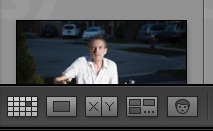
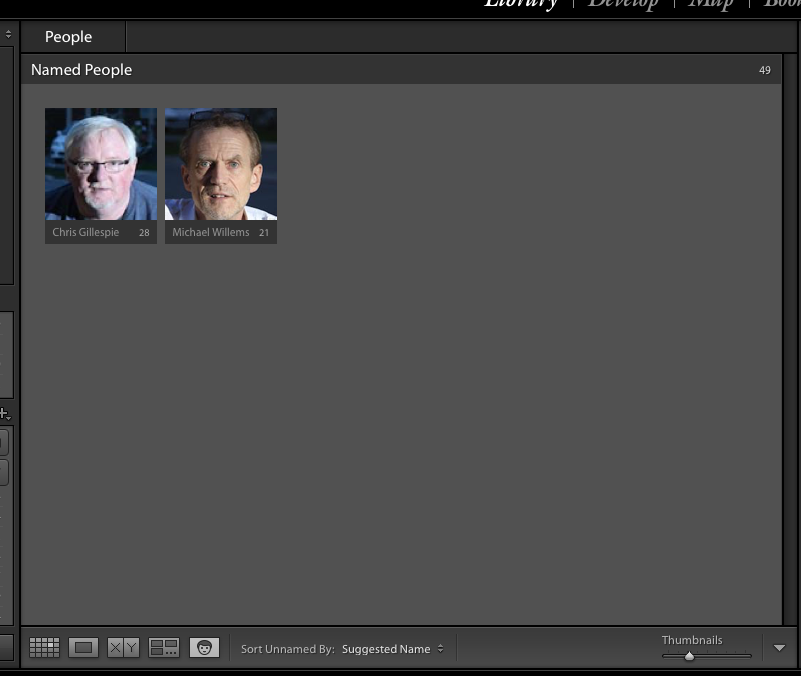
When you click that, you will see the faces Lightroom recognizes. Give them names. Over time, Lightroom gets better and better at naming faces. After you name them, you see:
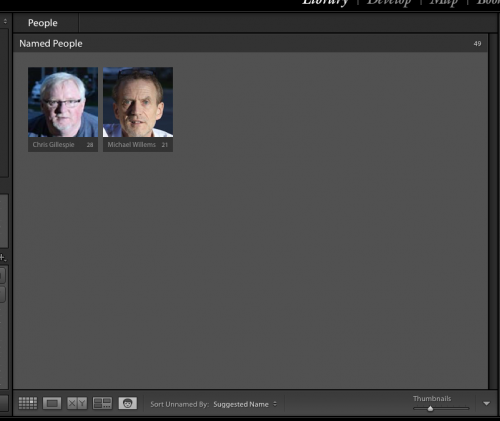
Initially, of course, all faces are unnamed.

You can turn face recognition indexing off (paused) or on by clicking on the Lightroom Logo on the very top left of your screen. You see:
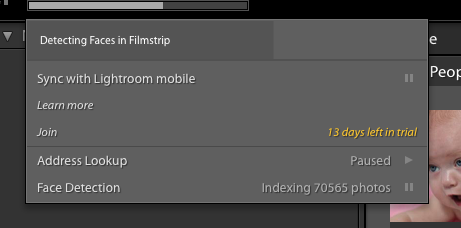
During this time, the application may be slow, not just when you are looking at the grid view, but also when exporting a picture, printing one, and so on. Allow plenty of time for the indexing to finish, and you can pause the indexing when you need speed. You can index per shoot, or per year, or all at once (though I would not recommend that when you have a large catalog, like mine).

I am still discovering new things, so there will be more blog posts about Lightroom 6. For now, though: recommended!

___

I also coach privately: bring me your laptop and I will not just teach you, but we will set up your own Lightroom installation in the optimal way. See http://learning.photography.



Basics

Before you go on to advanced topics, you need to know the basics. This is true of brain surgery, writing, painting… and it is also true of photography. Start with the basics, then build on top of them.

And yet, I sometimes meet people who think the basics can be safely skipped. Or who think the basics are simple (after all, they are called “basic”). But the basics are not simple; they are called basics not because they are simple, but because they are at the basis of everything.

These basics include:

Camera basics. You should know your camera, its menus, and its quick menus. What functions are where? Where are the buttons? Look at them all and see what they do. And I mean really learn them. How do you set a hundred and twenty-fifth second shutter speed? (No, it’s not 1/25, but it’s 1/125). What does 8″ mean? What does your camera maker call continuous focus, AF-C or AI-Servo?

A good exercise is this: pick up your camera and look at it. Ask yourself if you are fully familiar with each button: its name, purpose, and functionality.  But also: when to use it. You may be surprised that there is more that you did not know than you thought.

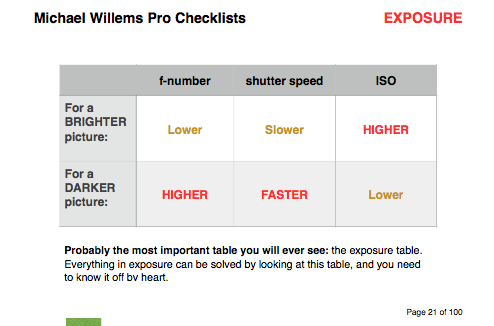
Exposure basics. This is the most fundamental of them all, and once you know them, things get easier. Hence my “table of truth”, a table that should be second nature to you. No, first nature; it’s that important:

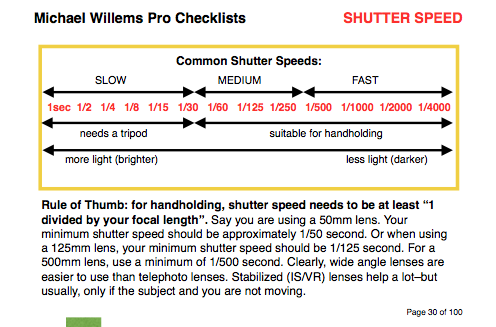
After you know this, put the two points above together, and learn what kinds of aperture and shutter speed settings are recommended.

Tables like this should also come naturally to you. As should the sumbers: the main shutter speeds as mentioned above, and the main f-numbers also: 1.4,  2.0,  2.8,  4.0,  5.6,  8.0,  11.0,  16, 22, and so on.

You should also lean how these interact, and how they work creatively.

Technique basics. These include such things as focus basics (when to use one focus point; when to let the camera choose; and when to use AI Servo/AF-C). It stands to reason you should know those before going on to advanced topics, but look around you and all you see is out-of-focus photos. And that is such a shame. So learn focus, white balance, how to hold the camera.

How do you learn? By a combination of:

  • Reading (may I recommend my e-books? You will find the Mastering Your Camera book and the Pro Checklists books, from which I copied the tables above, are excellent resources to always carry with you.
  • Taking courses. Whether it is private tuition, which is remarkably affordable for what it is, or classroom-style learning, this speeds up your book learning immensely.
  • Trying. You don’t pay per click, like in the film days, and trust me, doing it is the only way to really solidify your learning.

It’s much easier than you think, as long as you take it logically. The books and courses are available from http://learning.photography, and you will find this blog to be a useful resource as well. Go for it, and shoot like a pro soon.


Beginner’s Point

A beginner’s tip today.

You should usually focus as follows:

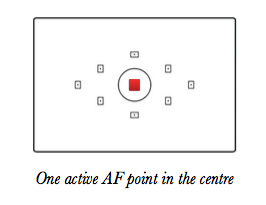
  1. Select a single AF Point (focus point), rather than have the camera select one or more from all available points. Set your camera to the mode where this is the case. You will see something like the illustration above;
  2. Ensure that your focus point selection is not “locked” with a switch on the back of the camera, as is possible on many cameras;
  3. Using cursor or control wheel, move that focus point to where you want it;
  4. Ensure that the focus point is on an object at the distance you wish to focus on (either on your subject, or on some other object that is the same distance away). Note that “an object” means contrast/lines;
  5. Press the shutter half way down, until you see or hear confirmation that focus is achieved (“the beep”);
  6. While holding your finger on the shutter, recompose if need be;
  7. Now press fully down to take the picture.

The mode where the camera chooses focus points often results in multiple points lighting up. Does this somehow result in “more focus” (as in, greater depth of field)? No! It simply means all those focus points found something at roughly the same (close) distance. It is still just that distance that is in focus.

The point is this, and the pun is intended: more focus point does not give you more focus.

___

Learn more from my e-books, including the just released book 7: See http://learning.photography to learn more. You should order now!

“My first… etc”

I very often hear people who are a little ahead of themselves. They do paid portrait shoots before learning how to focus, that sort of thing. They do not want to learn formally, for instance from a course, or books, or seminars; and yet they expect the knowledge to come to them for free, somehow.

Wishful thinking, and you know it. So let me grab a few of these things by the horns. Starting with portraits. You are doing a studio portrait; you have a backdrop; but the rest is mystery. So your images end up:

  • Badly lit.
  • Under- or overexposed.
  • With a background that is sharp instead of blurred.
  • With the subject not separated from that background.
  • Out of focus.
  • With the background white, not coloured even though you use gels.

That is because you never learned the basics. But there is good news: studio portraits are simple. All you need to learn is:

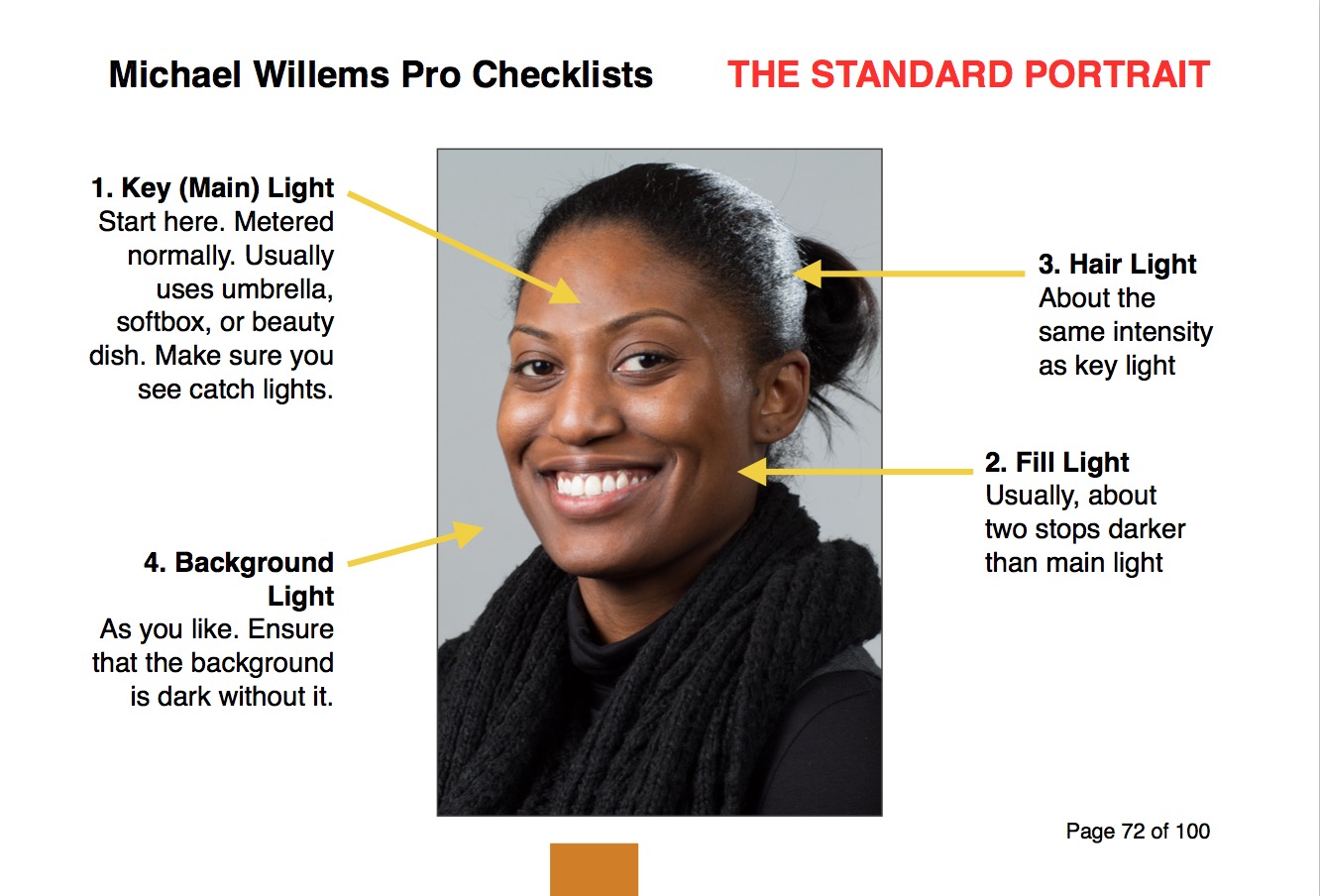
  • Lighting. A main light, 45 degrees away from subject. A fill light, same on other side. Hair light, opposite main light. See diagram, from my new book:

  • Exposure. Set your camera to manual mode, 1/125 sec, f/8, 100 ISO.
  • Turn the flashes to half way (obviously  the flashes are on MANUAL too).
  • Now meter the main flash. Adjust main light until it reads f/8.
  • Same for hair light.
  • Fill light: meter this to f/4 (i.e. adjust this light until meter reads f/4 when it flashes).
  • Background light: same as main light, again.
  • White balance to “Flash”.
  • Focus using one focus spot. Focus on the eye using that one spot.
  • Use a lens longer than 50mm. I prefer my 70-200 or my 85mm prime.
  • Move subject from background as much as you can. Then you can gel the background light. If, whoever, much of the normal light falls on the background, you cannot gel. Test this by turning OFF the background light: the background should be dark.
  • Turn subject toward main light, then head slightly to you.

Like this:

That really is all. Click., You have a competent portrait.

What you must not do is pretend that no learning is necessary. Go find a course, go buy my e-books; read this free resource www.speedlighter.ca; take private training; sign up at Sheridan College; : whatever you can do, do it now.

It really is simple. But not as simple as “I just bought a camera and next week I am shooting a wedding”—and believe me, I have heard that very statement more than once.


LR, Video, Flash: Learn Remotely

Lightroom 6 is out, and you need it. The End.

OK, not quite the end, but Adobe Lightroom 6 is an amazing workflow and editing tool, and no, you do not need to do the edits in Photoshop: you do almost all of them in Lightroom, as I do. Read yesterday’s post about some of the new features, and there’s a lot more. More description soon.

But how to learn it? It may be great and earth-shattering and all that, but most of us do not just intuitively learn a complicated app simply by playing with it.


Learn Lightroom Remotely:

Well: now there is a better way: I can teach you remotely. Using Google Hangouts, I can show you, and we can set up your workflow, edit photos, create cool presets: while we use the computer together. You see me; I see you; you hear me, I hear you; and we see each other’s desktops.mIt really is almost as good as being in the same room together. Whether you are next door, or in Australia (literally).

This method works so well that I have also started teaching video editing the same way. For my usual teaching rate I teach you individually. All you need is a reliable Internet connection, and preferably a computer with a built-in camera, speaker and microphone.

You see what I do, or I see what you do, while we talk and see each other as though we were in the same room. You will be amazed at how much more quickly you learn with this method.


Video Editing:

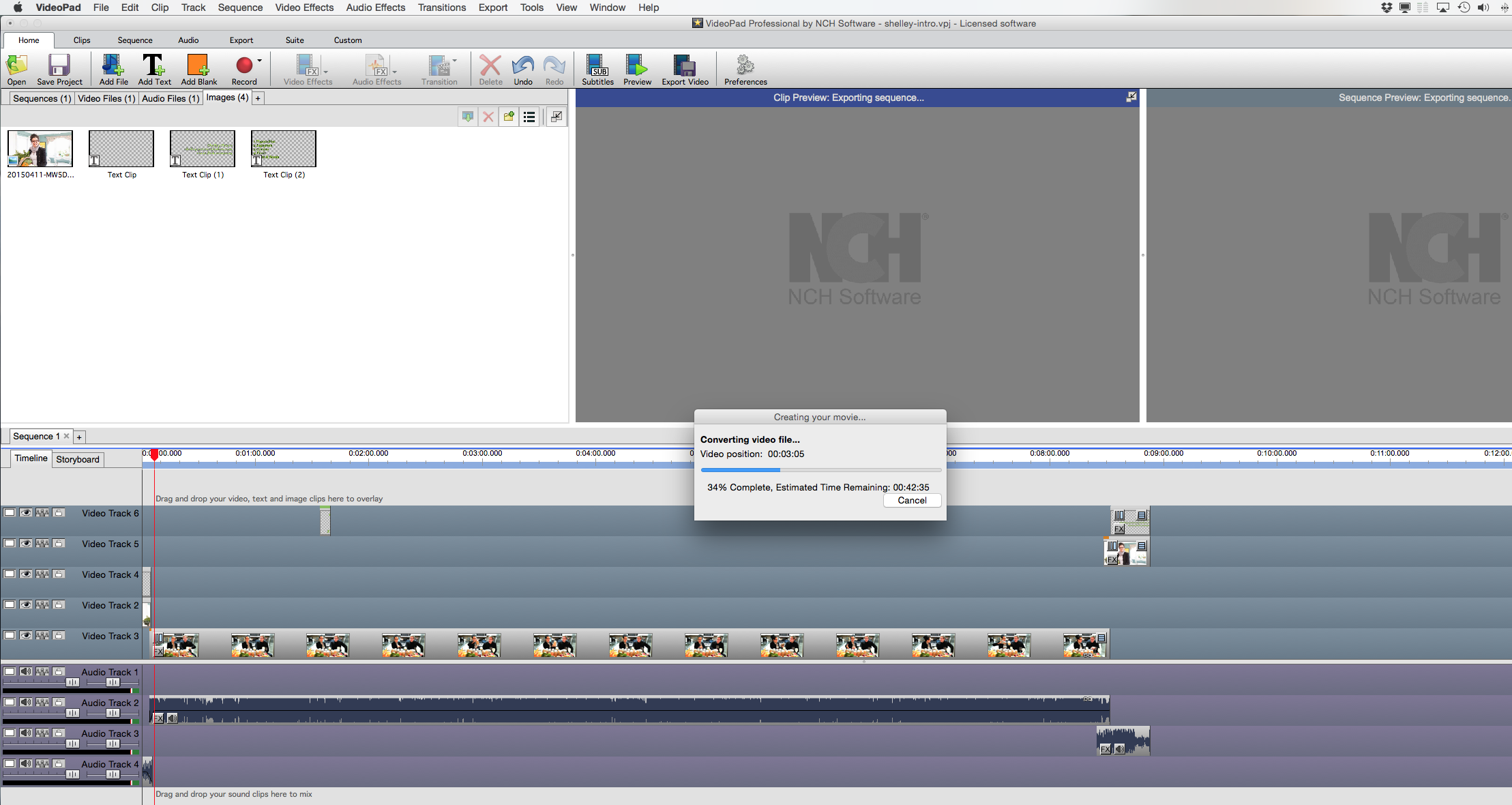
I also teach video and how to create video with a digital SLR. Here’s my desktop an hour ago, as I am creating a video export, combining video, audio, pictures, text, and royalty-free music, with a client:

This, too, lends itself very well to teaching remotely using Hangouts.

Pick up your phone and give me a call and from Lightroom to Video to Flash, I will teach you how it all works.  This, too, comes with my usual Full Happiness Guarantee: If you are not delighted, money back. It’s never happened, but if it does, I will honour my promise!


Finally: The Pro Checklist Book! IT WILL BE MADE.

Whether the Kickstarter campaign is successful or not (and you have about 12 hours left, if that) – the printed version of the new “Pro Checklists” book WILL be made. So in the last minutes, please go to Kickstarter (link HERE) now and support this print production, and at the same time benefit from interesting and fun rewards.

If the campaign fails to reach target, I will contact you individually, and I will honour the campaign promise, because come what may, this checklist/best practices book of charts and one-pagers will be made. Print quotes are rolling in as we speak!


Back to work, for me. No rest for the wicked, as they say.  —Michael

Opportunity knocks.

NEWS! My next project is being kickstarter-funded. And I am very excited to be able to tell you about it.

Kickstarter, as you may know, allows a business idea to take place without the investment capital: the public funds it. In return, people who fund it get benefits like funder pricing, extras, and so on.

And mine—wait for it—is a printed version of my new book. This checklist reference book:

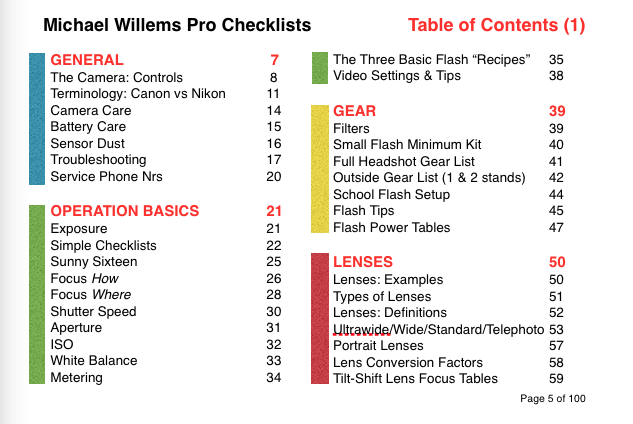
A printed version is exactly what we all need. From beginner to pro, all sorts of tables, guidelines, checklists, and more. Here’s the table of content:

Interested yet? Now imagine this on thick stock paper, one sized, with a ring binding at the top, so you can flip it to the page you want; and it’s a 4×6″ sizem so it fits easily in your camera bag, even in your jacket pocket.

Want to help me, and at the same time get lower prices or extra benefits? Then get in nowwww.kickstarter.com/projects/1117812792/the-ultimate-checklist-booklet-for-photographers

f/22

This is what f/22 looks like (at the usual outdoors flash setting of 100 ISO and 1/200 sec):

“You know the day destroys the night
Night divides the day, tried to run, tried to hide
Break on through to the other side”

(Jim Morrison, John Densmore, Robbie Kreiger, Ray Manzarek/The Doors)
[Read more: The Doors – Break On Through (to The Other Side) Lyrics | MetroLyrics]

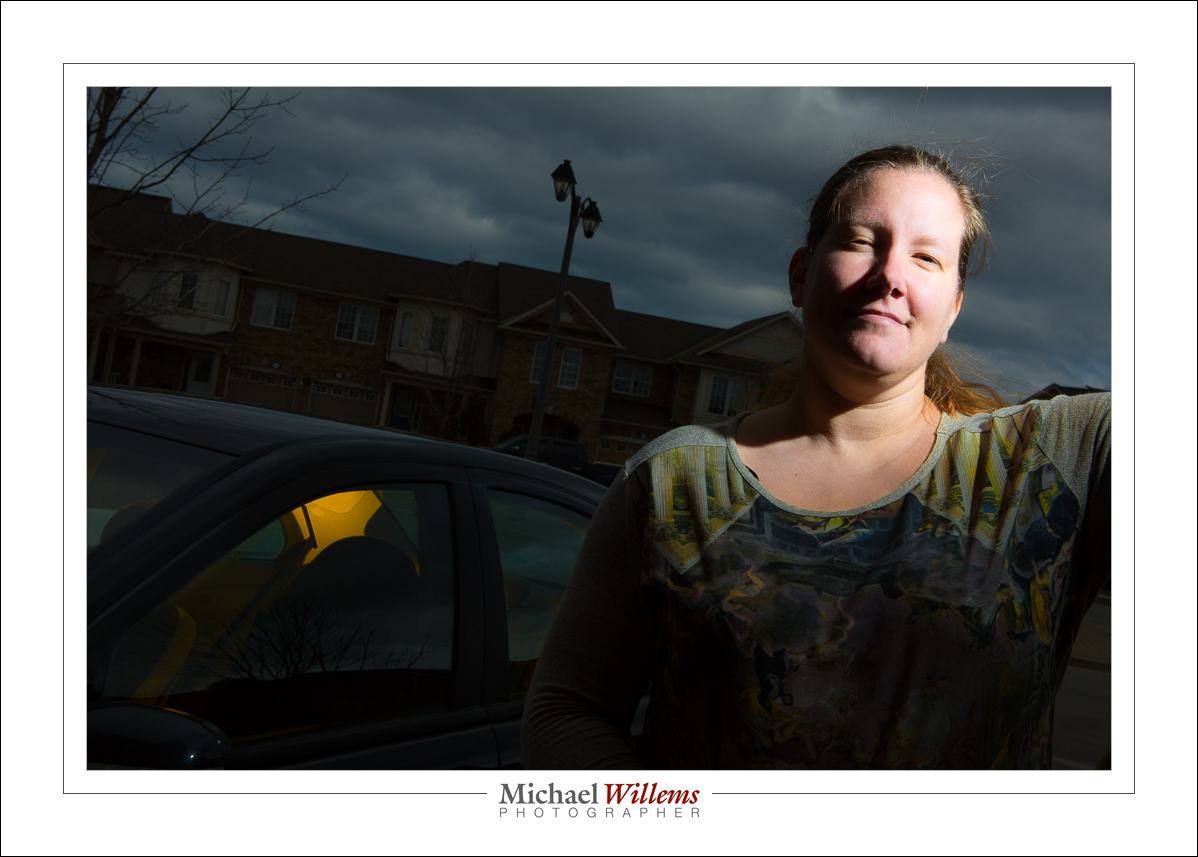
This was a normal day, and daytime (i.e. not evening). So with f/22 it turns dark. The flash, fired by means of Pocketwizards and set to manual, 1/4 power) is handheld by the subject, photographer Valerie.

Remember: Flash makes your camera a light shifter.


Basics. Ask.

If you do not understand basic things: ask. There’s no such thing as a bad question, if you don’t understand something and the answer brings you closer to understanding.

I have found often, for instance, that people don’t understand shutter speed. Like “a one thousandth of a second is faster than an eight of a second”., At that stage I lose some people.

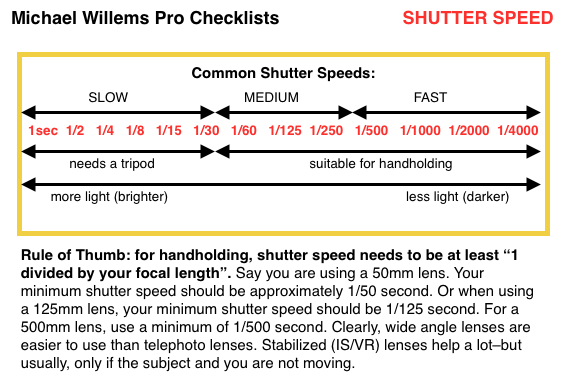
So here: shutter speeds explained in one small page.

Read that thoroughly if you are new to photography and all that tech talk confuses you. And if it is still not clear: ask more.

That’s how you learn, by asking. And that’s why I teach. Via Google Hangouts, if you aren’t local: I teach people all over the world, literally. And when most people say “literally”, they mean “not literally”. When I say “literally” I mean “literally”. 🙂  See http://learning.photography to learn more.


Welcome, TWIP listeners.

Welcome, TWIP (This Week In Photo) listeners. Scroll down, read, check out the ebooks, search, and ask questions. Welcome to the “go-to” instructional photography blog!

Want to hear me, in the episode I just co-hosted? Go to http://thisweekinphoto.com/twip-406-i-villain-i-photographer/ to listen to episode 406.

Footnote:

Enjoy speedlighter.ca and above all, enjoy your photography with the new skills I can teach you. Especially, flash skills. I use small flashes everywhere. Like in this corporate board photo of earliuer this week: see the two gelled flashes to add some excitement?