Printer woes

My Canon Pixma 9500Pro printer is suddenly printing too dark at the top. Fortunately, I have made all my exhibit prints, so I’ll look at it after the exhibit’s first weekend. First a thorough cleaning then we’ll see from there.

One intriguing issue I had to solve, though, is this, and I thought I would share it. When using Canon art papers, Canon insists on a 3.5cm margin around all edges. Fine, I know that and I have set up my Lightroom printer parameters accordingly.

Suddenly, though, the settings no longer worked, and every print failed with a warning to use a driver with a 3.5 cm margin. I tried everything I could, but it kept saying that – and the margin setting in the Lightroom setups had not changed since – forever.

Guess what? It took a bit of doing but I solved. that one. The margin used to be set as 1.38inches in Lightroom. But either the Mac OS, or the printer driver, or Lightroom 4, now translates 1.38 in as just below 3.5cm! Once I changed the margins to 1.39in, it all worked.

The moral of this story: don’t give up, try all sorts of things when you are having an issue. Be creative and eventually you will hit on the one that gives results. I mean.. who would have thought that a rounding difference would cause issues?
Fuji Happiness

Those of you who have a Fuji X100 APC-C sized small camera: the new 1.30 firmware is out. Maybe it has been for a while – reminder to self to check regularly!  Download it from here.

Then upgrade, ignoring the Fuji instructions – you do not need the extra file. Just the FPUPDATE.DAT file. Once you have that:

  1. Insert a fully charged NP-95 battery into your X100.
  2. Format your SD card in your camera. (Backup your data first!)
  3. Connect the card to your computer.
  4. Copy the FPUPDATE.DAT file to the root directory of the SD card.
  5. Insert the SD card into your camera.
  6. Turn the camera on while holding down the [BACK] button to start the firmware update process, and follow the on screen instructions.

You will need to reset date/time and all custom fuctions.

And you will now have a camera with a few major upgrades since last year. Among them:

  • Better Autofocus
  • The RAW button can now be used as a programmable Function button too – thank God!
  • Many bugfixes and other small functionality improvements

Fuji has a winner with the X100, as I have said before – more importantly, Fuji, unlike some other camera makers:

  1. Listens to its customers;
  2. Acts quickly to implement their requests;
  3. Sees  an expensive camera like the X100 as an ongoing project, not as a “I’ve sold it and now on tho the next project”

…all of which I find very refreshing!


Metering: The Light Meter Lives

Using a light meter, you say, is oldfashioned.

Not so!

  1. A light meter is fundamentally different from a camera-based meter. The former is an incident light meter and does not depend on the subject’s brightness. The camera based meter, on the other hand, is a reflected-light meter, and hence depends on the subject’s brightness. In fact the camera’s meter can only indicate the right number when you aim it at a grey card (and when using the spot meter, at that).
  2. For manual flash you can only use a light meter, a so-called “flash meter”.

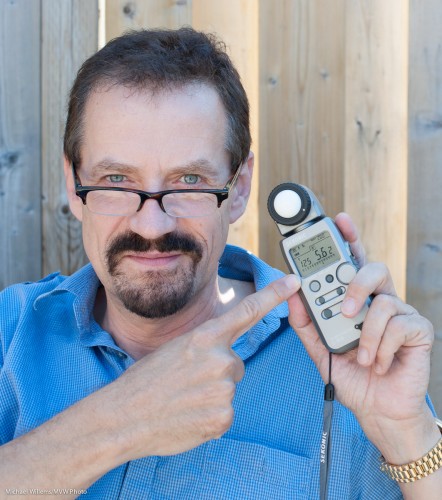
A modern meter like my Sekonic is both ambient and flash meter.

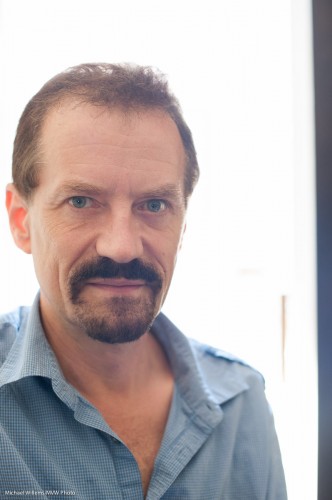
To use it for ambient light, as I did for the student photo above, do the following:

  1. Move the white dome all the way out.
  2. Turn the meter on.
  3. Using the MODE button, set the meter to ambient metering (the sun symbol). Select the mode where you set the aperture and the meter will indicate the shutter speed. (The F-number has a square around it on the Sekonic). You could also choose to set the shutter speed, and have the meter calculate the aperture instead. But let’s assume here that you choose the aperture and want the camera to calculate the shutter speed.
  4. Set the ISO to the ISO you choose to use on your camera (200 in the shot above).
  5. Set the meter’s aperture number to the aperture you have chosen on your camera.
  6. Hold the meter exactly where the subject will be, facing the camera. Ensure you are not blocking the light that falls onto the meter.
  7. Click the reset/measure button on the side.

And now you read the shutter speed you need with that ISO and that aperture. (You can change ISO and/or aperture and a new correct shutter speed will be displayed that match those ISO/aperture settings.)

Set that shutter speed on your camera – and you exposure is correct. Spot on.

You see, the benefit of using the meter is that you ace the exposure. Not like the camera meter, where you have to allow for darker-than-a-grey-card subjects (expose less than “0”), or lighter-than-a-grey-card subjects (expose more than “0”). With a light meter, no such adjusting.

Yes, you can use a grey card, and you can use the zone system. Sometimes you have to – mountains do not lend themselves to you running over to them with a light meter. But generally, if you have the time and the light is steady, consider using a meter and be a pro in terms of exposure.


Filters and Flare

You know it is handy to have a few clear filters available in your bag. But to use them always? I don’t think so.

Why not? Because they can degrade your image a little. In particular, they can cause extra flare. Like in these images taken today by a student:

With the clear protection filter on the 50mm lens:

And a second later, without the filter:

Look at my face, under my chin, etc: the strong back light causes flare in both locations; but it is noticeably worse with the filter, since the light bounces back and forth between the extra layers of glass, thus causing degradation.

My advice is: have a filter, but only use it when your camera is in danger from sand, water (especially sea water), snow, and other such dangers.

___

Learn From The Pro: You can benefit from private training and portfolio reviews too: the June special ($75 per hour instead of 95 per hour) is still on and there are some slots available during days, evenings and weekends.


Sometimes…

….you have to do what you can and work around issues.

Like my Canon 1D Mark 4 camera, which focuses inconsistently.

When I shoot with, say, my 35mm lens at f/1.4, and I operate the camera properly, nevertheless focus is different every time – and rarely right. I am using one focus spot; I focus away, then aim my spot at a contrasty subject; and so on – but it’s a gamble every time.

Look at these five shots – a very typical sequence – where in each case I carefully focused the 35mm lens at f/1.4 (using the centre focus point) on the round red logo on the bottleneck:

Incredible, no? Only one or perhaps two of those images are sharp enough. The reset are focused all over the place, except at the distance I was focusing.

Especially in low light, that is what I usually see. Of course what can I expect, from a $6,000 camera with $2,000 (each) lenses?

Now seriously – as a Canon shooter, I love their equipment, and rather than blog about how unreliable autofocus is, I would be discrete and handle it quietly, but

  • (a) Canon wants me to pay hundreds of dollars a year to get the good service I should get anyway when I spend tens of thousands on their gear (“CPS”, Canon Professional Services, which should be free); and
  • (b) Even when I had CPS, all I ever used to hear from them is “everything is OK” – when clearly it is not. They will never acknowledge problems.
  • A repair would take weeks, even longer.. what do I do in the mean time? Operate without a backup camera?

So why should I waste my time? Instead, I work around the issue. By avoiding close-up shots. By not shooting with large apertures. By avoiding shooting in low light. By choosing subjects that are good whether in focus in one area, or not.

The point is: even with expensive equipment, you will have issues that you cannot solve, but that you must work around.

Oh – my final workaround for Canon’s focus: shoot in bright light, and take every image several times.


What to start with?

So you are outside and want to darken the background for a mixed light picture. You’ve heard me talk about this repeatedly.

What can you do? Yes, the triangle, of course. Aperture smaller, shutter faster, ISO lower. But which do I prefer?

Outside in bright conditions your flash is competing with the sun. So you do not want to reduce effective flash power. Yet both aperture and ISO do not just reduce the background: they also affect the effective flash power.

So in those conditions:

  1. You start with the shutter, always. As fast as you can, which is the shutter sync speed: 1/200th sec on cheaper cameras, 1/250th on most, and 1/300th on some (like my 1D  Mk IV). Go to that speed.
  2. Then, and only then, if you still need to darken more, start messing with higher “f-numbers ” or lower ISOs.
  3. If you now end up with insufficient flash power? Add flashes. Bring the flash closer. Use more powerful flashes. Zoom in with your flash heads. Or as a last resort, wait until the light is less intense.

Simple rules make the technical aspects of photography simple and that is what we want.

After the click, an image taken thus at 100 ISO at 1/300th at f/6.3. (It’s a slightly NSFW image so it is after the click. For those of you uncomfortable with the unclothed human body, like those of you in Anglo-Saxon or Muslim countries, or who buy at large photo retailers in Ontario: you may not want to click. Everyone else: click away, it’s entirely harmless!):

Continue reading

Polarize It.. Don’t Criticize It…

Or, “more about those sunny days of summer”.

Why do you need a Polarizer (“Polarizing filter”, “Circular Polarizer”, “C-Pol”)?

Most lens filters bought nowadays  (“UV”, “Daylight”, “Protection”) do nothing but protect against sand, snow, and rain. And sticky fingers. But one filter, the Polarizer, does something.

Put it on your lens and you see the normal scene (but you need more ISO, lower “F-number”, or slower shutter to compensate for the loss of light):

Now turn the polarizer, and suddenly, the reflections on the non-metallic part of the car, the windows, disappear!

Bit more importantly, look at the sky. Here’s the scene outside my home yesterday at 2pm:

And now I turn the front of the filter until this happens: look at the sky, and observe the green colour of the tree:

And that is why, especially on those blue-skies-with-some-cloud days, you should carry a polarizer!

(Can we do this is Lightroom? Yes – but then you get funny edges around the shapes. There’s no real substitute for a Polarizer in this case.)

Of blurry backgrounds and slow lenses

Slow lenses? For blurry backgrounds?

Yes, you can create blurred backgrounds even with slow lenses – an f/1.4 lens is great, but even an f/8 lens can give you blurry backgrounds.

How?

By zooming in (using a long focal length lens) or getting close.

Very close. Look at this shot taken at f/8.0:

Not bad, eh. Taken with my Fuji X100 in macro mode-  very close. So yes, you can do blurred background as long as you get close to your subject, relative to the background. Remember that, next time you are regretting not having an f/1.4 lens and having to do with an f/5.6 lens.


Prime primer

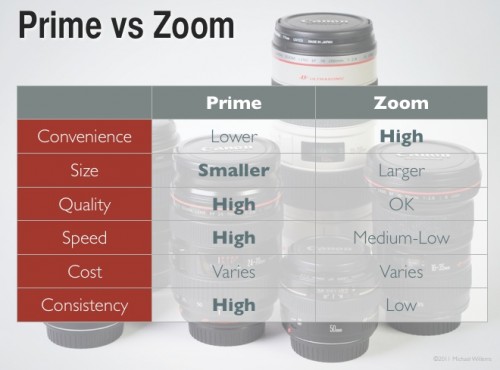
Again, a word about prime lenses, i.e. “non-zoom” lenses. I have said it before and it needs saying again.

Until the 1980s we used primarily prime lenses. Today, we use quality zooms – but quality or not, pros still use primes in many cases. I uses prime lenses whenever I can. Here’s why:

The main points for me are the lens speed – f/1.4 is better than f/2.8 as a maximum aperture – the sharpness, and the consistency of my shots. Zooms lead to laziness, while primes enforce discipline!

So if you only have zooms, then today get yourself a fast prime – a 24, 35 or 50mm lens perhaps – and go shoot some cool shots with that. On a crop camera, use 24 for events, 35 for general purpose, and 50 for portraits.


Crop factors

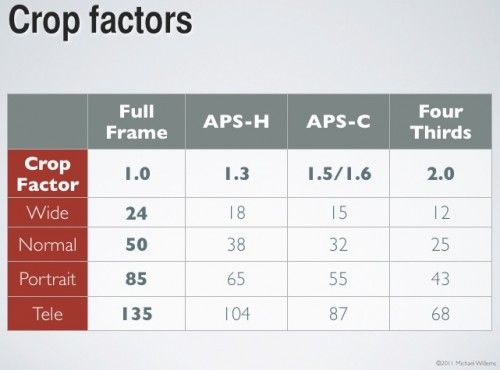
If you use a “crop factor” camera, one with a smaller sensor than a 35mm negative, you need to use smaller lens focal lengths to achieve the traditional effect a lens gives you with a 35mm sensor or negative. Like so:

So to get a “standard 50mm picture”, use a 35mm lens if you have a Digital Rebel, say (an “APS-C sensor” camera, which is the common size). And so on. You may want to copy down this table!