Three Years!

It was three years ago to the day, on 13 July 2009,  that I posted my first post here on www.speedlighter.ca: A-softbox-to-the-rescue/. Three years of, with a few exceptions, daily teaching posts. I surprise myself! And much more to come, I assure you. (Enjoying this blog, and feel like buying me a cup of coffee? Go here to do it!)

Tip of the day: replace your camera strap with a Domke camera strap: under $20 at B&H, and you get a better grip, less advertising of brand, and especially, a rotating swivel quick release at each end, so the eternal twisting-to-straighten-your-strap is a thing of the past.


Equipment Mania

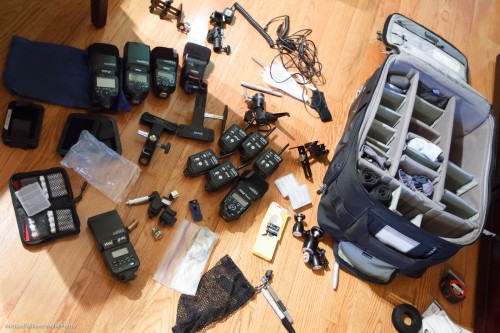
Continuing on the theme of “why a pro delivers (and shy he/she charges real money for shoots)”, let me share this snap, taken last night as I was re-arranging my photo bag:

As you can see, there’s a lot of gear there. Including:

  • Six speedlights,
  • Five Pocketwizards,
  • A light meter,
  • Many modifiers,
  • Many small items to power and connect it all,
  • Many gizmos to mount it all together.

Total value, probably around $$7,000 for that alone. Add the cameras (maybe $20,000), the lenses (maybe $16,000), and the big lighting and miscellaneous gear (maybe $5,000) and you get some idea as to why pro shooting costs money.

But do you need all that? I have two answers!

YES – if you want to shoot important events commissions and professionally. You should not shoot a wedding without gear, spares, possibilities: you do the  client a disservice.

NO – if you are shooting for yourself. A camera, one or two speedlights and a stand with umbrella is all you need for great art – look at George’s great image of me the other day (scroll down).

So, if you are a learner here: take some of my classes (scroll down too), and do NOT be discouraged by all the gear you could possibly buy. Add but by bit, but you can create art from the get-go, with basic equipment, Stay tuned here to find out how.


Reader Question

A reader asks:

A lens – say a Canon L lens that are f/2.8 – is the amount of light the same when it is wide open on an an APS-C sensor vs Full frame sensor? Does it get stopped down on APS-C ?

Great question. No – the light is the same. Area is smaller, but an f/2.8 lens lets in the same light on a smaller sensor that it does on a large sensor. f/2.8 is f/2.8!

Follow up:

Then how does the 2x or 1.4x extender get stopped down when added to 70-200 for example? is it because the barrel gets longer?

Exactly.  f/2.8 means the lens’s focal length divided by that is the circle’s diameter, so that does make a difference.

When all else fails…

….then you use the Gary Fong Lightsphere. As I am doing here, in a recent wedding (the shot, in the church, is by my assistant that day, Merav):

You see, normally when using flash I want to direct the light – tell it where to go. I don’t want to just bathe the room in photons – and yet that is all I can do here with a Lightsphere.

But sometimes it is the only choice: namely, when there is no single good bounce surface, sending light everywhere can be better, and usually is better, than direct flash. You may need to increase your ISO to allow for losses, and watch for light going forward directly (I cover the front sometimes).

So while the Lightsphere is the antithesis of creative light, it is sometimes the only thing that will get you good photos. That’s why I carry one in my bag. I don;t use it much, but when I need it, I need it!


Of Pigments and Dyes

A quick word about inkjet printers today.

My Canon Pixma Pro 9500 13×19″ art printer broke recently as you will have read – so I bought a Pixma Pro 9500 Mark II printer. These are pigment printers, as opposed to the more usual dye printers.

What is the difference?

Dyes, which are absorbed by the paper they are printed on, are easier to keep predictable in terms of colour, and hence are cheaper; pigments, on the other hand, which sit “on top of the paper”, whilst more expensive ($200+ for all ten cartridges on my printer) are permanent. Pigment inks can last more than 200 years on some paper types under ideal (museum-quality lighting and framing) conditions; dye inks fade quickly (sometimes in as little as days; usually in 20-30 years). Which is why art prints are made on pigment printers: you presumably want a piece of art to last forever.

When you use a pigment printer, you need to make sure that you use paper suitable for pigment printers. Good papers (like the Inkpress pro Silky I like to use for photos, or the Hahnemülle Fine Art papers) will say on the box when they are suitable for both dye- and pigment-printers. Pigments combined with long-lasting natural-fibre Fine Art papers, once you get all the settings and drivers right, give you extremely consistent, predictable, and lasting museum-quality prints.

Also, my Pixma printer accommodates Fine Art papers by having a straight (flat) paper path – this requires a complicated feeding procedure that takes time, and only individual art sheets can be loaded, but it is worth is since it does not bend the paper.

So when anyone asks “why does a print cost like $80?”, the answer is above. The cost of supplies, paper and printer, combined with the time needed to make a pro print, combine to make the finished product not cheap. But it is “museum quality” and lasts forever.

So before you go to Wal-Mart for a quick print – do some research, and consider having it done by a pro using pro pigment inks and art papers – or buy your own, and do the work to set it all up. There’s nothing like a quality, lasting print to show off your work!


Light Meters Are Old Hat. Not.

Not! A light meter is an indispensable tool if you want to ace your exposures first time.

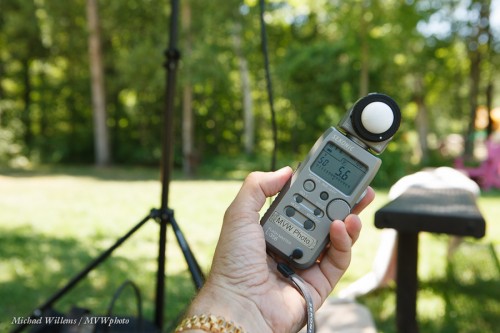
Take this scene (taken, incidentally, amidst a whole bunch of naked people):

That meter is well exposed. Perfectly, in fact. Values were 100 ISO, f/5.6 at 1/50th second.

How? By reading the values off the incident light meter (a meter you hold where the subject will be):

  1. Set the meter to ambient (not flash) metering
  2. Move the ball out
  3. Select the camera’s ISO and the aperture you want
  4. Hold the meter where the subject will be.
  5. Click and read the value for shutter.
  6. Set those values on your camera
  7. Click.

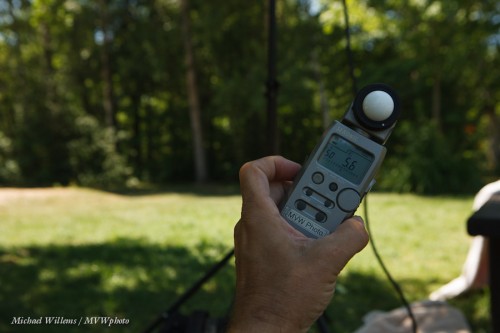
With the camera’s built-in light meter, however, the exposure came out like this, since the light background was also read by the meter:

That’s nice for the background, but if the meter is the subject, this exposure is all wrong – 2 stops too dark (the camera thought 1/200th was the correct shutter speed).  You would now have to adjust the exposure manually, or instead aim your camera, set to spot metering, at a gray card held there. Which is less convenient.

And that is why light meters are far from old hat. Pros use them all the time, even as ambient light meters as here.


What’s this Hi-Speed flash thing again?

A reminder for all you speedlighters.

Say you want a shot like this, taken a few days ago,with your Nikon D90 or whatever SLR you have equipped with an external flash (like an SB900):
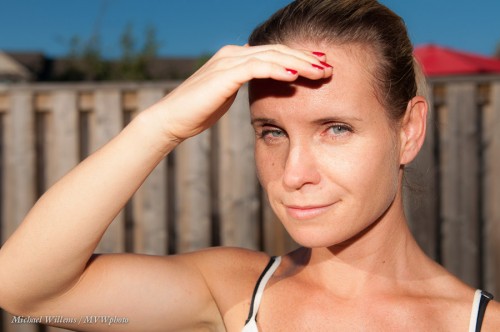
Yes, direct on-camera flash, when used outside and hence mixed with available light, can give you this – not bad eh? And the picture isn’t bad either. 🙂

But look at the background. It is blurry.

That means a large aperture was used (f/5.0 in this case).

But that means the shutter speed must have been very fast – even at low ISO, you need a fast shutter on a sunny day if you want the aperture to be large. I used 1/2500th second.

But hang on. When using flash, you cannot exceed the flash sync speed! Which is 1/200th second on this camera.

So how did I do this? I enabled “fast flash”. (“Auto FP flash” is what Nikon calls it; Canon calls it “High Speed flash”). On a Nikon, go into the flash part of the pencil menu and find flash sync speed, and set to Auto FP. On a Canon flash, indicate the little “H with a lightning symbol”.

Now the flash, whenever you exceed the sync speed, pulses rapidly instead of firing all at once, meaning that you can shoot at fast shutter speeds, where the shutter never fully opens all at once.

The drawback is that most power is lost, so you need to be very close. Aim the flash forward and watch the indicated flash range: as soon as you exceed the sync speed, that range drops rapidly. Stay within that range and you get great outdoors flash pictures!

___

NOTE: Come join me for a five day workshop at August’s Niagara School of Imaging – it is filling up but there is still space. Act now and spend five days with me on all this stuff, and emerge a flash pro.

 

Prints… or not.

Prints… good and bad, are on my mind today.

Good, because prints are the way to share photos. A beautiful print, professionally printed and framed, is a work of art to last.  Frame your pictures – they will look so beautiful. Choose art paper and permament ink and the quality will astonish you – once you work out the paper types, print flow, drivers, settings, and so on. I print straight from Adobe Lightroom – and it rocks.

Alas, I am having to replace my printer. The Canon 9500 Pixma Pro is a great pro printer but the print head appears to be busted, Canon thinks – which means $300+ plus labour plus tax, and a wait of several weeks while I cannot print.

Since I cannot possibly wait that long, and in any case do not want to pay that much for a repair, I just had to shell out for an all-new Pixma Pro 9500 Mark II. We shall see if this arrives soon – until then, no prints. Alas.


Hands-On with the Canon EX600-RT flash.

So, in the past weeks I have:

  • Lost a 580EX II flash
  • Broken my car windshield (gravel truck, pebble…)
  • Broken my second 580EX II flash.

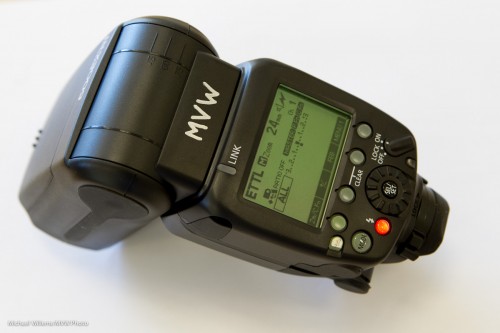
I have therefore had to go out and buy a 600 EX-RT. A not actually more powerful flash (600 refers to the highest guide number, but Canon has just upgraded the Guide Number table to include higher zoom settings – the actual head is the same power as the 580’s, it just has a 200mm zoom setting – and more zoom means more concentrated power forward), but one that has been significantly upgraded.

Here it is:

First – very first – impressions:

  1. It’s just like a Nikon SB900!
  2. But it now adds radio control (2.4 GHz, like WiFi) as a built-in option for controlling remote flashes. A Pocketwizard Flex killer? I never tried out the TTL Pocketwizards (the company was rather slow and difficult in getting test models to me, so I use the “dumb” industry-standard Pocketwizard II Plus, of which I have six), but if I were Pocketwizard I would probably be worried. Radio is evidently superior to light, especially outdoors.
  3. The radio control is, however, useless until you have other Canon radio-operated wireless devices, and there are few so far. I.e. until a new 430 replacement comes out, buy even more 600EX flashes. And with six existing 430s I am not about to start using radio to obsolete all those – you  cannot mix radio-control and light-control: it is one or the other.
  4. My 1D Mk IV controls the 600EX-RT – but not all of it. The custom menus are only partly controllable with my 7D and 1D Mark IV cameras. (Upgrade, Canon?)
  5. Still no optical slave? This function (which Nikon calls “SU-4 mode”), would be very welcome.  If it exists I have not yet found it.
  6. The new Custom Functions Menu is fairly intuitive. As is operation in minutes. Which is a nice change. But still, I can poke holes in the User Interface in minutes, and, not being a committee of older gentlemen ruled by consensus, I could improve it in minutes…
  7. Wireless flash has its own button now.
  8. But it takes a week, well, something like ten seconds, of holding down the C.Fn button to get to the Custom Functions.
  9. A possible warning sign for me: there’s a temperature overload feature and warning. I do hope this does not mean this flash has turned into a Nikon overheating flash: one outstanding feature of the Canon flashes has been that you can fire them at whatever power you need all night – and as an event and creative shooter, I very often do.
  10. The new optional “beep” seems erratic. It is meant to sound when the flash is charged, but it often does not do this – eg when it has fired at low power. At best, the feature is very poorly documented.
  11. Communication between the 600EX and my 1D Mk4 is erratic when I attempt to change FEC (flash compensation) on the flash as well as on the camera (which is bad practice but easily done).
  12. I like the new “light distribution” feature (alas, in a custom menu, whereas Nikon has a switch) that enables you to spread the light a little closer, or to concentrate the beam a little more for vignetting and more effective power).
  13. Compatibility with older cameras is doubtful. Canon says you lose synch speed unless you use a 5D MK3/1Dx camera, but it appears all is well on my cameras so far. Mmm.

I think a software upgrade would solve some of the issues; but they can generally be worked around.

This updated flash is an investment in the future that also works for today, but that may (willy-nilly or voluntarily) speed up our move towards that future.

Stay tuned for more impressions, and some images, soon.