Strap talk

A reader asks:

“Could you talk about straps on your blog a little bit? You mention that you use Domke and the blackrapid. Are you still using them or are you using anothere one? If you use multiple ones, when do you use them? You also mentioned the ezee strap. Looks like a nice idea but I haven’t heard much about it. Personally I don’t like how it looks at the back. Almost feels like I have billboard on my back, if you know what I mean.

I am looking at buying a strap. People like the blackrapid but the idea of having the camera on my hip makes me nervous. I prefer it on my chest. But that might just be me.”

Agreed.

Yes, I use a Domke strap on my cameras. They are tough, unrecognizable (no loud “CANON 1Ds” or “NIKON D3x” logos), and they allow themselves to be quickly unhooked using a quick release clasp at each end. They also have rubber bands interwoven, ensuring friction.

I also very much like the Black Rapid strap. It screws into the bottom, where the tripod normally mount. The camera thus hangs down, and the camera slides along the strap. Very convenient. It looks dangerous but if you screw the Black Rapid strap into the bottom firmly, it will not come off.

And I use the Domke strap because when I put the Black Rapid on, I can unclasp the Domke and take most of it off quickly.

So when so I use what?

Normally Domke. But when shooting an event with multiple cameras, the Black Rapid. The other strap, seldom.

Straps are personal, so find what you like and use it. As long as you use a strap of some kind, you are fine. Make sure it feels good to you: if a strap does, you will be well served by it.
Cheer for an old tool

…where “old” does not mean “outdated”.

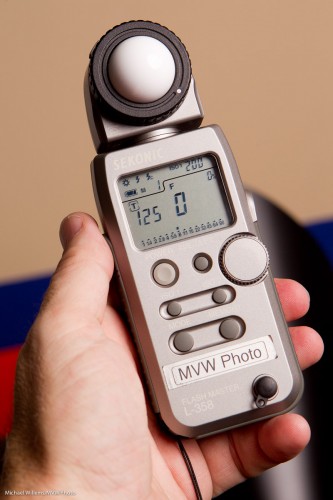
I am talking about the light meter.

Some of you may think this is a tool that rusty old photographers used to use in the 1960s.

Not so. Modern, cool, young photographers like me (you are as young as you feel) use them too – every day.

The light meter is different from the light meter built into your camera:

  • Unlike that camera meter, it is not a reflective light meter, but an incident light meter. It measures light falling onto your subject. Unlike your camera, which measures light reflected from the subject. So for the camera, the subject affects the measurement. A dark subject will reflect less, a light subject, more. So the camera will expose a dark-skinned person in a black suit differently from a light-skinned person in a white suit. And that is wrong: the camera should not care about the subject. Light is light. (Yes, true: keeping the exposure constant means that a dark subject will look darker than a light subject. But hey – that is exactly the way it should be!)
  • Also, the modern light meter is a flash meter as well. It reads the bright pulses of light emanating from a strobe (or a speedlight set to manual). Which is exactly what the photographer uses it for.
  • It is more accurate, sensitive, and quantitative. It can read light in stops or EV (exposure values), and it can read up to tenth of stops.

If you have never used a light meter, I urge you to start. When you shoot portraits, you have little choice, but even for outdoors light, and especially for mixed light, a meter will make your images’ exposure guaranteed good.

Use your mter as follows:

  1. Set the meter to the right mode (Flash, or ambient);
  2. Set the ISO to your camera’s ISO;
  3. Set the shutter speed to your camera’s shutter speed (e.g. 1/125th sec);
  4. Press the reset button, so the aperture displayed is zero;
  5. Hold the meter where your subject will be;
  6. Fire the flash;
  7. Read the value;
  8. Set that value on your camera.

You will not look back, once you get the hang of this excellent tool!

Speedlight tip

If you take portraits with speedlights you may well need to see where that light goes. Remember last night’s portrait? Here is one last version of that:

As you see, I have now finished the picture by adding a background light. Another speedlight, with a snoot (the 5″ Honl snoot). The snoot aims light on to one part of the background only.

To see where that area is, you need to fire the flash.

And one good way to do that is to fire a test flash. See that red button on a Canon speedlight?

That’s right, button. That red light is not just a red light. It is also a test button. Press it and the flash fires, so you can see where the light will go.

Lunch time!

And when you are a photographer like me, you may take that as a photo op. I cannot even look at a can of soup without thinking “Hmmmmm….”. In terms of photos.

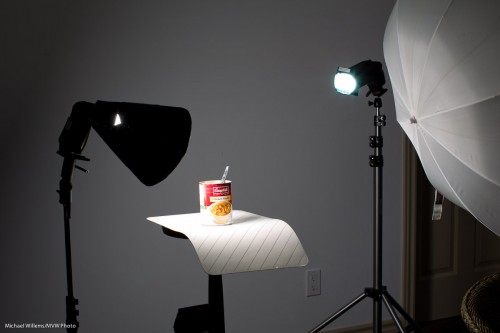
And that leads to this quick setup:

The remainder of lunch about to be photographed with speedlights (Photo: Michael Willems)

The remainder of lunch about to be photographed

That setup was a TTL setup, to save me time. (Connecting Pocketwizards and so on would take a few minutes. Hey, I was hungry – what can I say).

I have, here:

  • Main light, on our left, a 430 EX II speedlight with a Honl Photo Speed Snoot
  • Edge light, a second 430 EX speedlight with a Honl Photo Speed Snoot and a blue/green gel.
  • The umbrella is merely being used as a reflector, to fill in the right a little.
  • A striped place mat for the subject to sit on.
  • A wall, far enough away to be dark, as background.

The camera is a 1D Mark IV with a 580EX II speedlight on it.

And that gives me…:

Lunch, lit with speedlights in wireless TTL mode (photo: Michael Willems)

Lunch, lit with speedlights in wireless TTL mode

So now to bed quickly: I am teaching “Advanced Flash” with Guest Star David Honl (yes, that David Honl) today Saturday 11am-3:30pm in Toronto.

Wireless flash tip

In keeping with the “flash” tips, in anticipation of Saturday’s Advanced Flash course in Toronto, with Guest Star David Honl, for those of you who are trying wireless flash for the first time: here’s a beginner’s problem to avoid.

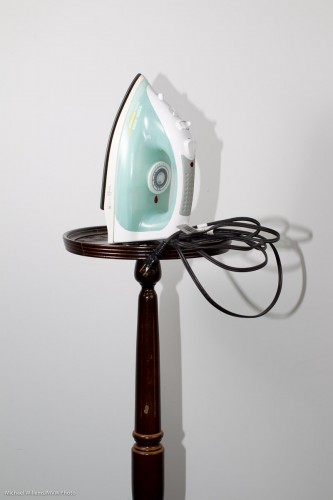
A picture of one of my favourite items (not) lit with an off-camera flash on my left using a Honl Photo Traveller 8 softbox; and a reflector on my left:

Can you see the problem? If you have eyes, you can: that horrible shadow.

You see, even though I used the off-camera flash with the Honl softbox, I failed (for the purposes of this demo, of course!) to disable the on-camera flash.

The on-camera flash (which can be the popup, on a Nikon or on a Canon 60D or 7D, or else an on-camera 580 EX or SB-900) is there to direct the off-camera flashes with “Morse code” pulses that happen before the shutter opens. So you need to make sure that when the actual flash happens, that on-camera flash is silent.

And you do that by setting the on-board flash to off. “–” on a Nikon, in the CLS menu, and just “disable” on a Canon. On the Canon, look, there are no rays coming from the flash head:

So then it still looks to you like it is working, but in fact it only fires its “Morse code” instructions, bu nothing else.

Now we have:

That’s better!

—–

One more recommendation, if I may (you will forgive me): there are spots open for the all-day “The Art of Photographing Nudes, 2 April 2011, Mono, Ontario. We use the same lighting techniques you are learning from me here, and more. Same model as last time, same two pros teaching! Click here to book.


Snoots

Leading up to this Saturday’s Advanced Flash course in Toronto, with Guest Star David Honl, (just a couple of spots left), I thought I might share another flash modifier tip today.

And that is the use of snoots.

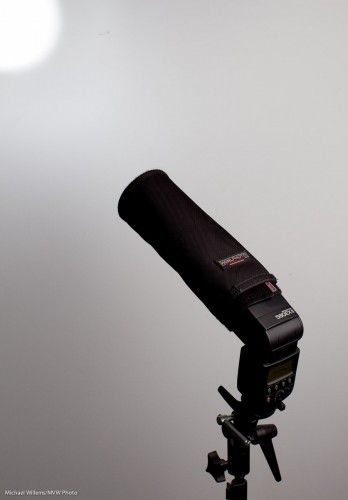
A snoot is a long appendage to your light that causes the light to be directed in a narrower beam.  So when you really want to direct the light to go just where you want to, and nowhere else, you use snoots.

The best snoot for small flashes like a Nikon D700 or D900 or a Canon 430 EX II or 580 EX II are Honl Photo snoots (and no, Dave is not paying me to say that – it’s just that I use them almost daily in my flash work, and love them).

The snoot is also the bounce reflector, just rolled up. So it stores flash and mounts as a sturdy snoot in seconds:

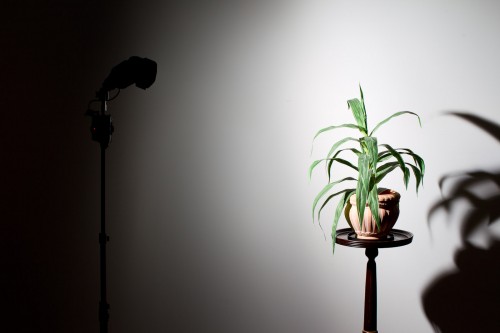
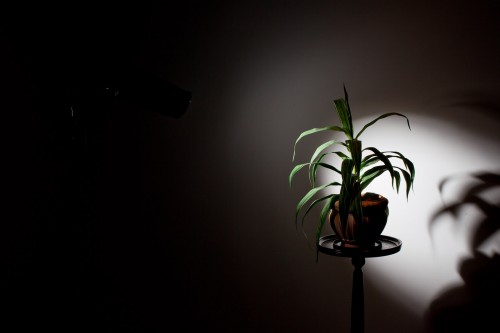
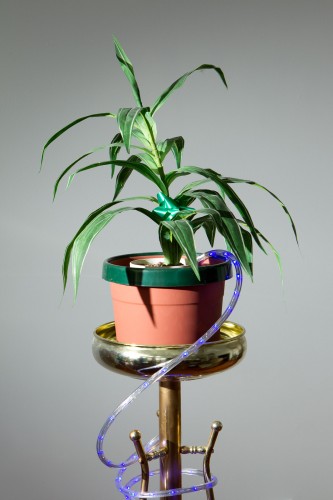
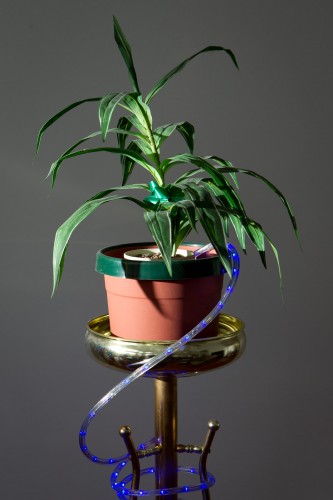
Remember, from yesterday’s post, the plant lit with a grid? If instead of lighting up the whole wall, I want to direct the light to a smaller area with a nice soft edge, I use a grid, like so:

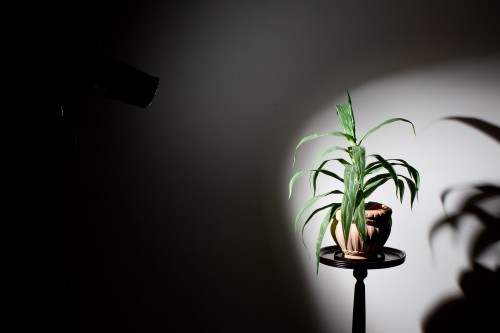
But what if I want a more clearly defined light area?

Then I use a snoot. If instead of a grid I stick a short Speed Snoot to the flash’s speed strap, I now get this:

And if I want a smaller area? Simple, then I use the long snoot:

How do you often this type of snoot? As a hair light. Or in creative lighting: remember, creative light is not about what you light: it is about what you do not light. And that is what snoots are all about.

Grid and bear it

When you are shooting with multiple lights in a studio-like setting, one of the most important things is to shape the light; to control where it goes. And the problem with a bare flash is that its light goes, well, pretty much everywhere.

And one of the most annoying of the “everywheres” is the background. If you want a darker background in a small basement studio, say, you have the following problem: your flash, even if it is a side flash, lights of the background, so you just cannot get a dark background. You get something like this:

Darn, but you wanted a dark background!

In that case, you have three options:

  1. Move everything away from the background.
  2. Paint the background black.
  3. Direct the light more specifically.

Since options (1) and (2) are not always easy, I recommend you learn option (3). Use barn doors, or snoots, or gobos: anything to direct your lights more.

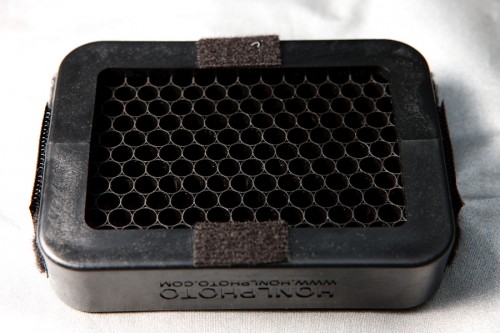
For small flashes, the grid is a fabulous option. A 1/4″ Honl Photo grid stuck onto the speed strap on the speedlight makes that picture into this:

That was easy! The grid stops the light from going everywhere – now we have a much darker background, since light no longer falls onto it.

The Honl grid is affordable (I have several), small, and looks like this:

Honl Photo 1/4" Grid

Indispensable for users of off-camera flashes.

(As you may have read here by now, David Honl, the inventor of that range of Honl small flash modifiers, will be my Guest Star in Toronto on Saturday. Don’t miss it if you want to learn Advanced Flash from the pros.)

How did I do this?

This was taken in bright daylight:

Otherworldly leaves

Otherworldly leaves

This looks otherworldly because:

  • I underexposed the background by two stops
  • I used a wide open aperture of f/4
  • I used a flash

How can I do that on a sunny day? 100 ISO and f/4 gives me 1/2000th second. (If you know the “sunny sixteen rule”, you will see that this is basically just another version of that: after all, f/16 at 1/100 means f/11 at 1/200th and hence f/8 at 1/400th, f/5.6 at 1/800th and f/4 at 1/1600th).

So that is what I set. 100 ISO, f/4 and 1/2000th second.

How, when I was using the flash? You know there is a flash sync speed limit of 1/200th second, depending on your camera’s shutter, right? So how was I able to get to 1/2000th?

Here’s how: I used fast flash. High speed flash/FP flash fires a series of pulses, so the light becomes continuous. Turn it on and you will see you can go to any shutter speed (if the subject is close, since with this technique you do lose power).

High-speed flash is among the many subjects I teach at my Advanced workshops, like the David Honl Special Guest “Advanced Flash” special on Saturday in Toronto, for which I believe there are just a couple of spots left.

Metering Gotcha

A photographer I know well (who shall remain nameless) called me in despair a few days ago.

She was doing some creative flash shots and had set her Nikon remote flash to manual. She was driving it with her pop-up flash. And because the remote flash was on manual, she had to meter. No problem. (Yes, you can set the remote flashes on “manual” while still using wireless flash to drive them!)

A Photographer using remote flashes

A Photographer using remote flashes

Oh. But however she set the flash, using the menus on the LCD control panel on the camera, the Sekonic light meter always indicated the same!

Huh? Was the flash not in fact varying its power in response to her settings?

Looking at the images, it seemed to be – but the meter kept indicating the same. She checked: the on-camera flash was disabled, meaning its light would not contribute to the shot.  So that wasn’t it. Now what?

After trying for an hour and a half, she called me in desperation. What was going on?

Do you know?

Okay, read on. It’s simple – as all these things are, once you know.

  • When you are using wireless flash, the on-camera flash tells the remote flashes what to do.
  • It tells them this using special flashes – binary signals in the form of short light pulses sent out before the mirror is lifted and the shutter opens. A sort of “Morse code instructions to the other flashes”.
  • But this “Morse code” is generated using short pulses of light!
  • The light meter sees these pulses of light, these instructions, and thinks they are the actual flash. So it reads them!
  • And since these pulses are always the same brightness, the meter always indicates the same.

D’oh!

So the solution is equally “simple once you know”:

  1. For a minute, set the remote flashes to manual (rather than “remote” or “slave” mode) using the switch at the back, and fire them using the test button at the back. Vary their power as needed.
  2. When you are happy with the thus achieved light, note down the power value (e.g. “1/16th of full power”).
  3. Then set that power on your camera’s remote menu
  4. ..and now finally, set the flash back to wireless slave mode.

Now you can go ahead and shoot, and every shot is well exposed.

As I said – when you know, it seems simple. But if you did not know the workings of TTL, it would take you forever.

You see, there is method behind the madness: this is exactly why I teach “TTL insides” in my one-time “Advanced Flash” workshop with Special Guest Star David Honl from L.A.- Toronto, 19 March, as you all know by now – a few places left only.

Aperture effect

Here’s an effect we forget sometimes. When a lens is wide open, it vignettes.

My 50mm lens at f/1.2:

And here is that same lens a stop and a third closed down, at f/2.0:

Can you see the difference? The first picture, wide open, shows significantly more vignetting.

Now I like vignetting – a lot, in portraits. But shooting portraits with a lens wide open is rather dangerous, since depth of field is very shallow and may not be sufficient. So I add vignetting in Lightroom – Post Crop Vignetting is one of the best controls in Lightroom for when you are shooting portraits.

And when you are not shooting portraits, avoid vignetting like this – so in those cases, avoid shooting with your fast lens wide open.