Reiterated Trick

I mentioned this once before as an aside, but it is worth a post: a trick that tells you which flash is casting what light in your images.

Say I am lighting a person (like me) with a flash outside. Nice:

Subject lit with an off-camera flash

Subject lit with an off-camera flash

But how can I be sure this light is from the flash? I mean, is that really all the flash? Or is the subject in the sun? Or in a mix of light?

Solution: put a coloured gel onto the flash. Now you see:

Subject lit with an off-camera gelled flash

Subject lit with an off-camera gelled flash

Ah. So it was the flash! Not only that – you can see exactly where it is -and importantly, where it is not – illuminating the subject.

Useful trick, eh? One more reason to always carry gels along with you.

Digital SLR Gotchas: LCD

The LCD on your digital SLR is fabulous.

But do not use it to judge exposure, for one main reason: it is not objective. Its apparent brightness is affected by ambient light as well as by your LCD’s brightness settings, and this can easily lead you astray. I see this all the time in classes. “Why is my camera overexposing every shot?” is usually answered by “it’s not, but you have set your LCD to full brightness”.

My tip:

  1. Expose well (use the tips on this blog; learn exposure compensation; learn to use the spot meter).
  2. Use the histogram to judge whether you got it right.
  3. When using the LCD, use a Hoodman Hood Loupe.
  4. Set the LCD to “average” brightness.

I like to “expose to the right” – your preference may be different. Either way: do not judge a photo by the LCD on the back of your camera.

Stop Press: Rogers screws customers

Oh sorry, that is not news. Cable and mobile telephony provider Rogers Inc, a company so close to its government buddies who provide them with the near-monopoly they enjoy that when a Rogers president dies, every living past and present Canadian prime minister attends the funeral, always screws their customers!

This time, Apple a few days ago sent an email about the iPad. It mentions the Rogers rate of $20 for existing iPhone data customers. So I order a 3G iPad. And then days later, Rogers say that rate is a typo. Actually it’s $35 for a few GB. And there’s no break for existing clients who already pay $60 for 6GB on the iPhone. Even if they only use a fraction of that 6GB.

My cell bill is never less than $125. Why we accept being raped (figuratively) by people who to me seem simple criminals is beyond me. But the outcry on the Rogers blog and other publications and even the Globe and Mail leads me to believe that they will recant. We shall see.

In any case, the iPad will be a major item for photographers: I think there will be entirely new, innovative ways to share and show off and use photos.

Flash: TTL or manual?

Do I set my flash to TTL or manual?

Both.

TTL (fully automatic flash measuring) is a revolution, and you should use it whenever:

  • The subject moves
  • You move
  • You have little time
  • You use one flash on camera
  • You use multiple flashes but they are within eyesight of each other

Use it as is (your flash shows “TTL” on the back display), and do not forget to use Flash compensation to adjust to taste (or when shooting dark or light subjects).

I used TTL here, Sunday night (with -2 stops flash compensation, or it would have been too bright):

Berlin Nightclub in Oakville

Berlin Nightclub in Oakville

Manual (your flash displays “M” at the back and you set the power level to 1/1, or 1/2, 1/4, etc) is useful in cases almost opposite to the previous, namely:

  • You and your subject are stationary
  • Things are predictable and you want full control
  • You have time to meter, try, and iterate
  • You use multiple flashes and they cannot see each other
  • You use Pocketwizards

You can even mix: use TTL for most flashes but fire small accent lights using Pocketwizards and manually set flashes.

Earlier that same Sunday night, when I had time, I used three speedlites set to manual and fired by Pocketwizards, here:

Berlin Nightclub in Oakville

Berlin Nightclub in Oakville

You can probably see I also used some Honl gels: one red and one purple. And one flash was zoomed in to light the picture.

A good photographer knows both TTL and manual. Practice with both, and make them “your own”.

Take care of your memory.. and memories

A regular reader asks:

Good morning Michael,

I’m going on a 2 week vacation soon, and am thinking about how I manage the cards to keep my risk as low as possible. I plan on nightly backing up the cards to a laptop and to usb sticks. I won’t be deleting any pictures off the cards until I get home (if at all possible). This way I should have 3 way protection. A little crazy, but we’re dropping 10k into this. I don’t want to lose anything. My big worry would be losing the camera bag and laptop due to theft. The usb sticks will always be kept on me or in a different location at least.

Anyway, I’ve a question about handling memory cards. I have always left them in the plastic containers they came in and then put them into slots in my camera bag. I find that cumbersome, but I don’t want to damage them. These are SD cards if that matters. Is it okay just to forget about the plastic cases and tuck the cards into the elastic slots? What about card cases? Do you have any recommendations?

Thanks for any thoughts. I’ve been enjoying your down to earth photography discussions.

Thanks for the compliment, and yes, I have some thoughts:

  • First, the idea of backups makes a lot of sense to me. Things fail and get stolen. I always keep backups, multiple backups if possible, while travelling.
  • If a laptop is big or expensive, consider a Netbook and external drives. A netbook is useless at most things but great for things like backing up pics from an USB-mounted card to an external drive or two – and they’re cheap.
  • I like 4 GB cards. Why? Because they avoid “too much on one card” and because a 4GB card fits in its entirety onto a DVD! Then you can burn DVDs (or go to a camera store to have it done) and mail yourself a copy at home. That’s real safety. And a DVD costs just a few pennies.
  • Cards in the bag without cases is fine – I do that too, as long as the bag is not a flexible type you will sit on. Camera stores sell little card-wraps/containers; many of these have a clip you can use to secure the container to your camera bag. This is an essential step.
  • After backing up a memory card, before reusing it always format it – and in the camera. It does not have to be a low-level format – but I do that too every now and then, just to keep the card fresh.
  • Avoid 800 pictures of Rome on one card. Someone grabs your camera: the pictures are all gone. I swap cards regularly whether I have to or not.

Finally: shoot RAW so you can save sub-optimal pictures, and bring a lot of memory. Your $10k is ephemeral: it is gone as soon as the trip is over – but by securing the trip in pics that $10,000 becomes a lasting investment. That’s worth some extra memory cards!

Manual

Interesting word,”manual”.

And one where a bit of disambiguation is called for, I think. I quite often hear students say “I am on manual”, or even “I am on automatic”, without understanding what this means.

OK, I am repeating myself – but I think I should, because this is such a misunderstood subject – and so often.

There are, you see, many meanings of “manual”, and they are not at all the same – not even close. They are in fact not even related. First, manual refers to a handbook, or even a hand.

And in cameras, we have:

  1. Manual exposure mode. This is the big dial on your camera. This turns the setting of your camera’s Aperture and Shutter Speed to manual (you set them, not the camera). But note, flash is still fully metered!
  2. Manual focus. This means turning the lens yourself to get accurate focus.
  3. Manual focus spot selection. This means you select the focus spot for autofocus – not the camera.
  4. Manual flash power. This  means no TTL metering occurs, but instead you set the flash to some power level you determine (like 1/4 or 1/32nd)
  5. Manual flash zoom. This means the angle the flash distributes its light across: it is normally automatic but you can also set it by hand (“35mm”, or “70mm”).
  6. Manual ISO (as opposed to “Auto”)
  7. Manual White Balance (e.g. a predetermined mode of degrees Kelvin,like 3200K).

None of these have anything whatsoever to do with any of the others. They are independent and unrelated. So never say “manual” without saying manual what. A sentence like “my flash is fixed power, because my focus spot selection is on manual” is meaningless, as is “autofocus does not work because my metering is on manual”.

Flash Modifiers, when to use: 1 – The Fong Thing

Some photographers love the Gary Fong lightsphere because it throws light everywhere and makes it simple to shoot. Others hate it because it throws non-directional light, meaning “no art”.

They are both right. Every modifier has a range of situations where you use it, and a range where you do not use it. The key is not just to learn how to use a modifier, but it is to learn when to use it in the first place, and when not to.

So the Fong Lightsphere is a modifier that:

    1. You put on your flash
    2. Aim upward
    3. Use without the dome if you have a white ceiling; else use with the dome (the round side down).
    4. And which then throws the light everywhere.

      And I mean everywhere. Left, right, up, down, front, behind: photons bathe the room. And reflect off anything that can reflect. Which is the Lightsphere’s benefit.

      It is therefore good to use in situations where:

      1. It is dark.
      2. It is impossible to find a good bounce wall/ceiling behind you. A good wall/ceiling is almost always preferable if you can find it.
      3. You are looking for anything to get light into the room: you are not interested in artistically shaping light.

      Like in this unedited image of the Wendel Clark restaurant I shot yesterday:

      Using a Gary Fong Lightsphere

      Using a Gary Fong Lightsphere to light a restaurant

      Note that I was using my Gary Fong Lightsphere on a separate flash in my left hand, aimed at the ceiling. I was using TTL to fire that flash from the one on my 1Ds camera. Yes, you develop strong hands as a photographer – that, and arthritis.

      That off-camera use is a key technique for me: I often like to use the Fong off-camera to give me at least a little bit of shaping.

      Here’s another picture from that shoot:

      Wendel Clark Restaurant lit with an off-camera Lightsphere

      Using a Lightsphere

      So while as you all know I normally much prefer the Honl lightshapers – they allow me artistic control over where the light goes – “trendy venues” is a prime case where I use the Fong Lightsphere.Because Trendy Venues have no simple walls or ceilings, and those that there are tend to be black. So you need to bounce those photons off anything that wiull reflect them, anywhere in the room. Enter the Fong Thing.

      What does the Fong Thing look like: Here’s me with one on the camera.

      Why I use 1-series cameras

      They don’t do anything more than a Digital Rebel. But they do do it better sometimes, and that is important when you shoot for a living. They are more waterproof and more shockproof and shoot faster. And they have several other neat functions that can really matter.

      Look at this shot here, from a commercial shoot I just did:

      Entertainment Central, Oakville

      Entertainment Central, Oakville

      No idea what happened to the bottom right corner: bad sector on the disk, perhaps?

      That is why the 1-series cameras, like my 1D Mark IV and my 1Ds Mark III, can write to two memory cards at once. I always do this. Sometimes the same format to both, sometimes large RAW to one and small RAW or even JPG to the other. That way I still have one when the other one has a problem.

      If you do not have a 1-series or similar camera that can write to two cards, what do you do?

      • Change memory cards regularly
      • Format them every time you re-insert into the camera
      • of course, backup, backup, backup.

      But you knew that.

      Black and white

      And this time I do not mean “as opposed to colour”. I am repeating myself here, but it is worth doing: a few words about metering light and how your camera does it, and how to fix it when it does a less than stellar job. I get so many questions abut this, it seems worth going over it again.

      Let’s analyze this exposure puzzle. It has three elements.

      ONE. Your camera’s light meter is a reflective meter. It measures light reflected off your subject. So it does not know how much light is hitting your subject – it only knows how much is reflected. That is one part of the puzzle.

      TWO. Your camera also does not know what the subject is. That is the second part of the puzzle.

      THREE. Your camera’s job is to:

      1. See how much light there is
      2. Then set aperture, shutter, ISO (or some of those – depending on what exposure mode you are in) to ensure that that observed quantity of light gives you a well-exposed picture: not too bright, not too dark. This is a narrow range of acceptable light on your sensor: a bit too little and it’s underexposed; a tad too much and it’s overexposed. Your camera’s job is to keep the light on your sensor within that range.

      That is the third part of the puzzle.

      So let’s put them together.

      Usually, they go together well and you get a nice picture of whatever you are aiming at. Done.

      But when does this not work? When your subject is meant to be dark – because it is. Or when your subject is meant to be bright – because it is.

      Exercise. in Program mode “P”), and using no flash, and taking care to fully fill your viewfinder with it, shoot a ski hill. Or a white sheet of paper made to look like one:

      Looks grey! Because that is the camera’s job.

      Now shoot a coal mine. Or a coat that is as black as one:

      What the… that also looks grey!

      That is because the camera does not know it is meant to be black. By default, your camera makes everything “in between” in terms of brightness.

      Solution. Now find the Exposure Compensation button on your camera. It looks like a “+” and a “-” with a diagonal line separating them. Plus means “turn up the brightness”, minus means “turn down the brightness”. (It does this by varying whatever it is varying of shutter speed, aperture or ISO, but only “more so”). You may have to hold the button while turning a wheel, and you can see what you are doing as a number or as a graph on the top of back of your camera, depending on which camera you have.

      Find the control and turn the value up to +2 and re-shoot the ski hill. Now you get:

      That’s better. Check the histogram to ensure it is not stuck against the right side (“overexposed”).

      Now set the Exposure Compensation to -2 (minus two). Re-shoot the black coat. You get this:
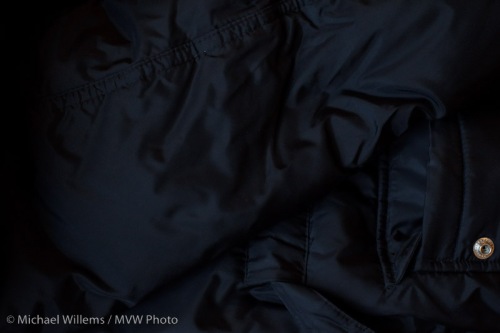
      Finally. A black coat!

      So now you know:

      • When your picture looks too dark, use +/- set to plus and retake the picture
      • When your picture looks too bright, use +/- set to minus and retake the picture
      • This is most likely to be needed when your subject is very dark (coal mine, black coat, dark night) or very bright (beach, snow, white marble room, piece of paper, person against a white wall).

      That is actually quite simple!

      Notes:

      • Do not use flash – that’s a separate subject (and it has a separate adjustment)
      • You can also spot meter to a grey subject to avoid the need for exp comp
      • You can use manual and use the displayed meter in the same way (minus mens darker, plus means brighter).

      Try it and you should, from now on, have no problem exposing right.

      Zoom zoom zoom.

      A beginner’s question this time:

      What does zoom have to do with wide angle? I thought they were two opposite things!

      Not necessarily. A “zoom” lens is simply an adjustable lens. As opposed to a prime lens.

      What you are perhaps confusing with a “zoom” lens, dear student, is a telephoto lens.

      Let me explain.

      There are two main types of lenses:

      1. Zoom – this means adjustable focal length.
      2. Prime – this means not adjustable: you have to zoom in by stepping forward.

      And, an entirely unrelated classification, there are various lengths of lenses:

      • Wide angle – roughly, less than 24mm on a crop camera
      • Standard – roughly, 30-40 mm on a crop camera
      • Telephoto – roughly, longer than 50 on a crop camera

      So a 10-20mm zoom lens is a wide angle zoom lens. A 24-105 zoom lens is a wide-to-telephoto zoom. A 24mm prime is a wide angle prime lens. And so on!