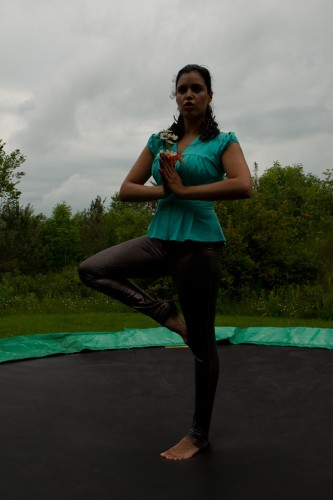
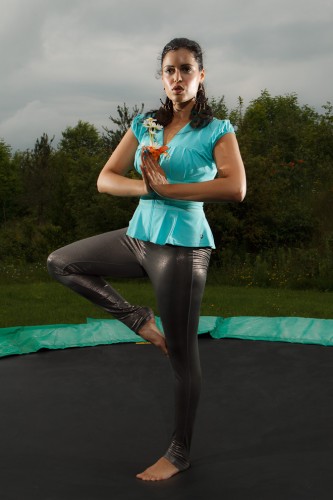
Size matters.

…the size of your umbrella, anyway.

I am using a big Photoflex umbrella today. How big? Here’s how big:
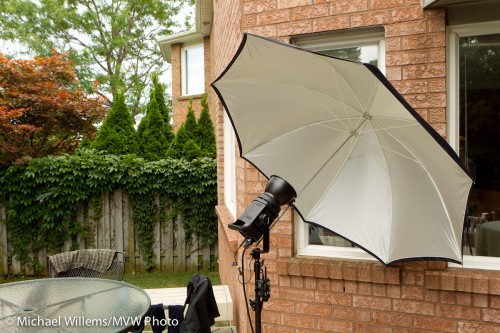
Big Photoflex Umbrella

Big Photoflex Umbrella

This umbrella, which can be used to shoot into, as I am doing here, or to shoot through, is huge. Which makes the light softer.

It is also very reflective, more than most. And that helps: I was able to overpower daylight on an overcast day with the single Bowens 400 Ws light set to 3 (out of 5), somewhat close to the subject. With my regular, smaller and less reflective umbrellas, I would have used a setting of 4 to 5 for that shot.

So, all this amounts to:

  • Softer light (since the source is larger),
  • Greater distance I can bridge,
  • Less spillover behind the umbrella (which in a studio is important)
  • A lot more shots out of my battery pack,
  • Faster recharge time between shots.

Here is that battery pack:
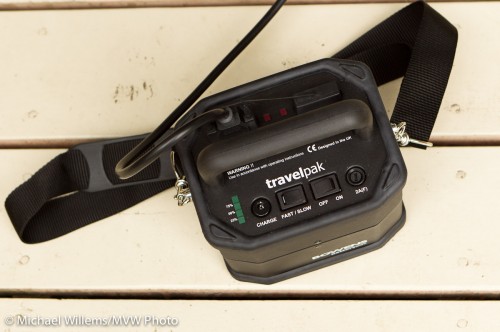
Bowens battery pack

Bowens battery pack

At full power, I get 150 shots out of a small battery (attached at the bottom); at power level 3, it is closer to 300 shots.

So by using a nice umbrella, metering to minus two stops ambient (minus three if metering off the dark garden), then setting the flash to the aperture thus achieved, which was f/5.6), I get this shot:
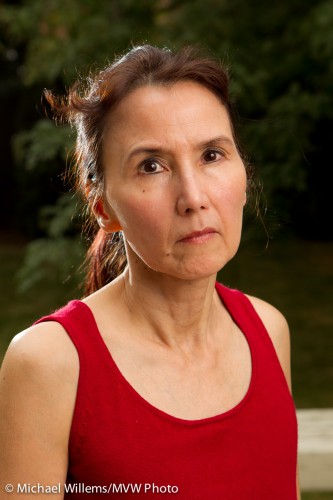
Nancy, photo by Michael Willems

In the back yard, lit by flash

As you can probably see, I am also using a speedlite on the camera left, to separate the hair from the background and to give some edge lighting interest. That speedlite is fitted with a Honl Photo 1/4″ grid to avoid the lens flare I would otherwise get.

Time for this snap: couple of minutes.

If all that is confusing, as it will be to beginners, then just take one of the flash courses and learn how to do this. It is fun, and well within reach of amateurs – not just for pros!

Michael’s Quick Judgment:

  • Photoflex large reflective umbrella: recommended.
  • Bowens Travelpak power pack: recommended.
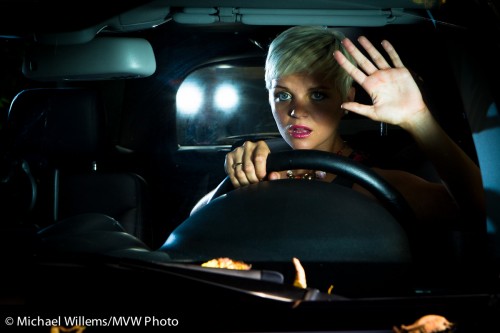
Light is what you make it

Night time? No.I took this shot in open daylight, last Saturday during the Advanced Flash course Joseph and I taught at Mono, Ontario:

Scary Drive (Photo Michael Willems)

Scary Drive (Photo Michael Willems)

The lesson here is not how that is done (it is involved, and needs speedlites, pocketwizards, reflectors, light stands, and my SUV), but it is that it can be done. Daylight can look like a scary stormy night.

On the advanced light course we teach you the details – but even before that, you can start playing with flash. Right now. Using one or more external flashes (not the pop-up).

And you should. Because flash can:

  • Make flat surfaces round;
  • Separate subjects from backgrounds;
  • Make dull subjects sharp;
  • Make wrinkled surfaces flat;
  • Make cold surfaces warm;
  • Make blurry motion sharp;
  • Make day into night;
  • Direct the eyes where they otherwise would not go;
  • Give you nice catchlights in the eyes;
  • …even create cars where there aren’t any.

That’s why this blog is called “Speedlighter” – speedlights and other flashes can be the most useful tool a photographer has, after the camera.

So my advice:

  • Get yourself one or more speedlites;
  • Find a way to fire them off-camera: TTL, flash cable, or pocketwizards;
  • Get some modifiers;
  • Stay tuned here, take a course: learn how they all work;
  • And above all, keep shooting.

And your photos will go up to the next level of professionalism and creativity.

Flash why?

Why do we use flash?

For “Uncle Fred” reasons? Those are the obvious reasons.  Like “it’s too dark”, “I need faster shutter speeds”, or for sophisticated Uncle Fred, “I want to fill in a backlit subject”.

All those are good reasons. but”for artistic reasons” is a better answer, if you want to make your images good. And The Speedlighter aims to make his images good.

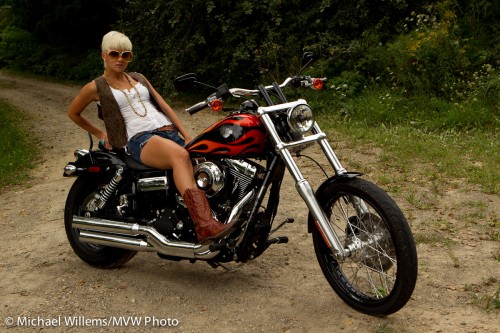
Take this snapshot of model Lindsay at last Saturday’s advanced light workshop:

Model Lindsay, lit by available light

Model Lindsay, lit by available light

Okay, I guess. I guess. Not bad. But not great, either. Dull.

So let’s add a bit of light!

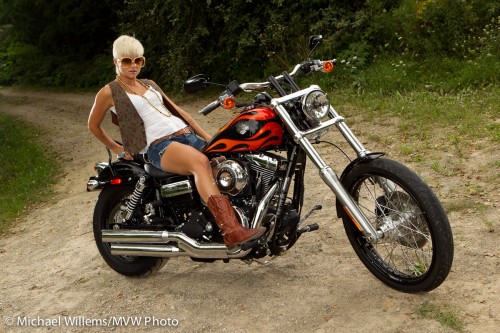
Add three small flashes set up the right way, and you get this:

Model Lindsay, lit by available plus flash light (photo Michael Willems)

Model Lindsay, lit by available plus flash light

Look at both images larger. The second one is much better because:

  1. She is now “bright pixels”. Willems’s Dictum says (yes I know that is double) that “bright pixels are sharp pixels”. When you light something with flash it is sharp, for reasons I have outlined on this blog before.
  2. Her face is well lit.
  3. The bike is now without too-dark shadow areas.
  4. She is separated from the background by the edge light
  5. The edge light adds contracts and interest.
  6. Instead of being dull, the bike has interesting and sparkling highlights (check both mirrors, and the rear mudguard).

That is better. And all that was needed was three speedlights, four Pocketwizards, and three Flashzebra cables. And a light meter. And lots of batteries. And the creative and technical knowledge to put it all together.

Oh and a model and a Harley. But those are optional: this light lesson applies even to your brother driving a Smart.

White Balance is/is not important

You know your camera’s White Balance setting. It should of course be called “colour balance”, but what with engineers doing the naming, science will trump understandability.

So this setting sets your colours properly for the available light. Is it important to set it? For instance, while taking portfolio pics like this, at Saturday’s workshop, do I set White Balance to anything, or do I leave it on Auto?

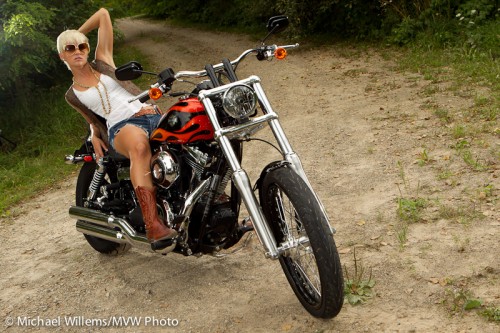
Biker chick, by Michael Willems

Biker chick - model Lindsay Biernat, 14 August 2010

Can you see how important the flash is, by the way? The edge light

Back to White Balance: is this important?

One possible (and valid) answer: If you shoot JPG pictures, yes, you should get the White Balance right in camera. But if you shoot RAW, no. White balance is set afterward, on your computer in Lightroom or whatever you use. It makes no difference what you set on your camera. Save yourself the time.

Another (equally valid) answer: Yes! Setting white balance is important when shooting JPG, but when shooting RAW you should set it too, because:

  • You get a much better impression while shooting of how the colours will eventually look. That saves you from many mistakes. It also makes you feel better about yourself and your abilities.
  • You save time afterward, because Lightroom will start off with your in-camera setting and you will have to correct less, and less often.

So when shooting with flash, set your white balance to “flash”. Especially if you use gels, avoid “auto” white balance.

So my answer: if the shoot is important and if you have a second, set it. If using flash, always set it (to flash).

Flashes: to clone, or not to clone?

I received the following question via email:

I have been following your posts since the Spring Camera show in Toronto. I have loved all of your tips and comments.

I would like to know your opinion on a 3rd party flash or your general opinion on 3rd party flashes. I am thinking of getting the Opteka EF-600 DG Super EO-TTL II for just over $100 the reviews are good and the promotional information says it works with other canon flashes if I wish to get brand name in the future and use this one as a slave. This will be my first flash for a Canon Rebel XT. I was also thinking of getting Opteka FL-50AF E-TTL II but with it only being able to tilt I do not think it will suit my needs as I learn to do more with flash.

I would like to know if it is better to save the money and go for the cheaper version or bite the bullet and go for the canon brand.

Oh yeah, I like this question. It is the kind of question we all struggle with.

I agree you need a flash that swivels and turns. A 430EX, 580EX, or a clone of either of those, in other words.

I have worked a little with some of the clone flashes, though not that very one, and here is my take on this:

Pros:

  • Much cheaper. Much!

Cons:

  • Not guaranteed to be as compatible in every situation (complex TTL).
  • Quality control and warranties may or may not be as good, so there is some uncertainty.
  • The interface is sometimes simpler (which is not always a bad thing!)
  • Not all features may be supported (eg high-speed flash, auto flash head zoom: I have seen some clones that did not support these).
  • If you have a problem, Canon will not help, and nor in all likelihood will the maker of the third-party flash.

Bear in mind that of you use flashes in manual mode (which often enough you will, once you master flash), then it makes no difference what flash you have, since you will not use TTL at all in that situation.

Knowing all this, I would say: (drum roll):

  • Make sure you have one flash that is made by Canon. If flash is important to you, that should be your first flash; if not, and you are experimenting, then it can be your second or third flash, whenever you get around to this.
  • Other flashes, try the clones.
  • Particularly if you shoot manual flash, and have many flashes, equip yourself with clones.

So in your case: “it depends”. If you want to be sure, get the 430EX. If you want to play, then by all means start with a clone and once you are happy, add a canon and make the clone your second flash.

Do make sure the offer is genuine, and do try the flash in the store to make sure you are happy. Take a few test shots. Opteka and Nissin (and various such OEM labels)  are “off brands”; Metz is a good brand. Off brands do not have to be bad, but they are not necessarily good either.

Outdoor portrait tip

A quick tip for new photographers and a reminder for more experienced ones:

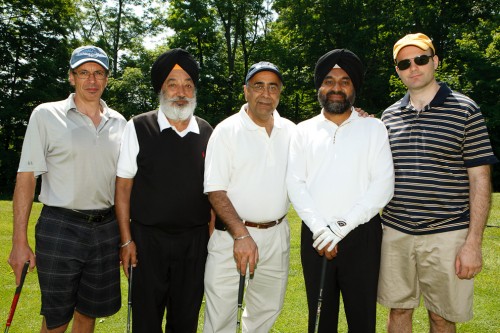
When shooting a portrait outdoors, have the sun behind the subject – but light that subject with a flash.

Government Services Minister Harinder S. Takhar and friends, photo Michael Willems

Government Services Minister Harinder S. Takhar

The sun behind them, because sunlight is harsh, and otherwise they would squint. The flash, to stop them from being silhouettes.

Another example:

Government Services Minister Harinder S. Takhar and friends, photo Michael Willems

Government Services Minister Harinder S. Takhar and friends

Creative light

There is just one more spot open for the all-day Creative Flash course in Mono, Ontario, an hour north of Toronto, Saturday.

Using a professional model and pro lighting equipment on Canon, Nikon and other camera brands, Joseph Marranca and I will teach our students to take shots not like this:

Tara Elizabeth

Tara Elizabeth

But instead like this:

Tara Elizabeth

Tara Elizabeth

You see how important light is? That’s what these workshops are about, to make users comfortable with the technical and creative aspects of light,

And they are about going home with portfolio shots.

And about having fun with cameras, all day!

Too much contrast!

A student wrote to ask me the following:

Sometimes it is impossible to avoid part of your picture getting over-exposed without your main subject becoming very dark. I didn’t have great improvement with a smaller aperture. What do I have to do in this case?

Good question. A sensor is more like slide film than like negatives: the dynamic range is limited. Meaning you can only show so much difference between lightest and darkest parts of your image.

So when I point at a person in front of a window, they are a silhouette. The aperture makes no difference in this case: not by itself, anyway. But if I increase the exposure (by using  my spot meter, manual mode, or exposure compensation) then they can be correctly exposed, but now the sky behind them is all blown out. Uh oh!

So what can I do?

As usual, there is no single answer. I can (and often do!) the following:

  • Move myself. If I shoot from the other side, no problem.
  • Move my subject or move my light (unless it is the sun!)
  • Use a reflector. That is why photographers always carry reflectors.
  • Use my flash! This is why on a sunny day we carry our flash. Sun is very contrasty light. With a flash, we minimize the differences.

An example of flash outside:

Daniel at the Alamo, photo Michael Willems

Daniel at the Alamo

Without the flash, Daniel would have been too dark (look under his chin), or else the Alamo would have been way too bright.

There is one other way that sometimes works.

I can shoot RAW and hope there is enough dynamic range to contain detail in the sky; and then adjust afterward, using HDR – High Dynamic Range.

I can do this either in Lightroom, by using “filll light”, “recovery” and other exposure adjustments, or by using specialized HDR software like Photomatix.

Photomatix HDR example from one RAW, by Michael Willems

Photomatix HDR example from one RAW

The original image (which I took Monday in Toronto’s Distillery District) had a very bright, blown out sky, and the foreground was too dark.

But because I shot RAW, I was lucky and there was enough detail “hidden” in the file, and I was able to bring it out.

This works as follows:

  1. Shoot a RAW image, expose “in between”.
  2. Copy it so that you have five identical images.
  3. Make one image two stops darker; make one one stop darker; keep one at the shot setting; make one one stop brighter; and make one two stops brighter. If you shot “in between”, each image should have detail on part of the image.
  4. Now run Photomatix software (I used a demo version here, see the watermark).

This is no panacea, and HDR (High Dynamic Range) can look gimmicky and unnatural, but when this works, it can help save you from these high contrast situations.

Normally, for HDR you take multiple exposures, of course. But there is so much “extra” information in a RAW file thatyou can get away with this technique quite often.

Afternoon = Gel

Another flash tip for you today.

Later afternoon pictures. You can make them look better by adding your own “golden hour” glow. Like this:

Patio at dusk, photo by Michael Willems

Patio at dusk, photo by Michael Willems

To take a picture like this, you might do the following:

  • Use an on-camera flash while there is still light;
  • First set your camera’s exposure (ISO, aperture, shutter) to get a nice background sky. Ignore the foreground for now.
  • Then position yourself such that there is no close subject (remember the inverse square law).
  • Use a half CTO gel on the flash (I used a Honl Photo half CTO gel on the speedstrap on my 580EX);
  • White balance to “Flash”.
  • Take a test shot. If the flash is too bright or too dark, use Flash compensation (+ or 1) to adjust. If the background is not right, adjust ISO, shutter or aperture.
  • A wide angle lens makes it easier.

And Bob’s your uncle: nice colours.

Night Sky

A black sky may look black to us.

But to the camera, it is not that way:

Night Sky, by Michael Willems

Night Sky, by Michael Willems

At least if you set up the camera correctly.

My recipe was:

  • Canon 1Ds Mark III on a tripod
  • Using the Canon 35mm f/1.4 L prime lens
  • Focus: Manual, set to infinity
  • Exposure: Manual, f/1.4, 30 seconds
  • 200 ISO

Note the following:

  • Lightroom will automatically remove “stuck pixels”
  • The sky starts off lighter, and goes darker, so adjustments may be necessary.
  • Focus needs to be accurate: do it before it gets dark.
  • A city in the distance will light up the sky greatly.

Try it. And above all, have fun.