Creative light

There is just one more spot open for the all-day Creative Flash course in Mono, Ontario, an hour north of Toronto, Saturday.

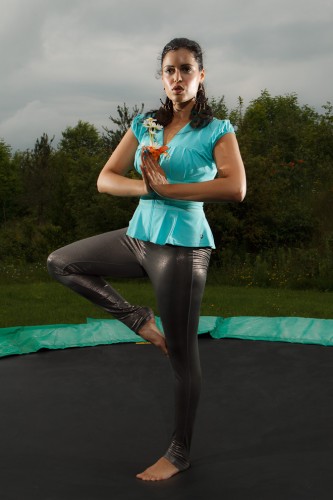
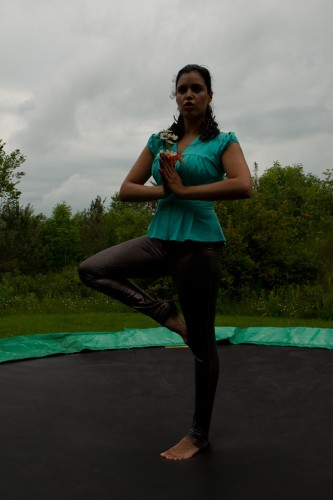
Using a professional model and pro lighting equipment on Canon, Nikon and other camera brands, Joseph Marranca and I will teach our students to take shots not like this:

Tara Elizabeth

Tara Elizabeth

But instead like this:

Tara Elizabeth

Tara Elizabeth

You see how important light is? That’s what these workshops are about, to make users comfortable with the technical and creative aspects of light,

And they are about going home with portfolio shots.

And about having fun with cameras, all day!

Too much contrast!

A student wrote to ask me the following:

Sometimes it is impossible to avoid part of your picture getting over-exposed without your main subject becoming very dark. I didn’t have great improvement with a smaller aperture. What do I have to do in this case?

Good question. A sensor is more like slide film than like negatives: the dynamic range is limited. Meaning you can only show so much difference between lightest and darkest parts of your image.

So when I point at a person in front of a window, they are a silhouette. The aperture makes no difference in this case: not by itself, anyway. But if I increase the exposure (by using  my spot meter, manual mode, or exposure compensation) then they can be correctly exposed, but now the sky behind them is all blown out. Uh oh!

So what can I do?

As usual, there is no single answer. I can (and often do!) the following:

  • Move myself. If I shoot from the other side, no problem.
  • Move my subject or move my light (unless it is the sun!)
  • Use a reflector. That is why photographers always carry reflectors.
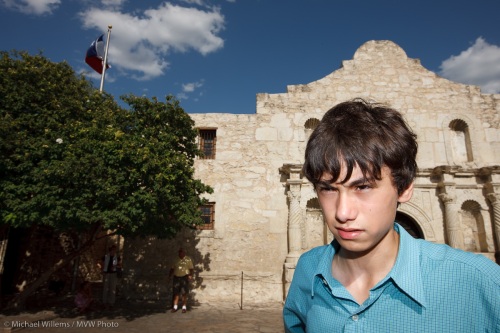
  • Use my flash! This is why on a sunny day we carry our flash. Sun is very contrasty light. With a flash, we minimize the differences.

An example of flash outside:
Daniel at the Alamo, photo Michael Willems

Daniel at the Alamo

Without the flash, Daniel would have been too dark (look under his chin), or else the Alamo would have been way too bright.

There is one other way that sometimes works.

I can shoot RAW and hope there is enough dynamic range to contain detail in the sky; and then adjust afterward, using HDR – High Dynamic Range.

I can do this either in Lightroom, by using “filll light”, “recovery” and other exposure adjustments, or by using specialized HDR software like Photomatix.

Photomatix HDR example from one RAW, by Michael Willems

Photomatix HDR example from one RAW

The original image (which I took Monday in Toronto’s Distillery District) had a very bright, blown out sky, and the foreground was too dark.

But because I shot RAW, I was lucky and there was enough detail “hidden” in the file, and I was able to bring it out.

This works as follows:

  1. Shoot a RAW image, expose “in between”.
  2. Copy it so that you have five identical images.
  3. Make one image two stops darker; make one one stop darker; keep one at the shot setting; make one one stop brighter; and make one two stops brighter. If you shot “in between”, each image should have detail on part of the image.
  4. Now run Photomatix software (I used a demo version here, see the watermark).

This is no panacea, and HDR (High Dynamic Range) can look gimmicky and unnatural, but when this works, it can help save you from these high contrast situations.

Normally, for HDR you take multiple exposures, of course. But there is so much “extra” information in a RAW file thatyou can get away with this technique quite often.

Night Sky

A black sky may look black to us.

But to the camera, it is not that way:

Night Sky, by Michael Willems

Night Sky, by Michael Willems

At least if you set up the camera correctly.

My recipe was:

  • Canon 1Ds Mark III on a tripod
  • Using the Canon 35mm f/1.4 L prime lens
  • Focus: Manual, set to infinity
  • Exposure: Manual, f/1.4, 30 seconds
  • 200 ISO

Note the following:

  • Lightroom will automatically remove “stuck pixels”
  • The sky starts off lighter, and goes darker, so adjustments may be necessary.
  • Focus needs to be accurate: do it before it gets dark.
  • A city in the distance will light up the sky greatly.

Try it. And above all, have fun.

Unstick yourself!

A recent meeting with a very talented young photographer, Peter McKinnon, prompts me to write about lens choices for a moment.

Peter, who is a student of mine in the Advanced Flash lighting workshops, showed me a wedding album and other wedding shots he recently did. He showed me a wedding he shot on his own,  entirely with a 24mm prime lens, and much of it at f/1.4. Never took that lens off. No long shots. No zooming. Just Peter and his wide angle lens. Fantastic work.

The 1D Mark IV makes a lens look 30% longer, so that’s 24 x 1.3 = 31mm. Roughly equivalent, then, to me using my 35mm f/1.4 lens on the full-frame 1Ds Mark III body.

Mmm. That would be liberating: one lens, a wide one, for an entire shoot. And I have mentioned before, for events this is my favourite lens.

Selective focus:

Cat, by Michael Willems (35mm, f/1.4)

Cat, by Michael Willems (35mm, f/1.4)

Low light ability:

Club, by Michael Willems (35mm, f/1.4)

Club, by Michael Willems (35mm, f/1.4)

And both, available light and selective focus:

Couple, by Michael Willems (35mm, f/1.4)

Couple, by Michael Willems (35mm, f/1.4)

So I checked. The last wedding I shot, I used my 35mm lens for fully 30% of the shots! I too love the shallow depth of field:

Bride and Groom, by Michael Willems

Bride and Groom, by Michael Willems

And I like the ability to get it in and to not have to worry about how to zoom.

Groom getting ready, by Michael Willems

Groom getting ready, by Michael Willems

So here is my suggestion: that you too spend an entire day shooting with one wide angle lens. This will free your mind from deciding on lens, zoom, and so on, and open your eyes to the photos in front of you. And that is what photography is about: photos, not cameras or lenses.

And you know what: I’ll do the same, on my next event shoot.

Blurring backgrounds

A quick tip, today, for new or inexperienced photographers. But one that some experienced photographers forget sometimes, too.

In a good photo, you draw attention to your subject. You can do that by framing, by using converging lines, by making the subject large, by surrounding it by negative space… or by blurring the background.

If like me you like blurry backgrounds, how do you achieve them? Using a camera with the largest possible sensor size, use any of these methods:

  1. Use aperture mode (A/Av) and select a large aperture (i.e. a small F-number, like 2.8). This is why lenses with those low F-numbers are so good, and so desirable, and worth paying for.
  2. Use a longer lens (zoom in).
  3. Get closer.

Or do several of these at a time, like in this snap I took during a tweet-up the other day:

iPad in hand, by Michael Willems

iPad in hand, by Michael Willems

The blurry background shows just enough to make the viewer work, to understand what is happening; but it also accentuates the iPad very nicely.

I used the Panasonic GF1 with its 20mm f/1.7 prime lens set to f/1.7 (yes, a very low F-number).

Studio tips

Two studio/product lighting tips for you, prompted by me shooting a few product shots just now for upcoming reviews. Shots like this:

Panasonic GF1, photo Michael Willems

Panasonic GF1, photo Michael Willems

That was taken here:

Product Photo

Product Photo Setup

Which, when seen from behind, looks like this:

Product Setup

Product Setup, with background flash

So what are the tips?

First, avoid stray light, especially on your background. Saturation means “how little white light is mixed in”. A saturated colour has no white mixed in. An unsaturated colour has much white mixed in.

So use a grey backdrop if you can, or just use distance and directional light. Of course since I am using an umbrella and a softbox, much light will stray. So I keep the background far away (you all remember the inverse square law).

So, not this:

Product, too much background light

Product, too much background light

But more like this.

Product, less background light

Product, less background light

Then set your camera to what you like (f/9 and 1/125th for me), and get the background right.

First take a picture with no flash, to ensure that is black; then shoot while activating the background light only. Now get the flash power right: too little and you get a dark background; too much and it turns white. For me, I found this about right:

Product, only background light

Product, only background light

Then you get the rest right, i.e. set the right power for your main lights, and finally, shoot the shot.

Second tip: always use a brush or compressed air to clean your product. Otherwise, hours of photoshopping will result.

Less can be more

Less can be more. We sometimes make things complicated as photographers: we get gear-itis. Yeah, me too.

But you can keep it simple. Richard Avedon shot much of his work with a view camera and a white sheet on the shady side of a building. Period. For the longest time, Robert Mapplethorpe shot with a simple Polaroid camera with no settings to speak of.

So while I teach complex lighting, and I teach making complex technologies like TTL understandable, sometimes it can be simple.

Look, for example, at this recent shot of model Lindsay:

Model Lindsay, photo by Michael Willems

Lindsay, photo by Michael Willems, 2010

This is simple how?

  • A simple background. A white wall. I love white walls.
  • Simple lighting equipment. Just one flash, namely a 580EX speedlite on the camera.
  • Simple lighting setup. That flash was aimed at the wall and ceiling behind me. Using TTL, so no metering was necessary (just flash exposure compensation of about +1.3 stops)
  • Simple colour (namely: no colour. I love black and white).
  • Simple clothing. White top for high-key effect. Jeans for a contrasty dark area.
  • Simple pose.
  • Simple post work (just slight exposure adjustments as needed and skin fixes where necessary).

Sometimes less really is more. Don’t you think?

So here is your assignment, should you wish to accept it: find a white room and shoot a high-key portrait like this. Aim the flash behind you. Expose well: to the right. Have fun!

Hyperfocal what?

What is a “hyperfocal distance”?

In essence, the hyperfocal distance for any given camera, lens and aperture combination is:

“The focus distance you set your lens to for that camera, lens and aperture combination that gives you a focus distance that goes exactly to infinity, no farther”.

You see, if I set my lens to infinity, for instance, I am focusing well beyond infinity, and “wasting” some of my sharp range. By focusing before infinity, I can set the lens just so that the far edge of my “acceptably sharp”area goes exactly to infinity, not more. And now I am not wasting any sharp area.

In the past, on prime lenses we had a focus indication dial, with aperture numbers indicated on the focus ring to help us set the hyperfocal distance. On today’s zooms, this is absent; plus, since a lens can be used on cameras of various sensor sizes, it would not work anyway.

So today you go to DOFMASTER, via this link here, to calculate the distances for your lens/camera/aperture combination.

Nice to know, so you can set your lens to the right distance for manual focusing, for instance. And nice to know just so you get a feeling for what you can achieve in a shot.

Need for speed.

The need for LOW speed, that is. Not every picture has to be razor sharp. In fact, often, to give the impression of speed and movement, you need to blur parts of a picture. The background parts.

You do this by panning.

To pan a picture, you need a slow shutter speed. Like 1/15th of a second. Panning gives you pictures like this:

Panning picture by Michael Willems

Panning picture by Michael Willems

Panning picture by Michael Willems

Panning picture by Michael Willems

To do this:

  1. Set your camera to Tv/S mode
  2. Select a shutter speed of 1/15th of a second
  3. Wait for the car. bike, child, etc to approach
  4. Start following them with the camera, keeping them in the middle
  5. When they are half way, right in front of you, SHOOT!

To focus, you can either focus quickly, or pre-focus “where they will be”, or use AI Servo/AF-C mode.

You can vary the shutter speed as you like, of course.

Have fun!

GF1 self portrait

A self portrait I took a few minutes ago:

Michael Willems, photo by Michael Willems

Michael Willems, photo by Michael Willems

I shot this with the Panasonic GF1:

  • Camera on manual, f/4.0, 1/60th second, 200 ISO
  • Using multiple-point autofocus
  • Pocketwizard on the camera
  • Pocketwizard on a 430EX flash, connected with Flashzebra cable
  • Flash set to manual, 1/32nd power
  • Honl Photo Traveller 8 softbox on the (handheld) flash

To lower the noise (“increase the signal to noise ratio”, for engineers) I exposed to the right (i.e. I exposed high, but without actually overexposing anything) and then pulled back a stop in Lightroom.

The 20mm lens (yes you can use 40mm, for that is what it is, for portraits) gives me that wonderful sharpness. Click and view full size to see how sharp it is.

The Honl softbox gives it that nice soft look and the unique round catchlights.

And I have said it before: for creative photography, lighting a subject is as much about what you do not light than about what you do light.

Postscript: And here’s one more: son Jason just now (similarly lit, also shot with the GF1)

Jason Willems, photo Michael Willems

Jason, shot with GF1/430EX